
In shortA CapCut alternative depends on who does the editing. CapCut is a free, do-it-yourself app with templates and AI tools, and you cut, caption and export every video. CreatorSuite is a done-for-you service: you upload raw footage and it returns a finished, ready-to-post video.
- CapCut is free to start and is the better choice if you enjoy editing yourself.
- A done-for-you service changes the cost from your editing hours to a monthly credit plan.
- CreatorSuite's Basic plan at $9 a month covers up to 3 short videos, because a short video costs 100 credits.
- Pricing for CapCut Pro depends on your region, so check your own price before you choose.
- Test any alternative on your own footage before you commit to a monthly plan.
The short answer
CapCut is hard to beat if you want a free app and enjoy editing on your phone or desktop. It is a poor fit if you need finished videos without the editing work. CreatorSuite fits creators who would rather pay for finished videos than learn a timeline, and the 3-day free trial lets you test it on one short video before you commit.
Best pick by use case
| If you need… | Pick | Why |
|---|---|---|
| Editing one video yourself on a phone | CapCut | CapCut works on phone, desktop and web, and its timeline and templates are built for hands-on editing. |
| Trying editing for free with no commitment | CapCut | CapCut has a free plan with templates and basic editing tools, and new users can start a 7-day Pro trial. |
| Learning editing and building your own style | CapCut | You make every cut and choice, which builds skill over time. |
| Getting finished videos each week without editing them | CreatorSuite | You upload raw footage and CreatorSuite's AI edits it and returns a finished video. |
| Long-form videos delivered finished | CreatorSuite | CreatorSuite handles long videos up to 35 min. In CapCut you edit a long video yourself. |
| Brand kit and thumbnails in one plan | CreatorSuite | Brand kit comes from the Plus plan, and thumbnails are included on every plan. |
| Template-driven trend formats on a tight budget | CapCut | CapCut has a large template library for trending short-form formats. |
CapCut alternative: feature comparison
| Feature | CreatorSuite | CapCut |
|---|---|---|
| Edits the whole video for you | ✓ | ✕you edit; templates help |
| Long videos (YouTube, podcasts) | ✓up to 35 min | ✓you edit it |
| Short clips from long videos | ✓ | ◐AI tools, you review |
| Animated captions | ✓ | ✓auto captions |
| B-roll and motion graphics | ✓ | ◐templates and stock |
| Brand kit (logo, fonts, colours) | ✓from Plus | ◐Teams plan |
| Thumbnails | ✓2+ per month | ✕not on pricing page |
| Revisions on request | ✓2 on Basic, unlimited from Plus | ✕you edit yourself |
| Free trial or free plan | ✓3-day trial | ✓free plan + 7-day Pro trial |
| API / MCP access | ✓from Starter | ✕not on pricing page |
| What you still do yourself | Upload raw footage and pick a style | Edit the video yourself (timeline or template), Pick music, captions and effects, Export and post |
| Turnaround | 3–4 hours to 6–8 hours | As fast as you edit |
✓ yes · ◐ partly or with limits · ✕ no. From each tool’s own site and help docs, checked Nov 21, 2026.
CapCut alternative: pricing
CreatorSuite
from $9/month, 3-day free trial
Basic$9/mo
up to 3 short or 1 long videos, or 12 clips
Plus$39/mo
up to 15 short or 5 long videos, or 60 clips
Starter$149/mo
up to 35 short or 11 long videos, or 140 clips
Growth$299/mo
up to 60 short or 20 long videos, or 240 clips
Free: 3-day free trial: 1 short video, 3 clips or 1 long video up to 10 min
CapCut
free plan; Pro price depends on your region (shown as PKR 2,900/mo in Pakistan on 21 Nov 2026), 7-day Pro trial for new users
FreeFree
free templates, basic editing tools
ProRegional (PKR 2,900/mo in Pakistan)
1,200 AI credits/mo, premium templates and features, 1 TB storage
UltraRegional (PKR 21,900/mo in Pakistan)
8,645 AI credits/mo, everything in Pro plus exclusive AI features
TeamsRegional, per seat
Pro features for every seat, brand kit, 1,200 AI credits per seat
Free: free templates and basic editing tools; new users can start a 7-day free trial of CapCut Pro
Checked Nov 21, 2026 on www.capcut.com. Prices change; check before you buy.
What it really costs per month
The price tag is only half of it: with a do-it-yourself tool you also pay with your editing time. Put in your own numbers.
| Option | Price / month | Your time | Real cost |
|---|---|---|---|
| CreatorSuitePlus plan | $39 | None | $39 |
| CapCutfree plan; Pro price depends on your region (shown as PKR 2,900/mo in Pakistan on 21 Nov 2026), 7-day Pro trial for new users | Varies | $300 | $300 |
Your editing time is your own estimate: change it above. Tool prices are their lowest paid monthly plan; your volume may need a higher one.
CapCut review
Editing app · www.capcut.com · free plan; Pro price depends on your region (shown as PKR 2,900/mo in Pakistan on 21 Nov 2026), 7-day Pro trial for new users
CapCut is a free editing app for web, desktop and mobile. It is one of the most popular do-it-yourself editors, with templates, auto captions and AI tools. You do the editing, from cuts and captions to music and pacing.
CapCut features
1. Free plan and templates. CapCut has a free plan with free templates and basic editing tools. For a creator who is just starting, this is the lowest-risk way to learn video editing.
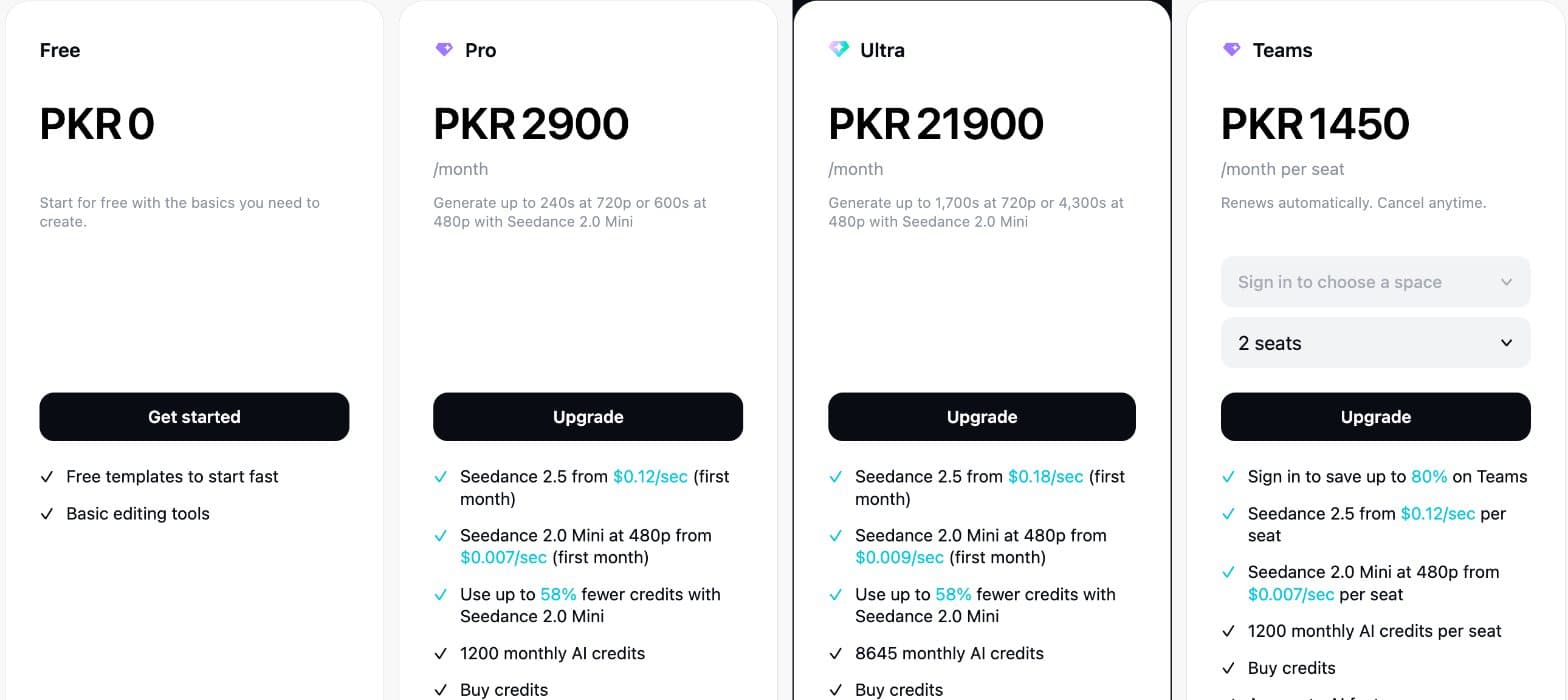
CapCut's plans as shown in Pakistan on 21 Nov 2026 (PKR): CapCut sets prices by region, so sign in to see yours. · Screenshot by CreatorSuite, Nov 21, 2026 2. AI tools on monthly credits. The AI features run on monthly AI credits. The Pro plan includes 1,200 AI credits a month, and generation draws them down, so heavy AI use needs a plan that fits it.
3. Auto captions. Auto captions are built in. You still check the timing and style of each caption yourself.
4. Regional pricing. Prices depend on your region and account, and the pricing page calls them reference only. On 21 Nov 2026 the page showed Pro at PKR 2,900 a month in Pakistan, so sign in to see your own price.
5. You do the editing. Every cut, caption, music choice and export is yours. The app gives you the tools, not the finished video.
Pros
- Free plan with templates and basic editing tools
- Works on phone, desktop and web
- Large template library for trending short-form formats
- Auto captions and AI tools built in
- New users can try Pro free for 7 days
Cons
- You do all the editing yourself, including cuts, captions, music and pacing
- Prices depend on region and account
- AI features draw down monthly credits
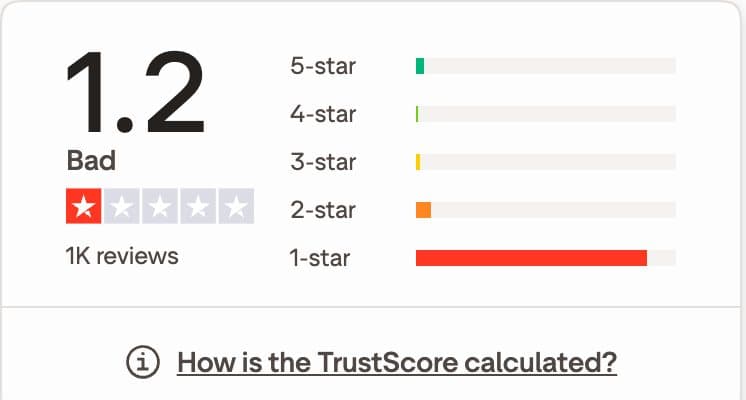
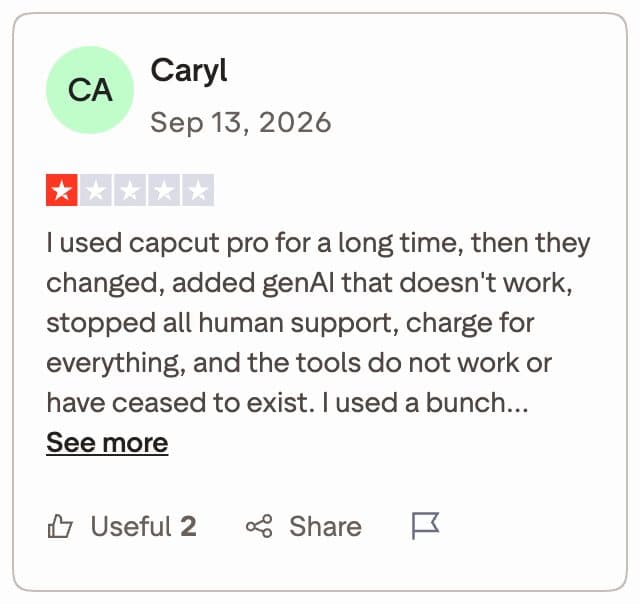
- Trustpilot score of 1.2 from about 1,000 reviews on 21 Nov 2026, with many complaints about billing and support
- Brand kit is only on the Teams plan
Choose CapCut over CreatorSuite if…
- You want a free app and are happy to edit yourself
- You enjoy the timeline and want control over every cut
- You make many short clips from templates and trending formats
- You want to learn editing before you pay for a service
What CapCut users say
What CreatorSuite sends back
A real upload and the finished edit, side by side. Switch between short form and long form.
What a CapCut alternative has to do
Most people searching for a CapCut alternative want one of two things. Some want another app they can edit in, cheaper or easier than CapCut. Others have stopped enjoying the editing and want a finished video back. The right answer depends on which of those you are. This page covers both, and it is fair to CapCut, which is the better choice for some creators.
CapCut is a free editing app for web, desktop and mobile. It comes with templates, auto captions and AI tools, and you do the editing yourself. If you are new to the idea of AI doing the edit, start with the beginner guide to AI video editing. The question is not whether CapCut can make a good video. It can. The question is how many hours you want to spend getting there.
CreatorSuite is a done-for-you alternative. You upload raw footage, and phone footage is fine, then pick a style. CreatorSuite's AI edits it, including the cuts, the hook, captions, b-roll, motion design, sound and colour, and sends back a finished, ready-to-post video. CreatorSuite does not film footage, generate video from text or make AI avatars. It edits the footage you give it.
CapCut at a glance
The table compares the two tools on the points that matter most when you are choosing a replacement. It shows where each one sits. It does not show which one gives you the better video, because that depends on your footage and the style you want.
For a wider view of the category, see the best AI video editors for creators.
| Question | CapCut | CreatorSuite |
|---|---|---|
| Who does the editing | You do, on the timeline or with a template | CreatorSuite's AI edits your footage |
| Free option | Yes, a free plan with templates and basic tools | A 3-day free trial with a card required |
| Auto captions | Yes | Yes, part of the edit |
| Long-form video | Yes, but you edit it | Up to 35 min, delivered edited |
| Thumbnails | Not listed on its pricing page | 2 on Basic, up to 25 on Growth |
| Brand kit | Teams plan only | From the Plus plan |
| Turnaround | As fast as you edit | Back in 6 to 8 hours on Basic, 3 to 4 hours on Growth |
How the workflow differs, step by step
Here is what one short video involves in each tool. The steps are the same whichever way you choose, but the person doing them is different.
- CapCut: import your footage, then start from a template or a blank timeline.
- CapCut: cut out dead air, add captions, and pick music and effects.
- CapCut: check the pacing, export the file, and post it yourself.
- CreatorSuite: upload your raw footage and choose a style.
- CreatorSuite: the AI makes the cuts, hook, captions, b-roll, sound and colour, then returns the finished video.
- CreatorSuite: review the result. Basic includes 2 revisions per edit, and Plus and above include unlimited re-edits.
- CreatorSuite: post the finished video.
Worked example: what three or fifteen videos a month cost
CreatorSuite prices work by credits. A short video costs 100 credits, a long video costs 300 credits and a clip costs 25 credits. The plan you need comes from the number of videos you publish.
Say you publish 3 short videos a month. Three short videos is 300 credits, which is exactly what the Basic plan includes at $9 a month. Now say you publish 15 short videos a month. That is 1,500 credits, which is the Plus plan at $39 a month.
CapCut does not charge you credits for basic editing. Its Pro plan includes 1,200 AI credits a month, and AI features draw those down. Your real cost in CapCut is the hours you spend editing each video. To work that out, multiply the minutes you spend on one video by the number of videos you publish each month, then decide what those hours are worth to you. Only you can put a number on that, and it is the number that decides whether a done-for-you plan is cheaper.
For a fuller breakdown of how these services charge, read video editing subscription services explained. The cost of doing it yourself is covered in DIY editing vs outsourcing: the real cost.
Pricing: free and cheap versus done-for-you
CapCut's prices depend on your region and account. The pricing page calls them reference only, so the price you see may not match someone else's.
The table lists the plans on each side. The CapCut prices are shown as they appeared on 21 Nov 2026.
| Plan | Price | What it includes |
|---|---|---|
| CreatorSuite Basic | $9 a month | 300 credits: up to 3 short or 1 long-form video, 2 thumbnails, 1 video at a time |
| CreatorSuite Plus | $39 a month | 1,500 credits: up to 15 short or 5 long-form videos, brand kit, 5 thumbnails, unlimited re-edits |
| CapCut Free | Free | Free templates and basic editing tools |
| CapCut Pro | Regional, for example PKR 2,900 a month in Pakistan | 1,200 AI credits a month, premium templates, 1 TB storage |
CapCut is the cheaper way to start if you are willing to do the editing. Basic's $9 a month is a low price for finished work, but it covers only 3 short videos, so count your videos before you choose.
Why CapCut might be the right pick
CapCut is a strong choice in several situations. It is the right tool if you want to learn editing, if you want full control over each cut, or if you want to try editing for free before paying for anything. The free plan lets you learn pacing and captions before you pay for anything.
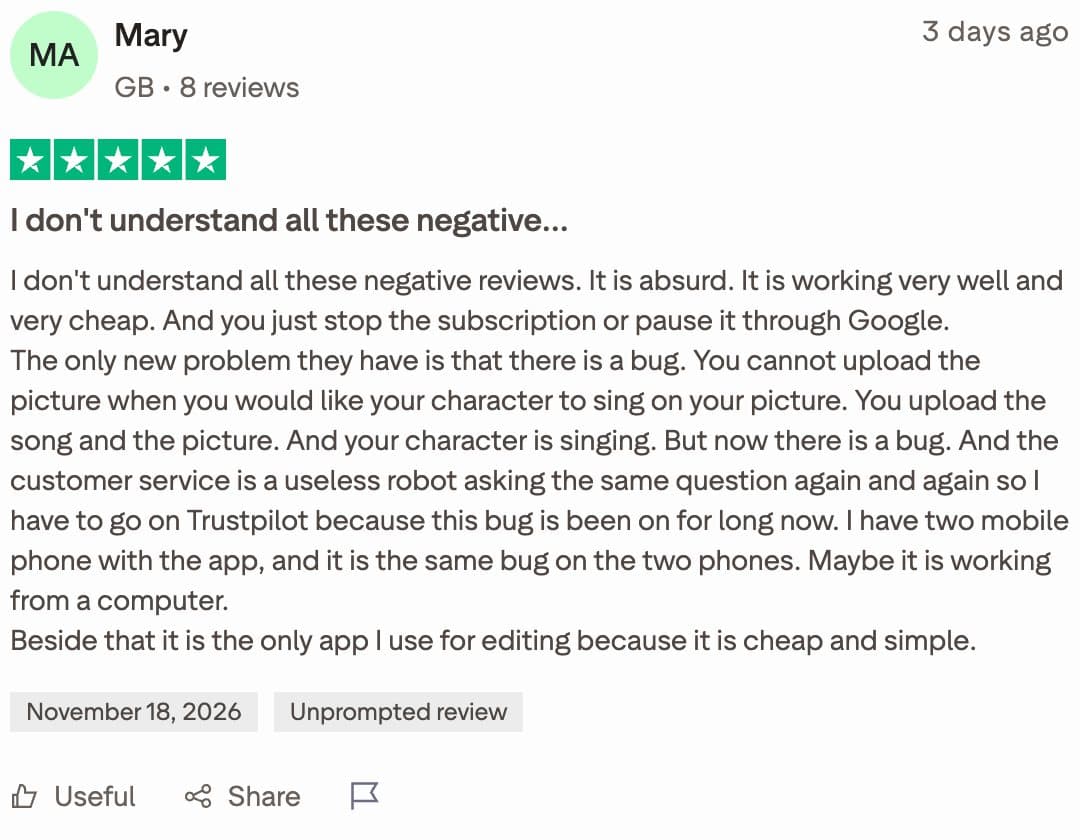
Reviews of CapCut are mixed. The Trustpilot score on 21 Nov 2026 was 1.2 from about 1,000 reviews, with most reviews rated 1-star and complaints about billing and support. Other reviewers call it cheap and simple, the only editing app they need. Read recent reviews and check your own region's price before you pay for a plan.
- You want a free app and are happy to edit yourself.
- You enjoy the timeline and want control over every cut.
- You make many short clips from templates and trending formats.
- You edit across phone, desktop and web and switch between them.
Where a done-for-you CapCut alternative fits
A done-for-you service fits when editing is the bottleneck. You have the footage, but the cuts, captions and export take the hours you would rather spend filming or planning. In that case a CapCut replacement that does the edit for you saves the time instead of moving the work to another app.
CreatorSuite is built for this. The plans include brand kit from Plus, thumbnails on every plan, long videos up to 35 min, and API and MCP access from Starter. 2,700+ creators in the last 7 days have used CreatorSuite. Another route is hiring a freelance video editor, which has its own trade-offs in cost and turnaround.
If you are unsure, test it on one video. The 3-day free trial includes 1 short video, 3 clips or 1 long video up to 10 min, and it needs a card. Use your own footage, not a sample, so you can judge the result you would post. For creators who want a short or long video that is edited for them, see how a talking-head video is handled.
The 3-day free trial is the quickest way to compare. Run one video through CapCut and one through the trial, and compare the time and the result.
How to choose a CapCut alternative
Work through these steps before you pay for any plan. They stop you choosing the wrong tool on price alone.
- Count the videos you publish each month, and note the length of each one.
- Estimate how long you spend editing one video today, honestly, including captions and export.
- Run one real video through CapCut, and through a done-for-you trial, and compare the result and the time.
- Check the plan limits that matter to you: videos at a time, revisions, brand kit and long-form length.
- Pick the cheapest plan that covers your count, not the cheapest headline price.
How this page was made: written by Badar Munir and the CreatorSuite team with AI assistance, reviewed by James, from facts we checked ourselves: competitor prices and features were checked on Nov 21, 2026 on their own sites. Screenshots are our own. Spotted something out of date? Email us and we’ll fix it.
CapCut alternative: FAQs
Is CapCut free?
CapCut has a free plan with free templates and basic editing tools. New users can start a 7-day free trial of CapCut Pro. Pro pricing depends on your region, so check the price shown when you sign in.
What is a CapCut replacement for someone who doesn't want to edit?
A done-for-you service is built for that. You upload raw footage, pick a style and get a finished video back. Use the credit math on this page to see which CreatorSuite plan covers the number of videos you publish.
Are there apps like CapCut that do the editing for you?
Most apps like CapCut leave the editing to you, CapCut included. A done-for-you service does the cuts and captions for you, so read what each plan includes before you buy.
Can CreatorSuite edit long videos?
Yes. CreatorSuite handles long-form videos up to 35 min. A long video costs 300 credits, so the Basic plan's 300 credits cover one long video a month.
Does CreatorSuite make videos from text?
No. CreatorSuite edits the footage you upload. It does not film, generate video from text or make AI avatars.
How many revisions do I get?
Basic includes 2 revisions per edit. Plus and above include unlimited re-edits.
Rather not edit it yourself?
Upload raw footage, get a finished edit back. 3-day free trial: 1 short video, 3 clips or 1 long video up to 10 min.
2,700+ creators in the last 7 days
Start 3-day free trial