
In shortOpus Clip and CapCut solve different problems. Opus Clip uses AI to find clips in a long video, reframe them to vertical and add captions, and you review and post them. CapCut is a free editing app where you do the editing yourself, from cuts to captions to export.
- Opus Clip is built to cut clips from long videos. CapCut is built for editing a video from start to finish.
- Opus Clip uses credits of one per source minute. A 30-minute video costs 30 credits.
- CapCut's free plan includes templates and basic editing tools, and its AI features run on monthly credits.
- Both leave the final edit to you. A done-for-you service does the edit instead.
- Ratings for both apps on Trustpilot are mixed, so test each one on your own footage first.
The short answer
Pick Opus Clip if your main job is turning long videos into a batch of short clips and you are happy to review and post them. Pick CapCut if you want to edit a full video yourself, for free or cheaply. If you want the finished video without the edit, a done-for-you service such as CreatorSuite is a third option, with a 3-day free trial to test it on your own footage.
Best pick by use case
| If you need… | Pick | Why |
|---|---|---|
| Turning one long podcast or stream into many short clips | Opus Clip | Opus Clip scans the long video for clip moments, gives each a virality score, and reframes them to vertical. |
| Editing one video from start to finish | CapCut | CapCut is a full editing app with a timeline, templates and effects, and you control every cut. |
| Trying a tool for free | CapCut | CapCut has a free plan with templates and basic tools. Opus Clip's free plan adds a watermark and blocks editing. |
| Posting clips with a scheduler | Opus Clip | Opus Clip can post to YouTube Shorts, TikTok and Reels, and Pro adds a scheduler. |
| Getting a finished long-form video without editing it | CreatorSuite | CreatorSuite's AI edits your footage, including long-form videos up to 35 min, and returns a finished video. |
| Exporting to Premiere Pro or DaVinci Resolve | Opus Clip | Opus Clip's Pro plan exports to Adobe Premiere Pro and DaVinci Resolve. |
Opus Clip vs CapCut: feature comparison
| Feature | CreatorSuite | Opus Clip | CapCut |
|---|---|---|---|
| Edits the whole video for you | ✓ | ◐AI picks clips, you review | ✕you edit; templates help |
| Long videos (YouTube, podcasts) | ✓up to 35 min | ✕clips only | ✓you edit it |
| Short clips from long videos | ✓ | ✓1 credit per source minute | ◐AI tools, you review |
| Animated captions | ✓ | ✓20+ languages | ✓auto captions |
| B-roll and motion graphics | ✓ | ◐AI B-roll: 3 clips/mo on Starter | ◐templates and stock |
| Brand kit (logo, fonts, colours) | ✓from Plus | ✓1 on Starter, 2 on Pro | ◐Teams plan |
| Thumbnails | ✓2+ per month | ✕not on pricing page | ✕not on pricing page |
| Revisions on request | ✓2 on Basic, unlimited from Plus | ✕you edit yourself | ✕you edit yourself |
| Free trial or free plan | ✓3-day trial | ✓free plan, watermark | ✓free plan + 7-day Pro trial |
| API / MCP access | ✓from Starter | ◐limited on Pro, full on Business | ✕not on pricing page |
| What you still do yourself | Upload raw footage and pick a style | Upload the long video, Pick and review the AI's clips, Fix captions and layout, Post or schedule | Edit the video yourself (timeline or template), Pick music, captions and effects, Export and post |
| Turnaround | 3–4 hours to 6–8 hours | Automated, depends on video length | As fast as you edit |
✓ yes · ◐ partly or with limits · ✕ no. From each tool’s own site and help docs, checked Nov 21, 2026.
Opus Clip vs CapCut: pricing
CreatorSuite
from $9/month, 3-day free trial
Basic$9/mo
up to 3 short or 1 long videos, or 12 clips
Plus$39/mo
up to 15 short or 5 long videos, or 60 clips
Starter$149/mo
up to 35 short or 11 long videos, or 140 clips
Growth$299/mo
up to 60 short or 20 long videos, or 240 clips
Free: 3-day free trial: 1 short video, 3 clips or 1 long video up to 10 min
Opus Clip
from $15/mo (Starter, monthly only), free plan with watermark
Free$0
60 credits/mo, watermark, no editing, clips exportable for 3 days
Starter$15/mo
150 credits/mo, 1 brand kit, no watermark
Pro$29/mo, or $14.50/mo billed yearly ($174)
3,600 credits/yr, 2 seats, 2 brand kits, AI B-roll, scheduler
BusinessCustom
custom credits, API, priority processing
Free: 60 credits a month (1 credit = 1 minute of source video), watermark, no editing, clips exportable for 3 days
Checked Nov 21, 2026 on www.opus.pro. Prices change; check before you buy.
CapCut
free plan; Pro price depends on your region (shown as PKR 2,900/mo in Pakistan on 21 Nov 2026), 7-day Pro trial for new users
FreeFree
free templates, basic editing tools
ProRegional (PKR 2,900/mo in Pakistan)
1,200 AI credits/mo, premium templates and features, 1 TB storage
UltraRegional (PKR 21,900/mo in Pakistan)
8,645 AI credits/mo, everything in Pro plus exclusive AI features
TeamsRegional, per seat
Pro features for every seat, brand kit, 1,200 AI credits per seat
Free: free templates and basic editing tools; new users can start a 7-day free trial of CapCut Pro
Checked Nov 21, 2026 on www.capcut.com. Prices change; check before you buy.
What it really costs per month
The price tag is only half of it: with a do-it-yourself tool you also pay with your editing time. Put in your own numbers.
| Option | Price / month | Your time | Real cost |
|---|---|---|---|
| CreatorSuitePlus plan | $39 | None | $39 |
| Opus Clipfrom $15/mo (Starter, monthly only), free plan with watermark + 10 h of your editing | $15 | $300 | $315 |
| CapCutfree plan; Pro price depends on your region (shown as PKR 2,900/mo in Pakistan on 21 Nov 2026), 7-day Pro trial for new users | Varies | $300 | $300 |
Your editing time is your own estimate: change it above. Tool prices are their lowest paid monthly plan; your volume may need a higher one.
Opus Clip review
AI clipping tool · www.opus.pro · from $15/mo (Starter, monthly only), free plan with watermark
Opus Clip is an AI clipping tool. You upload a long video, it finds the moments most likely to work as short clips, reframes them to 9:16 and adds animated captions. You review, edit and post the clips yourself.
Opus Clip features
1. Automatic clip finding. Opus Clip finds clip moments in a long video and gives each one a virality score, so you start from a shortlist instead of scrubbing the whole recording.
2. Captions and reframing. Animated captions come in 20+ languages, and auto reframe converts clips to 9:16. You still check the caption layout on each clip.

The free plan: 60 credits a month, but with a watermark, no editing, and clips exportable for only 3 days. · Screenshot by CreatorSuite, Nov 21, 2026 3. Credits by source minute. Each source minute costs 1 credit. The free plan includes 60 credits a month, and Starter includes 150 credits a month, so a long recording uses a large share of one month's credits.
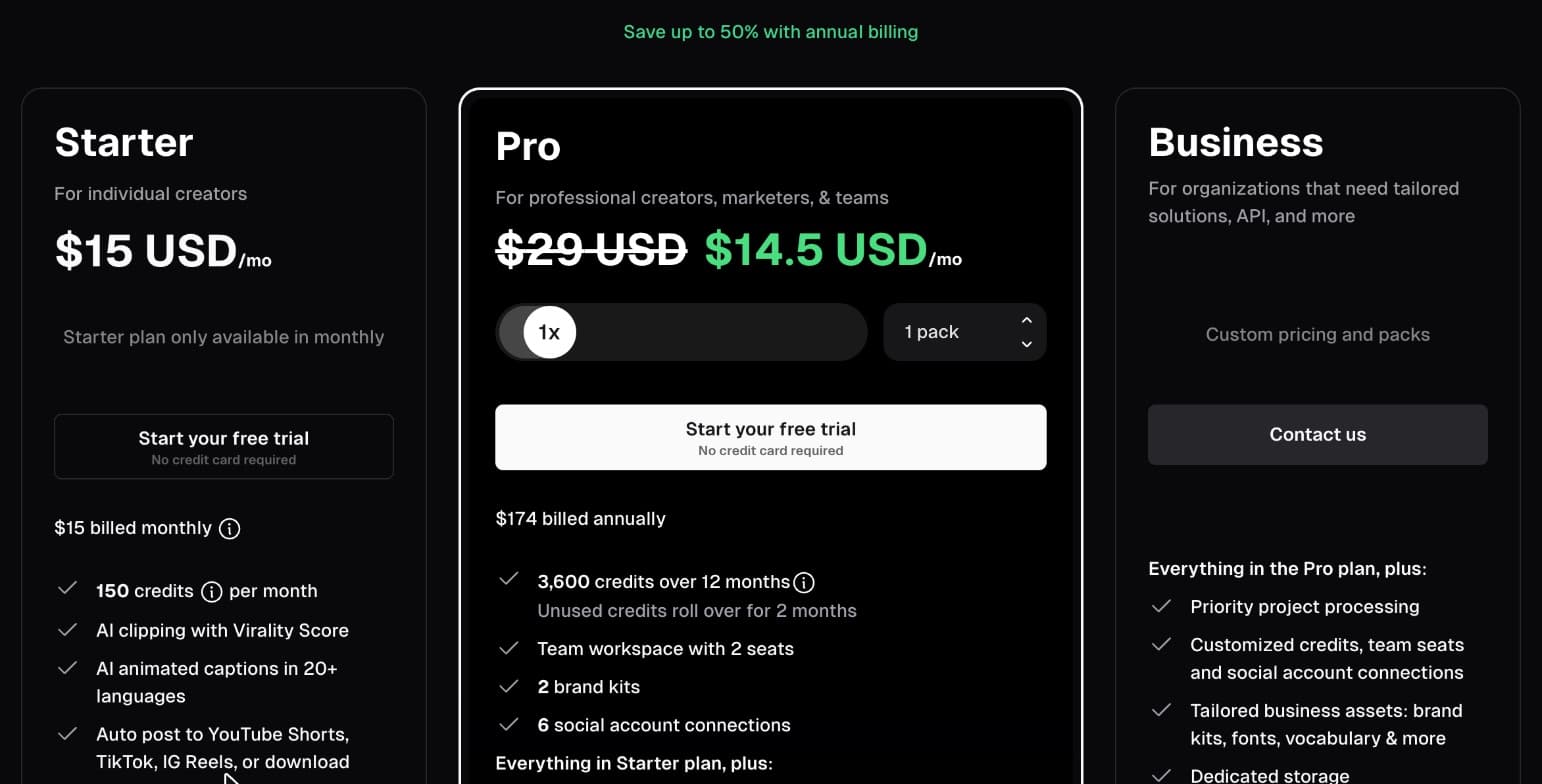
Opus Clip's pricing: Starter $15/mo (150 credits), Pro $29/mo or $14.50/mo billed yearly, Business custom. · Screenshot by CreatorSuite, Nov 21, 2026 4. Free plan limits. The free plan adds a watermark, does not allow editing, and clips can only be exported for 3 days.
The free plan: 60 credits a month, but with a watermark, no editing, and clips exportable for only 3 days. · Screenshot by CreatorSuite, Nov 21, 2026
Pros
- Finds clip moments automatically and gives each a virality score
- Animated captions in 20+ languages and auto reframe to 9:16
- Posts to YouTube Shorts, TikTok and Reels, and Pro adds a scheduler
- Pro exports to Adobe Premiere Pro and DaVinci Resolve
- Free plan to try it with 60 credits a month
Cons
- Credits are per source minute, so a 60-minute podcast uses 60 of Starter's 150 monthly credits
- It makes clips. It does not edit your full long-form video
- You still review the clips, fix captions and layouts, and post them yourself
- Free plan clips have a watermark, cannot be edited, and expire for export after 3 days
- AI B-roll is limited to 3 clips a month on Starter, and Starter is monthly only
Choose Opus Clip over CreatorSuite if…
- You have many long videos and want clip drafts from each one
- You are happy to review and polish clips yourself
- You want a scheduler and direct posting to short-form platforms
What Opus Clip users say
CapCut review
Editing app · www.capcut.com · free plan; Pro price depends on your region (shown as PKR 2,900/mo in Pakistan on 21 Nov 2026), 7-day Pro trial for new users
CapCut is a free editing app for web, desktop and mobile. It has templates, auto captions and AI tools. You do the editing yourself on a timeline or with a template, from the first cut to the export.
CapCut features
1. Free plan and templates. CapCut has a free plan with free templates and basic editing tools. New users can start a 7-day free trial of CapCut Pro.
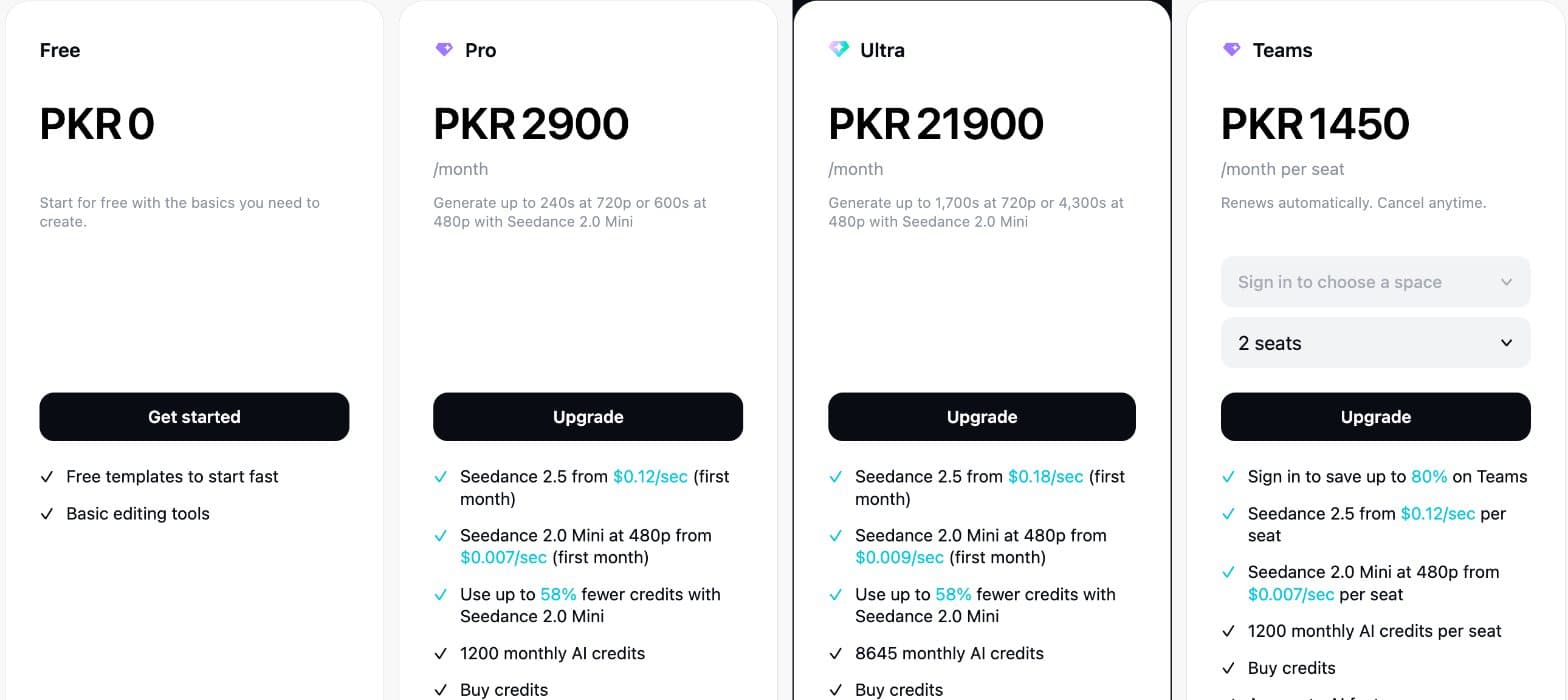
CapCut's plans as shown in Pakistan on 21 Nov 2026 (PKR): CapCut sets prices by region, so sign in to see yours. · Screenshot by CreatorSuite, Nov 21, 2026 2. Full editing on a timeline. You can edit a long video from start to finish, with cuts, music, effects and captions. The work is yours, which gives you full control and takes the time it takes.
3. AI credits. The Pro plan includes 1,200 AI credits a month, and AI generation draws them down. Prices depend on your region.
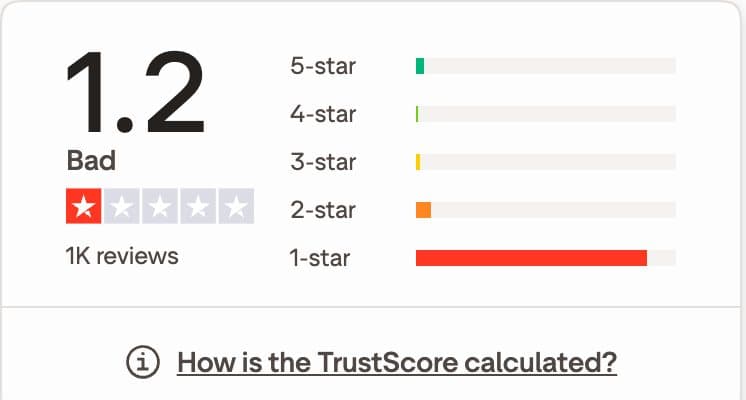
4. Regional pricing and reviews. Pro was shown at PKR 2,900 a month in Pakistan on 21 Nov 2026. The Trustpilot score on the same date was 1.2 from about 1,000 reviews, with most reviews rated 1-star.
CapCut's plans as shown in Pakistan on 21 Nov 2026 (PKR): CapCut sets prices by region, so sign in to see yours. · Screenshot by CreatorSuite, Nov 21, 2026
Pros
- Free plan with templates and basic editing tools
- Works on phone, desktop and web
- Large template library for trending short-form formats
- Can edit long videos, not just clips
- New users can try Pro free for 7 days
Cons
- You do all the editing yourself, including pacing and captions
- Prices depend on region and account
- AI features run on monthly credits that generation uses up
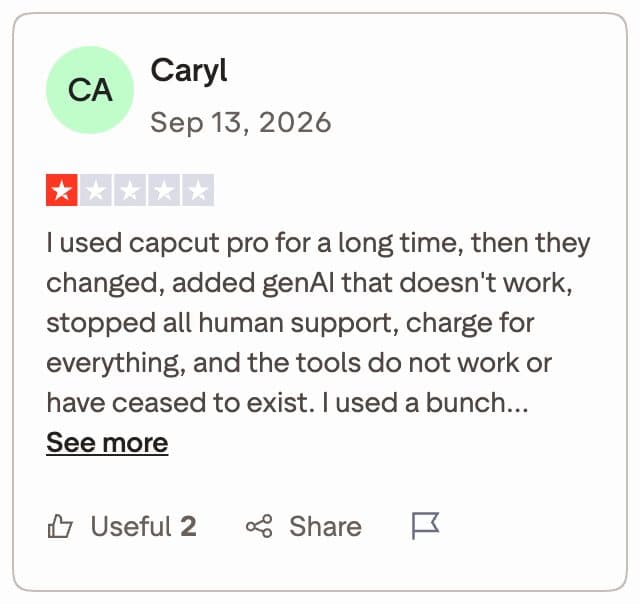
- Trustpilot score of 1.2 on 21 Nov 2026, with complaints about billing and support
- Brand kit is only on the Teams plan
Choose CapCut over CreatorSuite if…
- You want to edit a full video yourself for free or at low cost
- You enjoy the timeline and want to control every cut
- You make short videos from templates and want trending formats
What CapCut users say
What CreatorSuite sends back
A real upload and the finished edit, side by side. Switch between short form and long form.
Opus Clip vs CapCut: two different jobs
Opus Clip vs CapCut is not a like-for-like comparison, and that is the first thing to know. Opus Clip is an AI clipping tool. It takes a long video and proposes short clips from it. CapCut is an editing app. It gives you a timeline, templates and AI tools so you can build a video from start to finish. Both can produce short-form videos, but they start from different points.
If your question is CapCut vs Opus Clip for making clips from a long recording, the answer depends on whether you want a batch of drafts or full control. If your question is which one you should edit a video in, Opus Clip is the wrong tool for most full edits. Read the table and the workflow below, then decide which job you have.
For an overview of the wider category, see the best AI clipping tools for long videos.
Opus Clip vs CapCut: what each tool does
The table lists the points that matter most for this choice. Trustpilot scores are shown as they were on 21 Nov 2026.
| Question | Opus Clip | CapCut |
|---|---|---|
| Main job | Finds clips in a long video and reframes them to vertical | Edits a video on a timeline with templates and AI tools |
| Who does the editing | AI picks the clips; you review, fix captions and post | You do all of it |
| Long-form editing | No, clips only | Yes, you edit it |
| Captions | Animated captions in 20+ languages | Auto captions |
| Free plan | 60 credits a month, watermark, no editing, clips exportable for 3 days | Free templates and basic editing tools |
| Entry paid plan | Starter at $15 a month, 150 credits | Regional price, Pro at PKR 2,900 a month in Pakistan |
| Brand kit | 1 on Starter, 2 on Pro | Teams plan |
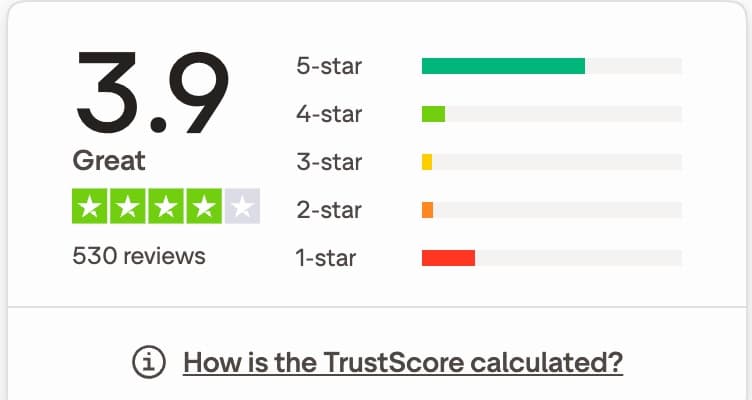
| Trustpilot on 21 Nov 2026 | 3.9 from 530 reviews | 1.2 from about 1,000 reviews |
Worked example: turning one long video into clips
Here is how a single long recording moves through each tool. Imagine a 30-minute interview you want to turn into short clips for the week.
In Opus Clip, you upload the long video. The AI scans it and suggests clip moments, each with a virality score. You choose the clips you like, check the captions and the 9:16 layout, and post or schedule them. The cost is 1 credit per source minute, so this 30-minute video uses 30 credits. Starter's 150 credits cover five videos of that length in one month, before you consider any AI B-roll.
In CapCut, you import the 30-minute interview and cut it yourself. You find the good moments on the timeline, trim each one, resize it for vertical, add captions and export. The AI tools can help with captions and cleanup, but you choose and check every clip. The cost is your editing time, plus AI credits if you use generative features.
A done-for-you service takes a different route. CreatorSuite's long-form videos go up to 35 min, so a 30-minute interview fits within that limit, and a long video costs 300 credits. CreatorSuite's AI edits the footage you upload, which covers cuts, hook, captions and sound, and returns a finished video. The limit is 35 minutes, so a 60-minute recording is outside that range.
For more on the clipping approach, read about podcast clip editing for TikTok and Reels.
Opus Clip vs CapCut pricing side by side
Opus Clip prices are per month or per year, with a custom Business plan. CapCut prices are regional and depend on your account. CreatorSuite's plans are fixed. The table lists the plans as they appeared on 21 Nov 2026.
Opus Clip's Pro plan is $29 a month, or $14.50 a month billed yearly, which comes to $174 a year. Starter is monthly only.
| Plan | Price | What it includes |
|---|---|---|
| Opus Clip Free | $0 | 60 credits a month, watermark, no editing, clips exportable for 3 days |
| Opus Clip Starter | $15 a month | 150 credits a month, 1 brand kit, no watermark |
| Opus Clip Pro | $29 a month, or $14.50 a month billed yearly ($174) | 3,600 credits a year, 2 seats, 2 brand kits, AI B-roll, scheduler |
| CapCut Free | Free | Free templates and basic editing tools |
| CapCut Pro | Regional, PKR 2,900 a month shown in Pakistan | 1,200 AI credits a month, premium templates, 1 TB storage |
| CreatorSuite Basic | $9 a month | 300 credits: up to 3 short or 1 long-form video |
| CreatorSuite Plus | $39 a month | 1,500 credits: up to 15 short or 5 long-form videos |
Compare by the job, not the headline price. A low monthly price for a clipping tool still leaves you reviewing and posting every clip, and a low price for an editing app leaves you doing every edit.
Where Opus Clip is the better choice
Opus Clip is the stronger tool when your videos are long and your goal is many short clips. It finds clip moments for you, which saves time when you have a lot of footage. It also posts to the main short-form platforms, and the Pro plan adds a scheduler and exports for Premiere Pro and DaVinci Resolve. For the caption side of that workflow, compare AI caption generators.
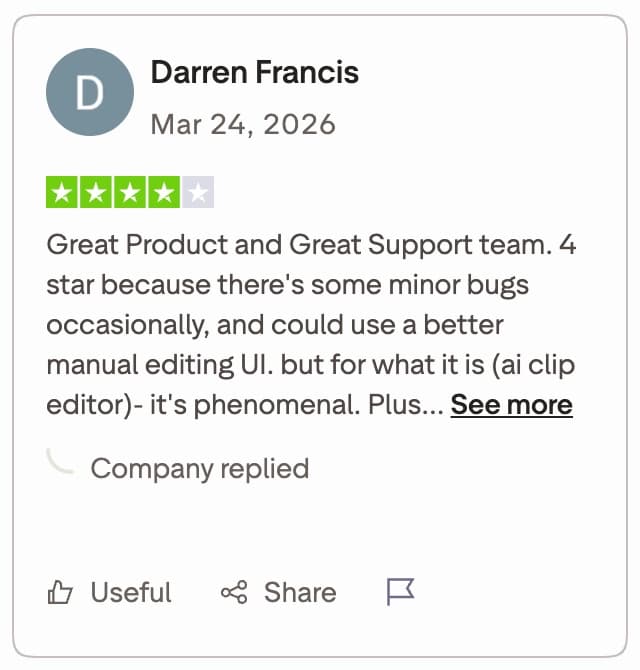
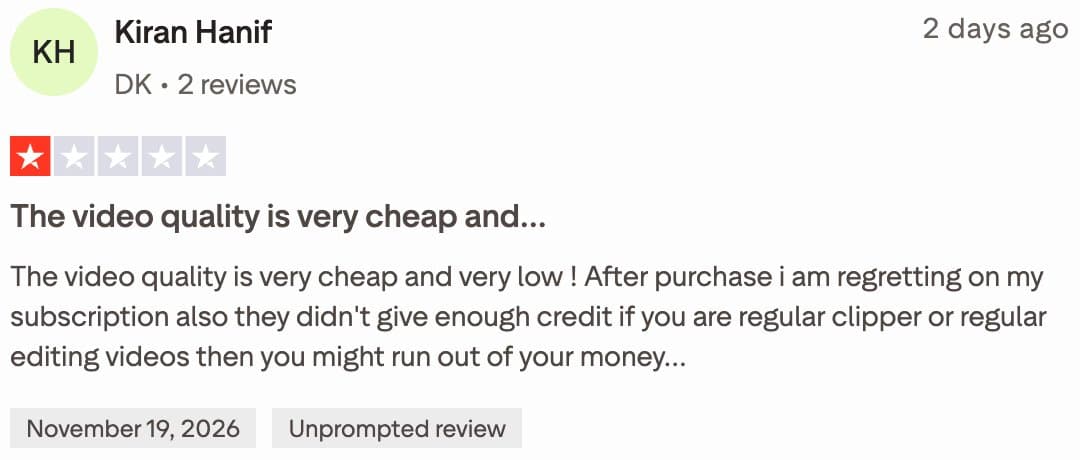
Reviews of Opus Clip are mixed. The Trustpilot score on 21 Nov 2026 was 3.9 from 530 reviews, mostly 5-star, with a visible block of 1-star reviews. One 4-star reviewer liked the AI clipping but wanted a better manual editing interface. A 1-star reviewer said the credits ran out and the output quality disappointed them.
- Long recordings you want to cut into a batch of clips
- Posting and scheduling to short-form platforms
- Exporting to Premiere Pro or DaVinci Resolve on Pro
Where CapCut is the better choice
CapCut is the better pick when you want to edit a whole video yourself. It is also the cheaper way to start, because its free plan includes templates and basic editing tools. Opus Clip's free plan adds a watermark and blocks editing, so it is a trial, not a working tool.
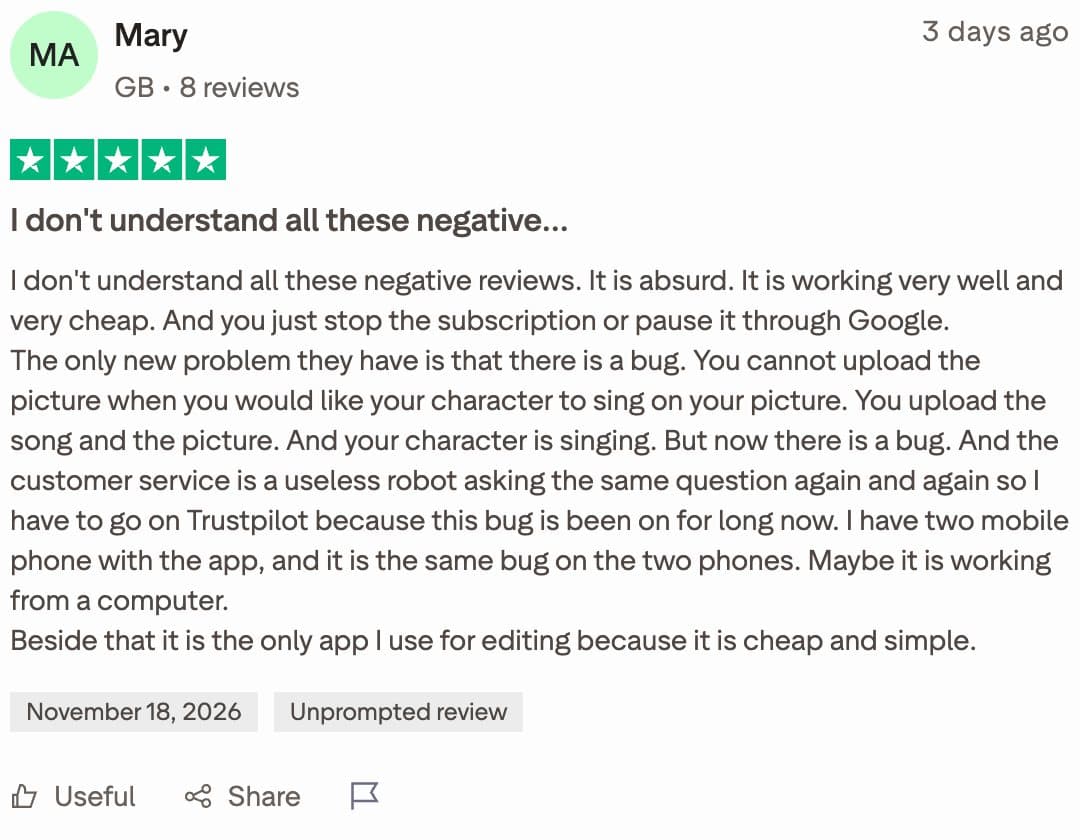
The trade-off is time. CapCut gives you the control, and it leaves the work to you. Its Trustpilot score on 21 Nov 2026 was 1.2 from about 1,000 reviews, with complaints about billing and support. Some reviewers call it cheap and simple. Check your region's price and read recent reviews before you pay.
- One long video edited from start to finish
- A free start with templates and basic tools
- Full control over every cut, caption and effect
Where a done-for-you service fits
If you want a finished video without the cuts, neither tool does that job alone. Opus Clip gives you drafts to review, and CapCut gives you a timeline to work in. A done-for-you service such as CreatorSuite is built for the case where the edit itself is the bottleneck.
CreatorSuite's AI edits your footage and returns a finished video. Its plans include brand kit from Plus, thumbnails on every plan, and API and MCP access from Starter. 2,700+ creators in the last 7 days have used CreatorSuite. For a broader view of the category, see what an AI video editing service does and how AI editing compares with a human editor.
You can test it before you commit. The 3-day free trial includes 1 short video, 3 clips or 1 long video up to 10 min, and it needs a card. Use one of your own long videos, so you can compare the result with what you would get from Opus Clip or CapCut.
The 3-day free trial is the quickest test. Run one of your own videos through it, then compare the finished result with the clips or edit you made in the other tools.
Which should you pick?
Use these questions to decide. Your answers point to one tool, and in some cases to a done-for-you service instead.
- Do you have long recordings you want cut into many short clips? If yes, Opus Clip is the closer fit.
- Do you want to edit one video from start to finish, and enjoy the timeline? If yes, CapCut is the closer fit.
- Do you want a finished video and no editing time? If yes, a done-for-you service is the closer fit.
- Is your budget tight? Start with the free plans, then test with your own footage before paying.
- Does the video run longer than 35 minutes? CreatorSuite's long-form limit is 35 minutes, so check that before you choose it.
How this page was made: written by Badar Munir and the CreatorSuite team with AI assistance, reviewed by James, from facts we checked ourselves: competitor prices and features were checked on Nov 21, 2026 on their own sites. Screenshots are our own. Spotted something out of date? Email us and we’ll fix it.
Opus Clip vs CapCut: FAQs
Is Opus Clip better than CapCut?
Neither is better across the board. Opus Clip is better for turning long videos into a batch of clips. CapCut is better for editing one video yourself, especially on a budget.
Can CapCut make clips from a long video?
You can cut clips from a long video in CapCut, but you find and trim each moment yourself. Opus Clip proposes the clip moments for you, then you review them.
How many credits does Opus Clip use?
Opus Clip uses 1 credit per source minute. A 30-minute video uses 30 credits, and a 60-minute podcast uses 60 credits.
Is CapCut free to use?
CapCut has a free plan with free templates and basic editing tools. New users can start a 7-day free trial of CapCut Pro. Pro prices depend on region.
Can CreatorSuite replace both tools?
It can replace the editing step if you want a finished video. CreatorSuite edits the footage you upload, with long-form videos up to 35 min. It does not film footage, generate video from text or make AI avatars.
Which tool is better for posting to TikTok and Reels?
Opus Clip can post to YouTube Shorts, TikTok and Reels, and its Pro plan adds a scheduler. CapCut is an editor, so you export the video and post it yourself.
Are there apps like Opus Clip for editing?
Opus Clip is a clipping tool, so most apps like it do the same job of finding and reframing clips. For a full timeline edit, CapCut is the closer fit. To see more tools head to head, [browse the comparisons](/compare).
Rather not edit it yourself?
Upload raw footage, get a finished edit back. 3-day free trial: 1 short video, 3 clips or 1 long video up to 10 min.
2,700+ creators in the last 7 days
Start 3-day free trial