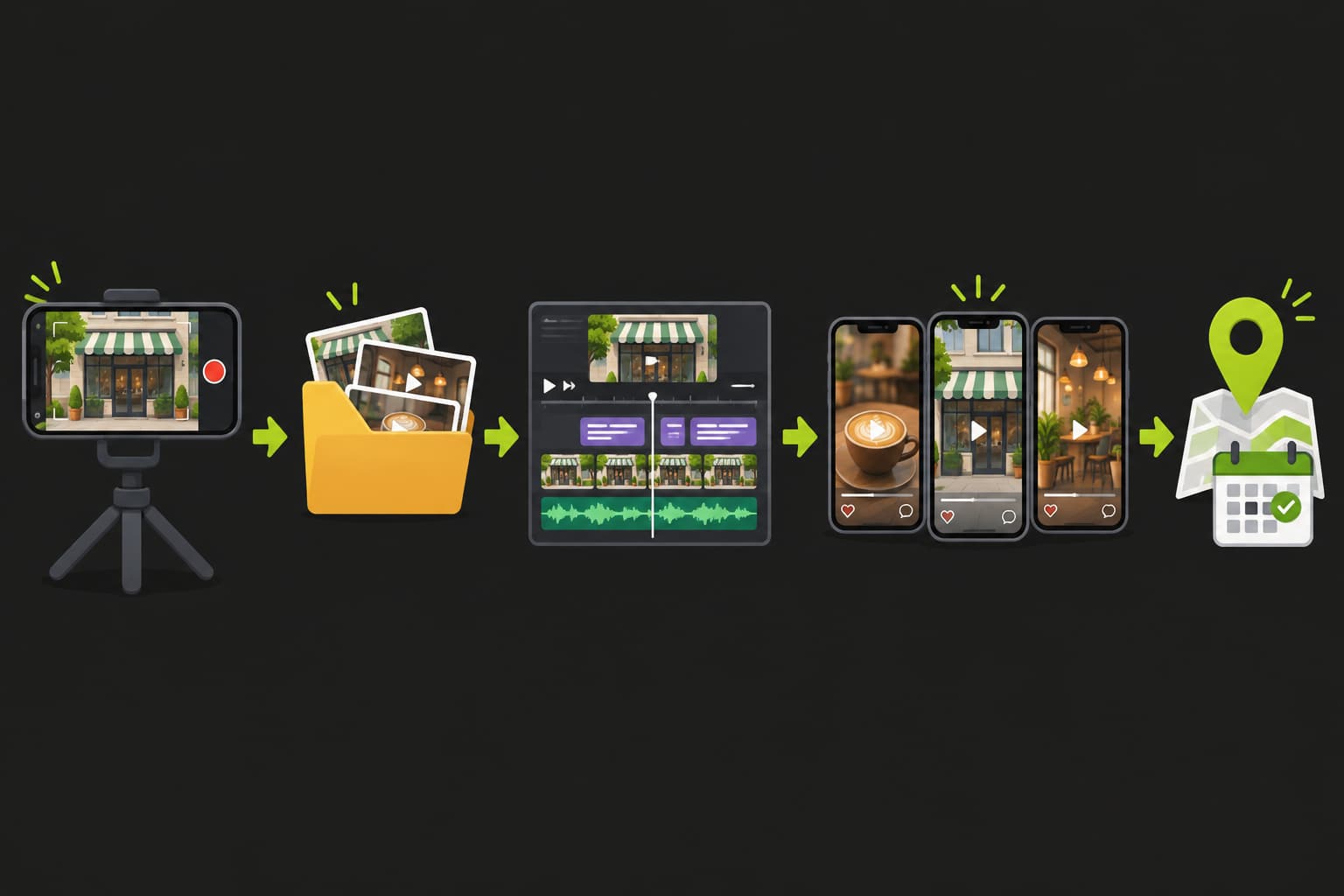

In shortVideo for local businesses works when it is filmed for nearby strangers, not existing customers, and ends with one clear next step such as a DM, a booking or directions. Two or three short videos a week, posted for a couple of months and measured by enquiries rather than views, is a realistic plan for a restaurant, salon or gym.
- Judge local video by DMs, calls, direction requests and bookings, not by view counts.
- Film for people who have never visited: show the room, the people, the result and how to book.
- Put your town or neighbourhood in the first line and tag the location on every post.
- Google Business Profile accepts videos up to 30 seconds, up to 75 MB, at 720p or higher.
- Consistency matters more than polish: a small weekly routine beats a big shoot once a quarter.
- Editing is usually the bottleneck; batch it, hand it to an app, a freelancer or a done-for-you service.
What video for local businesses is really for
Video for local businesses has a different job from creator video. A creator needs reach. A restaurant, salon or gym needs a few hundred of the right people, within a short drive, to see the place and decide to come in. That changes almost every decision: what you film, how you write the first line, where you post and what you count as success.
Local marketers keep coming back to the same point. On the Hometown ADvantage podcast for local business owners, the host describes a Reel that reached only about 300 people but sent 10 of them to the profile, and argues that this is the kind of result a local business should want. Two-Brain Business gives gym owners similar advice: aim for steady growth, not virality. PushPress tells gyms to track DMs, link clicks and intro sign-ups, and to stop worrying about follower counts.
Viral moments do happen. CBS News reported on a Santa Rosa noodle shop whose owner's daughter posted a seven-second TikTok of the empty dining room; within days it had passed 100,000 views and the owner described lunch crowds of roughly ten times the previous month. That is a story worth knowing, but it is not a plan. The plan is a weekly routine that keeps your business in front of nearby people.
If you want the broader picture first, read our guide to video marketing for small businesses. This post narrows local business video marketing down to three types of shop that sell an in-person experience.
Why local business videos get views but no customers (or no views at all)
When owners say video does not work, it is rarely one thing. Below are the causes that come up again and again in local marketing guides and owner discussions, with a quick way to check each one. Work down the list before you change everything at once.
| What you see | Likely cause | How to check |
|---|---|---|
| Regulars like the posts, no new faces | You are filming for people who already know you (inside jokes, member shout-outs) | Ask: would a stranger understand this with the sound off? |
| Views from far away, no bookings | No location in the hook, caption or tag | Look at the first line and the location tag on your last 5 posts |
| People watch, nobody acts | No next step, or too many next steps | Does the video end with one action: DM, book, call or get directions? |
| Views drop off in the first seconds | Slow opening: logo, wide empty shot, long intro | Check the retention or replay data in Instagram or TikTok insights |
| Nothing happens after a month | Not enough time or posts yet | Count posts in the last 8 weeks; PushPress suggests 60 to 90 days of consistent posting before social drives sign-ups |
| DMs come in, few become customers | Slow or no replies | Measure how long your replies take; PushPress advises within an hour, ideally within 10 minutes |
| Can't boost a good Reel as an ad | It uses trending in-app audio | Rebuild it with licensed or original music before boosting |
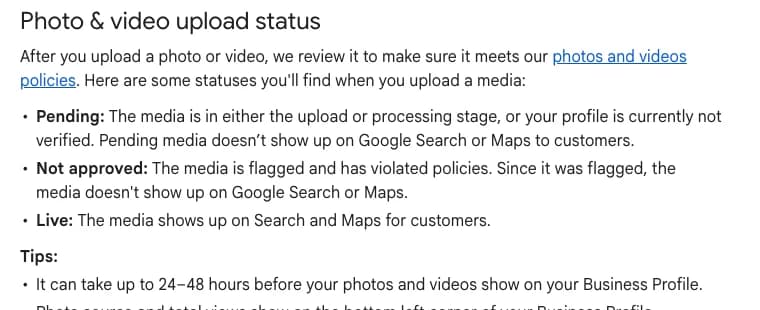
| Videos missing from Google | Business Profile not verified, or media still pending | Open your Business Profile photos tab and check each item's status |
Editing is only one of these causes. A well-edited video with no location, no next step and no follow-up on DMs will still bring nobody through the door.
What to film: video ideas for restaurants, salons and gyms
A useful frame from the Hometown ADvantage podcast is to pick topics from three buckets: behind the scenes, what makes you different, and short stories. Then make sure each video has a hook, enough context for a stranger, and a call to action. Here is how that looks for each business type, from short videos for restaurants to salon video marketing ideas and gym social media videos.
If you have happy customers willing to talk on camera, a short testimonial is often the strongest video you can make. Our guide to testimonial video editing covers how to cut those down so they stay honest and short. Customer-filmed clips are covered in UGC video editing.
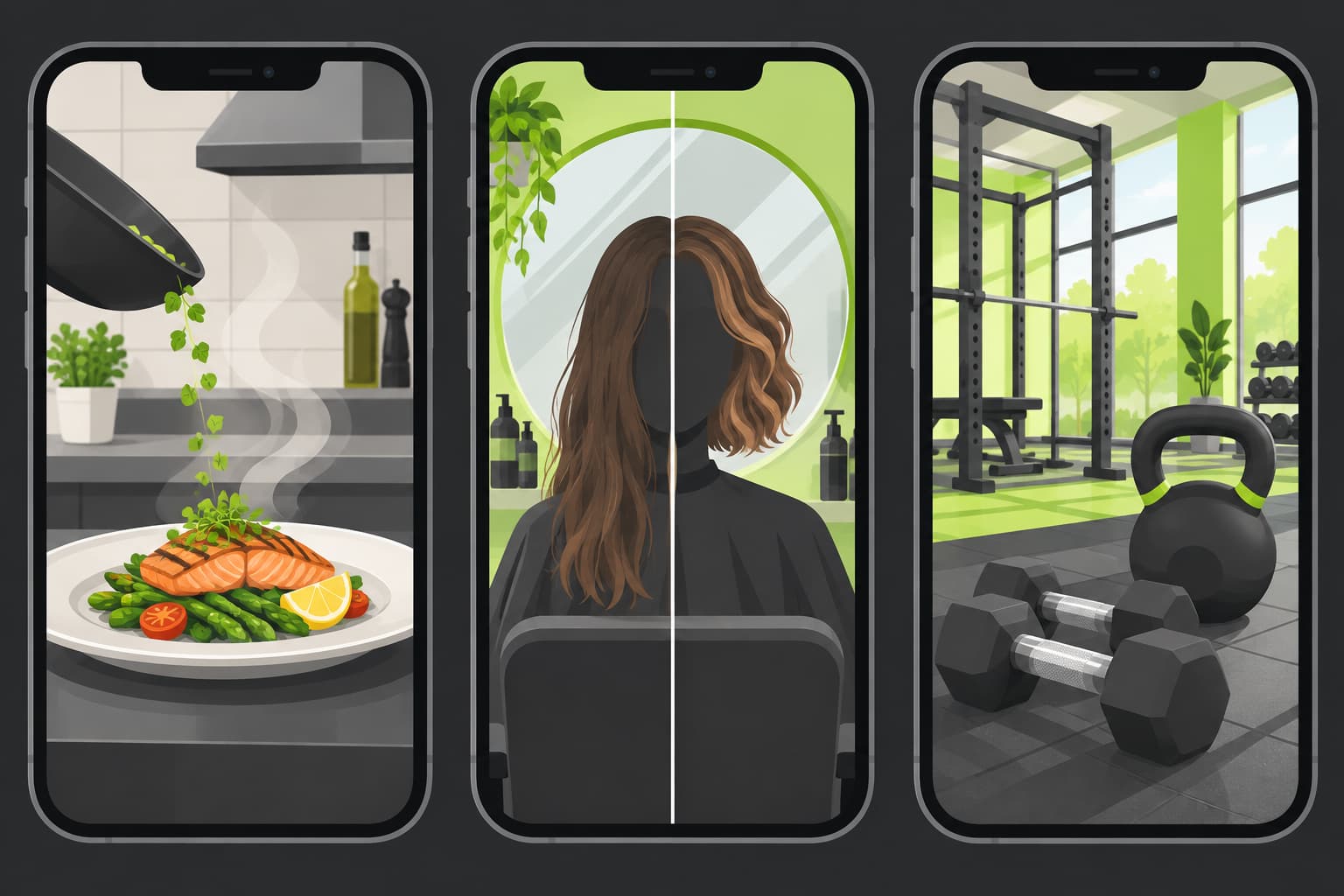
- Restaurants: film the dish being made and served, not only the finished plate. Steam, sound and hands keep people watching.
- Salons: answer questions clients really ask in the chair, such as how to make a blowout last, then show the result.
- Gyms: film for beginners. A lot of gym content shows already-fit members, which can put off the people you most want to reach.
| Business | Behind the scenes | What makes you different | Story or proof | Next step to ask for |
|---|---|---|---|---|
| Restaurant | Prep before opening, plating one dish start to finish | The dish people drive across town for, a house-made ingredient | The founder's first recipe, a regular's order | Book a table, order online, get directions |
| Salon | Mixing colour, the consultation before a cut | A technique you are known for, how you handle curly or damaged hair | Before and after with the client's permission, answering a common client question | Book a consult, DM for a quote |
| Gym | Setting up the morning class, a coach walking the floor | Class format, beginner-friendly coaching, equipment | A member's first session, what a session actually looks like | Book a free intro, DM to ask about pricing |
Where to post video for local businesses
You do not need every platform. PushPress suggests picking one or two and doing them well, and its gym audience split is a useful starting point for any local business: Instagram for a broad adult audience, TikTok for younger customers, Facebook for older ones. Reuse the same vertical edit across them where the rules allow.
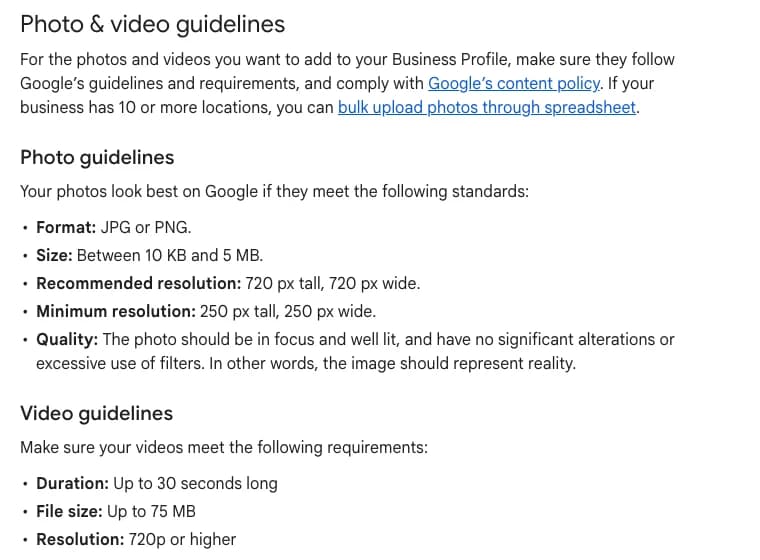
A Google Business Profile video is the one many owners forget. It is where people look when they search for a restaurant, salon or gym near them, and you can add video there too. Google's help page lists the rules: videos up to 30 seconds long, up to 75 MB, and 720p or higher. Media only shows once the profile is verified, and Google notes it can take up to 24 to 48 hours to go live. Whitespark found in 2023 that longer videos sometimes upload if the file stays under the size limit, but Google's stated limit is 30 seconds, so plan your clips to that length.
YouTube Shorts is worth adding if you already post vertical video elsewhere; the same files usually work. See our YouTube Shorts editing service page for the format details.
| Platform | Good for | Length to aim for | Watch out for |
|---|---|---|---|
| Instagram Reels | Reaching nearby non-followers, DMs | Short; get to the point in the first seconds | Trending audio blocks boosting as an ad |
| TikTok | Younger local customers, stories | Short and story-led | Takes regular posting to find your audience |
| Older customers, local groups, events | Short to medium | Group rules on self-promotion | |
| Google Business Profile | People already searching for you | Up to 30 seconds | Must be verified; media can sit as pending |
| YouTube Shorts | Search and a long shelf life | Under a minute | Low early reach for new channels |
What CreatorSuite sends back
A real upload next to the finished edit. Switch between short form and long form.
A weekly video plan a small team can keep up
Two-Brain Business gives gym owners a simple weekly rhythm that suits any local shop: one post that asks for the sale, one that builds connection, and one that teaches something useful. It also suggests pinning three videos to the top of your profile: who you are, what a session or visit looks like, and how to get started, including pricing and next steps. If time is the problem, it suggests starting with 15-minute blocks three times a week.
PushPress lands in a similar place for short video: two to three Reels a week, with roughly four community or value posts for every promotional one. Here is how that turns into a plan you can actually run.
| Day | Video | Purpose |
|---|---|---|
| Monday | Behind the scenes (prep, setup, a coach or stylist at work) | Connection |
| Wednesday | A tip or answer to a common customer question | Value |
| Friday | This week's offer, special or free intro, with one clear next step | Conversion |
| Once, then pin | Who we are / what a visit looks like / how to book | Always-on profile tour |
Batch it. One filming session of 30 to 60 minutes can cover a week of posts if you shoot several short moments rather than one long video.
Worked example: one filming session at a salon becomes a week of posts
Here is the routine step by step, using a salon. The same steps work for a restaurant (swap the haircut for a dish) or a gym (swap it for a class).
- Step 1, plan three moments (5 minutes): a consultation, a colour or cut in progress, and the finished result. Write the hook for each before you film, with your area in it, for example a line that names your neighbourhood and the problem you fix.
- Step 2, film on a phone (30 to 45 minutes): vertical, steady, near a window. Shoot each moment a few times. Get the client's permission for any before and after. Record one 30-second clip of you saying who you are and how to book.
- Step 3, edit into short videos: trim dead air, put the strongest frame first, add captions (many people watch muted), add music you are allowed to use, and end on one call to action.
- Step 4, post on the plan above: Monday the colour in progress, Wednesday the question you answered during the consultation, Friday the result with a booking link. Tag the location every time.
- Step 5, reuse: put the 30-second 'who we are' clip on Google Business Profile and pin it on Instagram.
- Step 6, reply fast: answer comments and DMs the same day, and move each conversation to a booking.
- Step 7, keep a tally: note each enquiry and booking that mentions a video. After eight weeks you will know which topics bring people in.
How to edit local business videos without losing your evenings
Step 3 is where most local owners stop. Filming takes minutes; editing takes hours, and it lands after closing time. There are four realistic routes to editing video for local businesses, each with honest trade-offs, from free apps to cheap video editing for small business owners who would rather not edit at all.
If you are choosing between editing apps, our Descript vs CapCut comparison explains which suits talking-head clips and which suits quick social edits. If you are weighing doing it yourself against paying someone, DIY editing vs outsourcing walks through how to put a number on your own time. And if you are hiring, our Upwork video editors alternative page covers what to check before you commit to a freelancer.
CreatorSuite sits in the done-for-you row. You upload the phone footage from Step 2 and pick a style, and its AI video editor does the cuts, hook, captions, b-roll, motion design, sound and colour, then sends back a finished video that is ready to post. It edits what you filmed; it does not film for you or make videos from text.
| Route | What it costs you | Best when | Trade-off |
|---|---|---|---|
| Edit in the Instagram or TikTok app | Your time only | Very short clips, one location, you enjoy it | Hard to keep consistent; trending audio limits boosting |
| Editing apps like CapCut, Canva or Descript | Your time plus any subscription | Someone on the team likes editing | Learning curve; still hours a week |
| Freelance editor | Their rate and your time managing them | You need a fixed style and have budget | Quality and turnaround vary; briefing and revisions take time |
| Done-for-you AI video editing service (CreatorSuite) | From $9/month | You film on a phone and want ready-to-post videos back the same day | You still film and post; it does not create footage |
What a month of local business video costs with CreatorSuite
Using the weekly plan above, a restaurant, salon or gym posts two to three short videos a week, which is roughly 8 to 12 short videos a month. Here is how that maps to CreatorSuite's plans, using only the published plan limits.
Basic at $9/month covers up to 3 short videos (or 12 clips) and returns each in 6 to 8 hours, with 2 revisions per edit. That suits a business testing whether video is worth it, or one posting a single video a week from clips. Plus at $39/month covers up to 15 short videos (or 60 clips), works on 3 videos at a time, returns them in 5 to 6 hours, includes unlimited re-edits and adds a brand kit, so your colours and fonts stay the same across posts. For the weekly plan above, Plus is the fit. Starter at $149/month (up to 35 short videos) suits an agency or a group with several locations.
You can try it with the 3-day free trial: 1 short video, 3 clips or 1 long video up to 10 minutes (card required), with a full refund before your 2nd edit. A sensible test is to film the salon routine above once and send the footage through the AI video editing service to see what comes back.
| Plan | Price | Short videos per month | Turnaround | Fits |
|---|---|---|---|---|
| Basic | $9/month | Up to 3 (or 12 clips) | 6 to 8 hours | Testing, one video a week from clips |
| Plus | $39/month | Up to 15 (or 60 clips) | 5 to 6 hours | The 2 to 3 videos a week plan |
| Starter | $149/month | Up to 35 (or 140 clips) | 5 to 6 hours | Several locations or an agency |
How to tell if video is working for your local business
Views tell you whether the hook worked. They do not tell you whether video is paying for itself. Track a small set of numbers each week in a simple spreadsheet.
To work out whether it pays, divide what you spend in a month (your plan or editor cost plus the hours you put in, valued at what your time is worth) by the number of new customers who mention a video. Compare that with what an average new customer spends with you over a few visits. If the first number is well below the second, keep going; if not, change the topic or the call to action before you change the editing. When a video clearly brings in enquiries, it is a good candidate to boost as a paid ad; our video ads editing tips and Facebook ad video editing pages cover how to cut it for that.
- DMs and comments asking about prices, availability or booking
- Calls, website clicks and direction requests from your Google Business Profile
- Bookings, reservations or intro sign-ups that came from social
- New customers who say they saw a video (ask at the counter or in the booking form)
- Which video topics produced those enquiries, so you can make more of them
When CreatorSuite is not the right fit
Be honest about what you need. If you want someone to come to your restaurant and shoot a polished brand film with lighting and a crew, you need a local videographer; CreatorSuite edits footage you send, it does not film. If someone on your team enjoys editing and has the time, a free or low-cost app is enough and keeps full control in-house. If you post one video a month, the Basic plan or a phone app will do.
Where a done-for-you AI video editor helps most is the common middle case: you can film on your phone in a few minutes, but editing is what keeps you from posting every week. Other industries face the same trade-off; see how it works for different businesses on our AI video editor for your industry pages. CreatorSuite was used by 2,700+ creators in the last 7 days, and the 3-day free trial is the simplest way to see whether it fits your shop.
What we read for this guide
- Manage your Business Profile photos & videos (Google Business Profile Help) · support.google.comVideo limits (30 s, 75 MB, 720p+), verification requirement, upload statuses and 24-48 hour delay.
- How to Add Videos Longer Than 30 Seconds to Your Google Business Profile (Whitespark) · whitespark.ca2023 test where a longer video uploaded under the file-size limit; Google's stated limit is still 30 seconds.
- The Only Social Media Framework Your Gym Needs (Two-Brain Business) · twobrainbusiness.comGrowth over virality; one conversion, connection and value post a week; pin three videos; 15-minute blocks.
- Gym Social Media Marketing Playbook (PushPress) · pushpress.comPick one or two platforms, 2-3 Reels a week, fast DM replies, track DMs and sign-ups, 60-90 days before results.
- Ep 5: Your Complete Guide to Local Reels (Hometown ADvantage podcast) · buzzsprout.comLocal Reels judged by profile visits not views; topic buckets; trending audio blocks boosting as ads.
- Daughter's viral TikTok rescues her family's struggling Santa Rosa restaurant (CBS News) · cbsnews.comA seven-second TikTok of an empty dining room passed 100,000 views and filled the restaurant at lunch.
- How to manage photos or videos for your Google Business Profile (Google Help, YouTube) · youtube.comOfficial walkthrough of uploading and removing Business Profile media.
How this page was made: written by Badar Munir and the CreatorSuite team with AI assistance, reviewed by James, from facts we checked ourselves and the sources listed above. Spotted something out of date? Email us and we’ll fix it.
video for local businesses: FAQs
What kind of video works best for local businesses?
Short vertical videos filmed for people who have never visited: the place, the people, the result and how to book. For restaurants that is a dish being made, for salons a before and after with permission, for gyms what a first session looks like. End each one with a single next step.
How often should a restaurant, salon or gym post video?
Gym marketing guides from PushPress and Two-Brain Business suggest around two to three short videos or posts a week, kept up for at least two months before judging results. Consistency matters more than production quality.
Can I add videos to my Google Business Profile?
Yes. Google's help page says videos can be up to 30 seconds, up to 75 MB and 720p or higher, and they only show once your profile is verified. New media can take up to 24 to 48 hours to go live.
What is the best way to get cheap video editing for a small business?
Editing it yourself in the Instagram or TikTok app costs nothing but your time. Editing apps add a subscription and a learning curve. If editing is what stops you posting, CreatorSuite's done-for-you plans start at $9/month for up to 3 short videos, with a 3-day free trial.
Do I need professional cameras to make video for local businesses?
No. A recent phone, steady hands or a small tripod, and window light are enough for social and Google Business Profile video. Good sound matters more than the camera when someone is talking.
Why do my local business videos get views but no customers?
The usual causes are videos aimed at existing customers, no location in the hook or tag, no clear call to action, and slow replies to DMs. Check those before changing your editing.
Rather not edit it yourself?
Upload raw footage, get a finished edit back. 3-day free trial: 1 short video, 3 clips or 1 long video up to 10 min.
2,700+ creators in the last 7 days
Start 3-day free trial