
In shortLong-form vs short-form on YouTube is not a choice between two formats; it is a question of how to feed both without splitting your audience or your time. Keep both on one channel when the same person would enjoy both, cut Shorts from your long recordings, link each Short to its full video, and judge each format by its own metrics.
- YouTube says experimenting with Shorts does not penalise a channel; each video is judged on how viewers react to it.
- YouTube also says few viewers move between formats on their own, so link Shorts to long videos on purpose.
- Same audience, same channel. A second channel only makes sense when the Shorts serve a clearly different viewer.
- Judge Shorts and long videos on different numbers: Shorts on reach and new viewers, long videos on retention and returning viewers.
- One long recording per week can feed one full video and a set of Shorts if you plan the clips before you film.
Long-form vs short-form on YouTube: what each format actually does
If you are weighing long-form vs short-form on YouTube, start with what each one is for. They live in different parts of the app, they are found in different ways and they ask different things of the viewer. Treating them as two sizes of the same video is the most common reason creators feel one format is "hurting" the other.
Shorts are vertical videos up to three minutes, watched in a swipe feed. YouTube's own help page says the Shorts feed leans on recency and is built for discovering new content, so a Short can reach people who have never heard of you. Long videos are found through search, suggested videos, the home feed and the subscriptions tab, where viewers chose to sit with you for a while. That is where loyalty, watch time and most sponsorship value come from.
The table below is a working summary built from YouTube's help pages and the creator discussions we read for this guide. Use it to decide what job each format does on your channel before you plan anything else.
What YouTube says about running long and short videos together
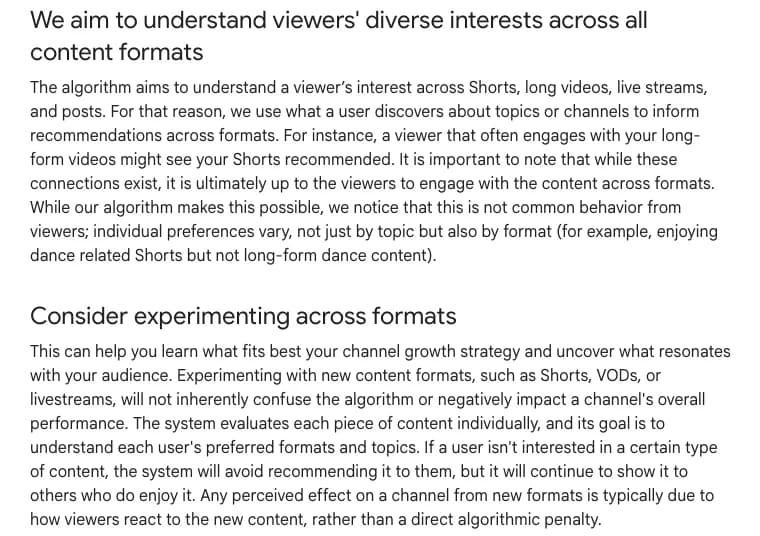
YouTube has answered this question several times, and the answers are more useful than most blog advice. Its help page on the recommendation system says experimenting with Shorts, long videos or live streams "will not inherently confuse the algorithm" or hurt a channel. Each video is evaluated on its own, and any drop you feel after starting a new format is usually down to how viewers react to that content, not a penalty.
The same page adds an important catch. The system can recommend your Shorts to people who watch your long videos and the other way round, but YouTube says viewers moving between formats is "not common behavior". People can love Shorts on a topic and have no interest in long videos on that same topic. So the link between your two formats is something you build, not something the algorithm does for you.
On the channel question, a Creator Insider Q&A summarised by Social Media Today said creators succeed with both approaches, and that a separate Shorts channel only makes sense if the Shorts are significantly different from your main uploads. The same answer said cutting Shorts from your own published videos is a good way to repurpose, as long as each Short makes sense on its own.
YouTube's position in one line: mixing formats does not penalise you, but viewers rarely cross between them unless you give them a reason and a link.
The problems creators report when they add Shorts
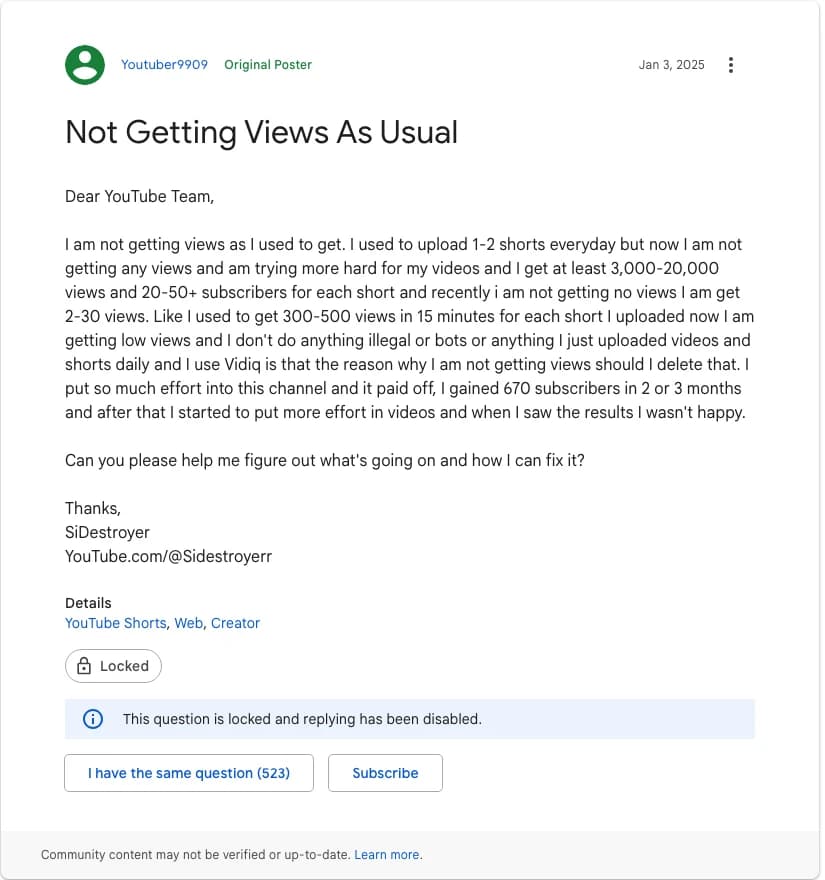
Read enough creator threads and the same complaints come up again and again. These are the ones we saw most often in public forums, YouTube Help Community threads and creator-news coverage.
- Shorts get views, long videos don't move. Creators say a Short picks up far more views than their normal uploads, but the long videos underneath stay flat. This matches YouTube's note that few viewers cross formats.
- New subscribers who never watch long videos. Subscribers gained from a viral Short often skip long uploads, so the subscriber count rises while long-video views per upload fall.
- Shorts views that suddenly stop. A YouTube Help Community thread titled "Not getting views as usual" shows a creator whose daily Shorts went from steady views to almost none, with hundreds of other creators marking that they had the same question. Shorts reach swings hard because the feed favours what is new.
- Fear that Shorts are "killing" long-form. Tubefilter reported on YouTube staff discussing whether Shorts were eating into long-form viewing across the platform. That is a platform-wide trend, not proof that your Shorts hurt your long videos.
- Burnout from making two kinds of content. Filming, editing and packaging two formats every week doubles the work unless both come from the same recording.
How to diagnose what is really going on in your analytics
Before you change how you balance long-form vs short-form on YouTube, find out which problem you actually have. Most "Shorts are hurting my channel" worries turn out to be one of four different issues, and each needs a different fix. Work through these checks in YouTube Studio:
- Content tab, filtered to Videos vs Shorts: compare long-video views per upload for the months before and after you started Shorts. If they are steady, Shorts are not hurting you; they are simply a separate stream.
- Audience tab, Unique viewers: YouTube's help page recommends this over subscriber count to see your real active audience size. If unique viewers of long videos are flat while subscribers grow, your new subscribers are Shorts-only viewers.
- Traffic source on each long video: look for traffic from Shorts. If it is close to nothing, your Shorts are not pointing anyone to your long videos, which is a linking problem, not an algorithm problem.
- Retention curve on long videos: if long videos lose most viewers early, the issue is the first minute, not Shorts. Our guide on how to edit YouTube videos for retention walks through fixing that curve.
- Viewed vs swiped away on Shorts: a weak number here means the first second of the Short is not stopping the scroll. Read how to write hooks for short videos before changing your topic.
If the topic of your Shorts and your long videos is different, the analytics will usually show it as Shorts viewers who never touch long uploads. That is the strongest sign a split might help.
What CreatorSuite sends back
A real upload next to the finished edit. Switch between short form and long form.
One channel or two for long-form and short-form?
The simplest rule comes from YouTube's own advice: same audience, same channel. If the person who enjoys your Shorts would also enjoy your long videos, keep both together. One channel means one subscriber base, one set of analytics, one community and one place for sponsors to look.
A second channel starts to make sense in a few cases: your Shorts cover a different topic from your long videos, they are in a different language, they target a clearly different age group, or your analytics show Shorts viewers almost never watch your long uploads after months of linking. Even then, a second channel doubles the work of packaging, community and uploads, so start it only when the main channel runs smoothly.
Use this quick test. Write down who your ideal long-form viewer is in one sentence. Then write who your typical Shorts viewer is. If the two sentences describe the same person, stay on one channel. If they describe two different people, consider two.
| Situation | Recommendation |
|---|---|
| Shorts are clips from your long videos | One channel |
| Shorts are behind-the-scenes or tips on the same topic | One channel |
| Shorts are a different topic or style (for example, memes vs tutorials) | Consider a second channel |
| Shorts are in a different language | Consider a second channel |
| Shorts viewers never watch long uploads after months of linking | Test a second channel |
A weekly workflow to run long-form and short-form from one recording
The way to run both formats without doubling your workload is to make every Short a by-product of the long video. Here is a weekly workflow that works for a solo creator filming one long video a week.
- Monday, plan: outline the long video and mark three to five moments that could stand alone as Shorts, such as a strong opinion, a quick tip, a surprising result or a funny reaction.
- Tuesday, film: record the long video in landscape, but keep your face and any key object near the centre of the frame so vertical crops still work. Say the Short-worthy lines cleanly, as complete thoughts.
- Wednesday, edit the long video: cut for pace, add b-roll and design the thumbnail. Our guides on how to add b-roll to YouTube videos and YouTube thumbnail design tips cover both steps.
- Thursday, cut the Shorts: reframe each moment to vertical, open on the most interesting line, add captions and trim anything that needs context from the full video.
- Friday, publish the long video. Then release one Short per day over the following days, each linked to the full video with the related video setting.
- Weekend, review: check long-video retention and Shorts viewed vs swiped away, and note which moments worked so next week's outline has more of them.
How editing changes between long and short videos
A clip cut straight out of a long video rarely works as a Short. The long video can spend a few seconds setting up; the Short cannot. Here is what changes in the edit.
If your long videos are mostly you talking to camera, our talking head video editing tips apply to both formats, and they make the vertical crops easier.
| Edit step | Long-form | Short-form |
|---|---|---|
| Opening | Promise the payoff in the first 30 seconds, then deliver | Open on the payoff or the strongest line; no intro |
| Pacing | Vary it; give important points room | Cut every pause and filler word |
| Framing | 16:9 landscape | 9:16 vertical, face or subject centred |
| Captions | Optional, closed captions help | Burned-in captions; many people watch muted |
| Visuals | B-roll, screen recordings, graphics to hold attention | Zooms, quick cuts, text emphasis on key words |
| Ending | End screen to the next video | Loop back to the start or point to the full video |
Connecting your Shorts to your long videos
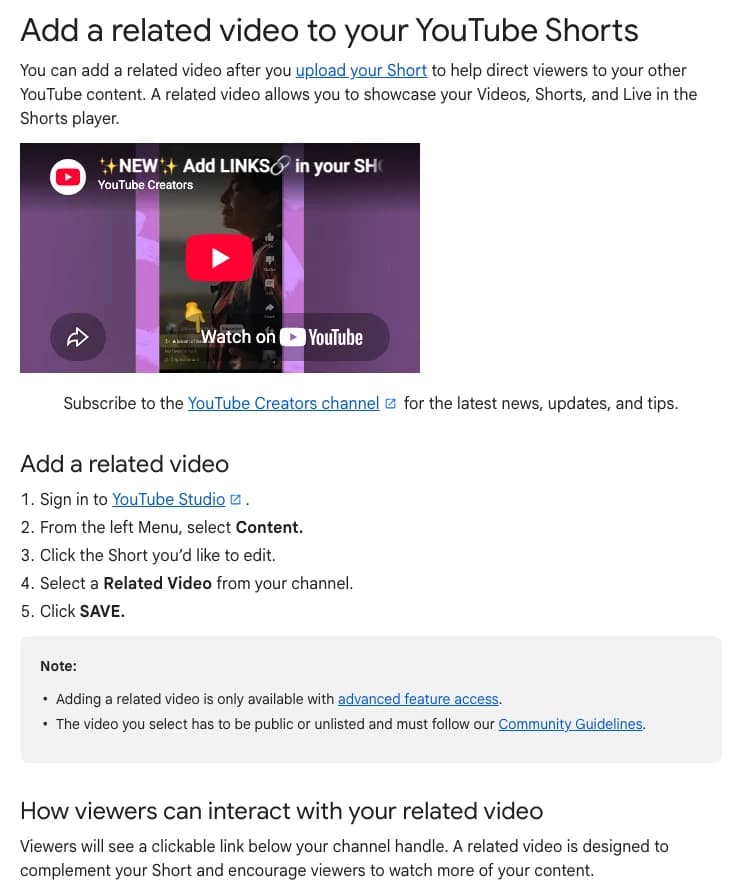
Because viewers rarely cross formats on their own, give every Short a clear path to a long video. YouTube's related video feature puts a clickable link under your channel handle in the Shorts player. According to YouTube's help page, you add it in YouTube Studio: open Content, click the Short, choose a related video from your channel and save. The linked video must be public or unlisted, and the feature needs advanced feature access.
Make the link honest. If the Short is a tip, link the long video where that tip is explained in depth, and make sure the opening of that long video picks up the same idea so the viewer feels they are in the right place. A pinned comment and a spoken line such as "the full breakdown is linked" help too. The short official video below from YouTube Creators shows the feature.
Who should edit both formats: DIY, apps, freelancers or a service
Editing is where running long-form vs short-form on YouTube gets expensive in time. There are four realistic options, and each fits a different creator.
CreatorSuite is one example of the last option. It is an AI video editor service: you upload raw footage, pick a style, and get back a finished long video or vertical clips with cuts, hook, captions, b-roll, sound and colour done. Long videos can be up to 35 minutes, and the same upload can be turned into clips through long video to shorts editing. If you want hands-on control of every frame, editing yourself or with a freelancer fits better. If you already like a clipping tool, compare it in our Opus Clip alternative review.
| Option | Good for | Trade-offs |
|---|---|---|
| Edit everything yourself | Creators with time who enjoy editing | Full control, but two formats a week can take most of your free time |
| Auto-clipping apps | Pulling many clips quickly from long videos | Fast, but you still edit the long video yourself and check every clip; see [Opus Clip vs CapCut](/compare/opus-clip-vs-capcut) |
| Freelance editor | Creators who want one person to learn their style | Personal, but finding, briefing and managing someone takes effort; read [how to outsource YouTube video editing](/blog/how-to-outsource-youtube-video-editing) |
| Done-for-you editing service | Creators who want finished long videos and clips back without editing | Less hands-on control of each cut; you guide it with style choices and revisions |
Worked example: a month of long-form and short-form for a solo creator
Say you publish one long video a week and want a steady flow of Shorts from each one. Here is how that month looks, and how the editing load works out if you use an AI video editing service instead of editing yourself.
Plan four long recordings. From each, mark three moments for Shorts using the Monday step above. That gives four long videos and twelve Shorts in the month, all from four filming sessions.
On CreatorSuite, credits are spent per item: a long video uses 300 credits and a clip uses 25. Four long videos use 1,200 credits and twelve clips use 300, which is 1,500 credits in total. That is exactly what the Plus plan includes at $39/month, with unlimited re-edits and five thumbnails, which covers most of the month's long videos. The Basic plan at $9/month (300 credits) covers one long video a month, which suits a creator testing the workflow first.
Whatever you use, the work that stays with you is the same: pick the topics, film well, choose which moments become Shorts and read the analytics each week. If you are deciding whether to keep doing the edit yourself, our breakdown of DIY editing vs outsourcing: the real cost helps you price your own hours.
| Month plan | Count | Credits each | Credits used |
|---|---|---|---|
| Long videos | 4 | 300 | 1,200 |
| Shorts cut from them | 12 | 25 | 300 |
Making long-form vs short-form on YouTube work long term
The creators who handle both formats well keep three habits. They decide what each format is for, and judge it by matching numbers. They make Shorts from what they already film instead of inventing a second content calendar. And they link every Short to a long video that delivers more on the same idea.
Start on one channel, give it three months of linked Shorts, then check your Unique viewers and traffic from Shorts. If the two audiences still don't overlap, a second channel is a reasonable test. If editing is what's stopping you, try CreatorSuite's 3-day free trial: one short video, three clips or one long video up to 10 minutes, so you can see whether a done-for-you AI video editor fits your weekly workflow before paying for a month.
What we read for this guide
- Good to know about recommendations for YouTube's recommendation system (YouTube Help) · support.google.comSays new formats don't penalise a channel, but viewers rarely move between Shorts and long videos; recommends Unique viewers.
- Add a related video to your YouTube Shorts (YouTube Help) · support.google.comSteps for linking a Short to a long video and the requirements.
- YouTube Answers Common Creator Queries About Shorts (Social Media Today) · socialmediatoday.comCreator Insider answers on separate Shorts channels and repurposing long videos into Shorts.
- Not getting views as usual (YouTube Help Community) · support.google.comA Shorts creator whose views collapsed, with many others reporting the same.
- YouTube Shorts cannibalizing long-form views (Tubefilter) · tubefilter.comReports YouTube staff concerns about Shorts and long-form viewing trends.
- Why some YouTube Shorts don't attract long-form viewers (vidIQ) · vidiq.comExplains YouTube separating Shorts and long-form watch history.
- YouTube's Creator Liaison answers creator questions in Shorts series (Tubefilter) · tubefilter.comRene Ritchie's advice to follow the audience and use the Audience tab.
How this page was made: written by Badar Munir and the CreatorSuite team with AI assistance, reviewed by James, from facts we checked ourselves and the sources listed above. Spotted something out of date? Email us and we’ll fix it.
long-form vs short-form on YouTube: FAQs
Do Shorts hurt long-form views on the same channel?
YouTube's help page says experimenting with Shorts will not inherently hurt a channel and each video is judged on its own. What creators often see is that Shorts viewers don't watch long videos, so long-video views per subscriber fall. Check Unique viewers and traffic from Shorts in YouTube Studio to see which is happening.
Should I post Shorts on my main channel or a separate channel?
Should I post Shorts on my main channel is the most common version of this question. If the same person would enjoy both your Shorts and your long videos, keep them on one channel. A separate channel for YouTube Shorts makes sense when the Shorts are a different topic, language or audience.
How many Shorts should I make from one long video?
There is no fixed number. Mark every moment that makes sense on its own without the rest of the video, such as a strong opinion, a tip or a reaction. Three to five per long video is a practical range for most talking videos; a podcast episode often has more.
How do I link a Short to my long video?
In YouTube Studio, open Content, click the Short, choose a related video from your channel and save. The linked video must be public or unlisted, and you need advanced feature access. Viewers see the link under your channel handle in the Shorts player.
What is the best YouTube Shorts and long videos strategy for a small channel?
Film one long video a week, cut Shorts from it, link each Short to the full video and review both formats on their own metrics every week. Keep everything on one channel until your analytics show the two audiences don't overlap.
Can an AI video editor handle both long videos and Shorts?
Yes. CreatorSuite edits long videos up to 35 minutes and turns uploads into vertical clips, with cuts, hook, captions, b-roll, sound and colour done. It starts at $9/month with a 3-day free trial.
Rather not edit it yourself?
Upload raw footage, get a finished edit back. 3-day free trial: 1 short video, 3 clips or 1 long video up to 10 min.
2,700+ creators in the last 7 days
Start 3-day free trial