
In shortThe most reliable short video ideas for small businesses come from work you already do: making or packing the product, answering customer questions, showing a before and after, and introducing the people behind the counter. Film them vertically, open on the result or the question, add captions, and post on a steady schedule rather than chasing a viral hit.
- Mine ideas from your own week: your process, customer questions, results and people.
- Make one point per video and show it in the first few seconds.
- Film vertically, caption everything and keep text out of the bottom of the frame.
- Batch-film once and edit into a month of posts; consistency beats any single idea.
- If views stall, check the hook, topic and posting rhythm before blaming the idea.
Why small businesses run out of short video ideas
If you have searched for short video ideas for small businesses, you have probably posted a few videos, watched them stall, and hit the blank-page moment: what do I film next? That moment is the most common reason owners stop posting, and it is rarely about creativity. It is about having no system for spotting ideas in an ordinary working day.
The guides we read for this post list the same pain points. Social Media Examiner calls production overwhelming because filming, speaking on camera, editing, captions and audio are separate skills, and it names idea generation as its own problem because each video needs a clear purpose. Plann That tells small shops to stop chasing a viral hit, post steadily, and use their own comments as a topic list.
There are a few real causes behind the empty idea list:
- You think a video has to be a production. Most formats that work for shops, cafes and service businesses are 10 to 30 seconds of something you already do.
- You only film when something is new. Launches are rare; processes, questions and results happen every day.
- You post only sales content. Adobe's small-business guide suggests keeping promotional posts to a small minority, roughly one in five, so the rest can teach, entertain or show the work.
- You have no capture habit. Ideas show up while you work, then disappear before you sit down to plan.
Start a running note on your phone today and add every question a customer asks you. That list alone is a month of videos.
The idea bank: 20 short video ideas for small businesses
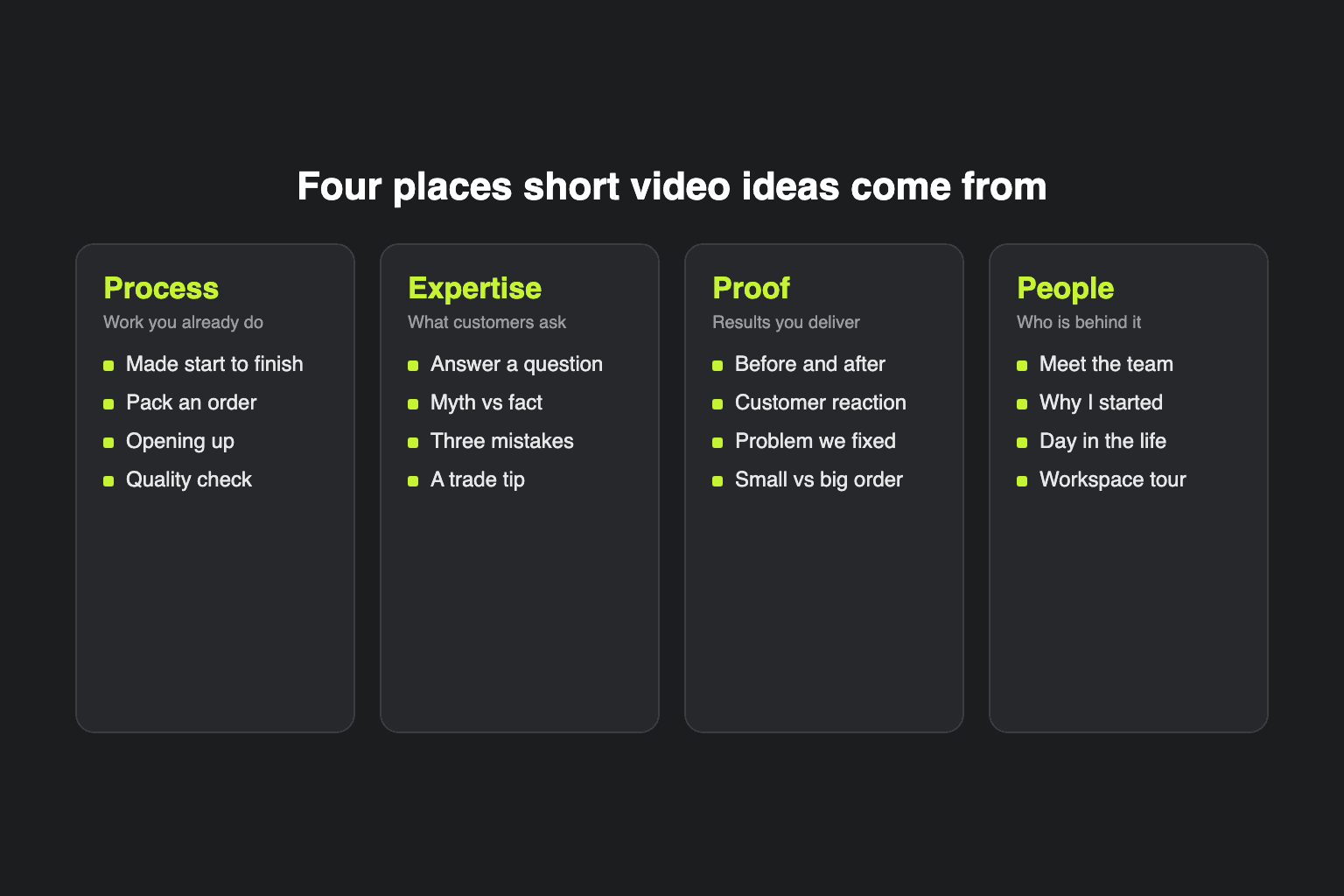
Each idea has a filming note and an edit note. Lengths are starting points; see our guide to the best length for Reels, Shorts and TikTok, then let your own watch-time numbers decide. The ideas fall into four groups that recur across the guides we read: process, expertise, proof and people.
Start with two from each group. That gives you eight videos that teach, show the work and build trust before you ask anyone to buy. Every one of these short video ideas for small businesses can be filmed on a phone in under 15 minutes.
| Idea | What to film | Edit note |
|---|---|---|
| 1. Made from start to finish | One product being made, in 6 to 10 short clips | Open on the finished item, then rewind to the start; cut every clip to under 2 seconds |
| 2. Pack an order with me | Hands, box, tissue, label, sealing tape | Keep the natural sound (tape, paper); no music needed; caption the product name |
| 3. Opening up in 20 seconds | Lights, door, coffee machine, first customer at the counter | Cut on the beat of one track; one clip per action |
| 4. How we check quality | The check itself and a reject pile | Voiceover explaining what you look for; caption key words |
| 5. Answer a customer question | You talking to camera, chest-up | Show the question as on-screen text in the first frame; cut pauses and filler words |
| 6. Myth vs fact | Two short statements to camera | Split into two beats with a hard cut; red and green text are optional |
| 7. Three mistakes people make with X | Talking head plus quick demo clips | Number each mistake on screen; one clip of b-roll per point |
| 8. How to use it, the right way | Demo of the product in real use | Top-down or over-the-shoulder angle; captions for each step |
| 9. A tip from your trade | The tip in action | Lead with the result, then show how; save-worthy text at the end |
| 10. Before and after | Same angle, same light, before and after the job | Hold the after a beat longer; use a single swipe or hard cut |
| 11. Customer reaction or testimonial | Customer's own short clip, with permission | Add captions; trim to the strongest sentence; no fake or scripted reviews |
| 12. Problem we fixed this week | The problem, the fix, the result | Three beats; text label for each |
| 13. A day in the life | Clips from morning to close | One clip per hour; time stamp text optional; music bed |
| 14. Meet the team | One person, one fact, one favourite product | Lower-third name text; keep each person to one video |
| 15. Why I started this business | Talking head, honest and short | Cut to old photos or early products as b-roll |
| 16. How it started vs how it's going | Old photo or clip, then today | Hard cut on a beat; no extra text needed |
| 17. Comment reply video | Screenshot of a real comment, then your answer | Use the platform's reply-to-comment feature where it exists |
| 18. Choose the next product or flavour | Two or three options on the counter | Ask in the first line; pin a comment with the options |
| 19. Faceless how-to | Hands and product only | Voiceover or text only; see our guide on how to make faceless Reels |
| 20. The honest offer | You, the product and the price | Keep the offer in the first line; one call to action at the end |
Short video ideas for small businesses by type of business
The same 30 formats look different depending on what you sell. Here is how they translate for the most common kinds of small business, so you can skip straight to the ones that fit. If you are camera-shy, almost every product idea works with hands only; our walkthrough on how to make faceless Reels covers voiceover and text-only versions.
Service businesses that sell time and know-how rather than a physical product get the most from the expertise group: answer a question, bust a myth, explain a term. Our notes for consultants show how these formats look for advisers.
Most Reels ideas for small business accounts also work as TikToks and YouTube Shorts ideas for small business channels, so treat this list as small business video content ideas for every vertical platform.
- Cafes, bakeries and restaurants: made from start to finish, opening up, a day in the life, choose the next flavour.
- Product shops and makers: pack an order, how to use it the right way, small vs big order.
- Trades and home services: before and after, problem we fixed this week, fix a common problem fast.
- Salons, studios and clinics: before and after (with client permission), myth vs fact, meet the team.
- Coaches, consultants and advisers: three mistakes people make, answer a customer question, why I started, comment reply video.
How to choose which ideas to film first
A long list does not help if you film the wrong three. Use a simple filter before you pick up the phone. Social Media Examiner suggests building around three pillars: expertise (teach what you know), your story (why you do this and who you are) and the business itself (offers, products and proof). A healthy week has at least one of each.
Then ask three questions of each idea: Can I film it in under 15 minutes? Will a customer learn or see something new? Can I state the point in one sentence? If not, move it down the list.
Your comments, DMs and counter questions are the richest idea source you have, because they are already phrased in your customers' words.
| Pillar | Goal | Ideas from the bank |
|---|---|---|
| Expertise | Show you know the craft | 5, 6, 7, 8, 9, 19 |
| Story and people | Make the business feel human | 3, 13, 14, 15, 16 |
| Proof | Show results before you sell | 10, 11, 12 |
| Business and offers | Turn interest into sales | 17, 18, 20 |
What CreatorSuite sends back
A real upload next to the finished edit. Switch between short form and long form.
Worked example: one filming session, four weeks of short videos
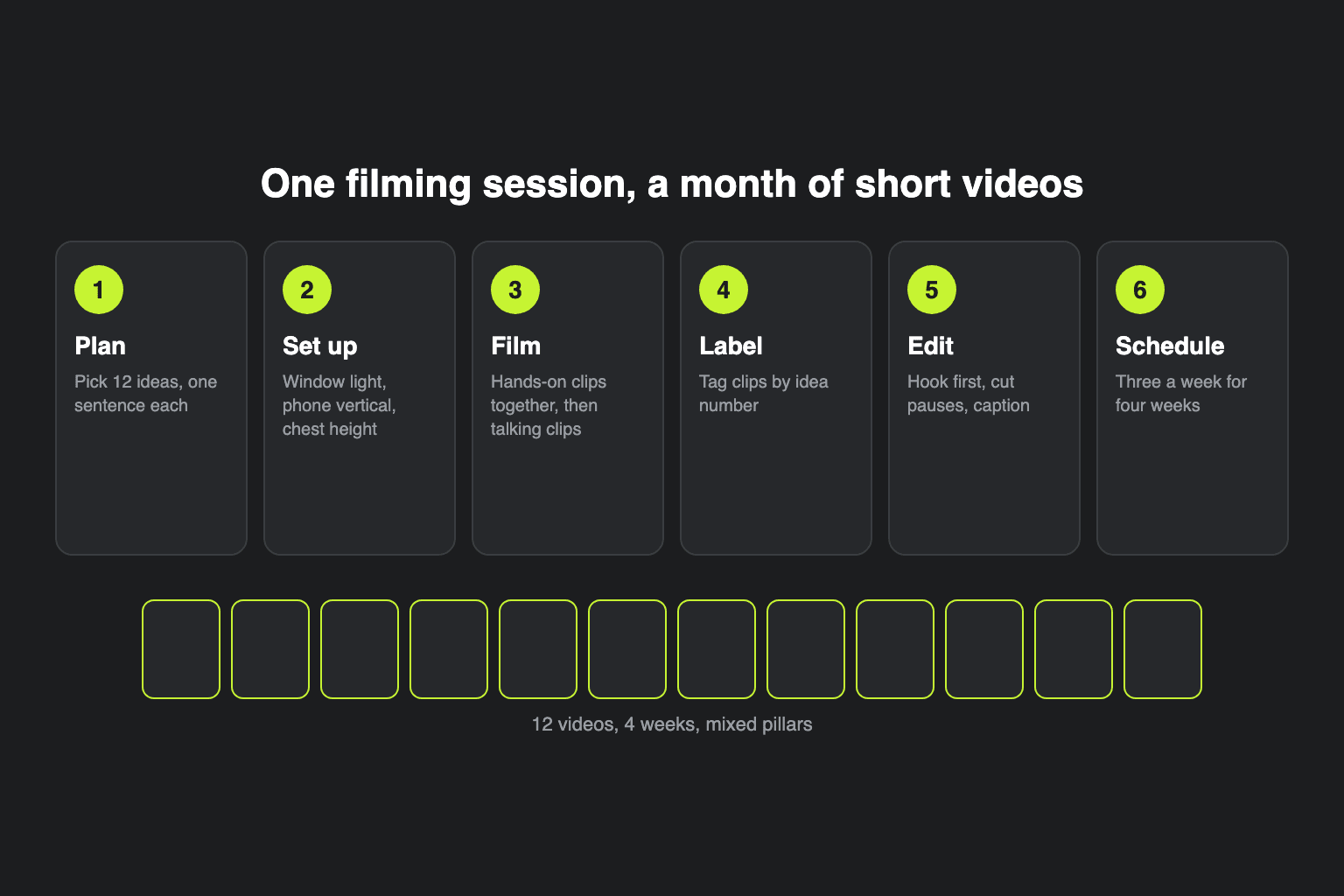
Here is how a small bakery could turn one 90-minute session into a month of posts. Swap the products for your own; the steps stay the same.
Step 1, plan the list (10 minutes). Pick 12 ideas from the bank: three expertise, three story, three proof, three offers. Write one sentence for each: the point the viewer should walk away with.
Step 2, set up once (10 minutes). Clean the counter, face a window for light, prop the phone vertically at chest height. TikTok's own creative guidance asks for vertical 9:16 video at 720p or higher with sound, which any recent phone handles.
Step 3, film in clusters (60 minutes). Film all the hands-on clips together (making, packing, before and after), then all the talking-to-camera clips together. Record each talking clip two or three times and keep the strongest take. Grab extra b-roll of the shop as you go; our guide to b-roll for short videos lists the shots worth collecting.
Step 4, label as you go (10 minutes). Favourite or rename clips by idea number so editing does not start with a hunt through the camera roll.
Step 5, edit in a batch. Apply the edit notes from the idea bank: open on the result or the question, cut pauses, caption every word, keep text above the bottom of the frame. If you edit yourself, a phone app is enough. If you would rather not edit at all, a done-for-you service such as CreatorSuite, an AI video editor that takes raw phone footage and sends back finished, captioned videos, fits here; the Basic plan covers up to 3 short videos a month for $9, and the Plus plan up to 15 for $39.
Step 6, schedule. Spread the 12 videos across four weeks, three per week, mixing pillars so no week is all sales.
| Week | Monday | Wednesday | Friday |
|---|---|---|---|
| 1 | Answer a customer question | Made from start to finish | Why I started |
| 2 | Myth vs fact | Before and after | New arrival |
| 3 | Tip from your trade | Meet the team | Customer reaction |
| 4 | Three mistakes | Opening up in 20 seconds | The honest offer |
Edit notes that apply to every idea
Good short video ideas for small businesses still fail when the edit loses people early. These notes come from TikTok's creative guidance for advertisers, Meta's Reels guidance and Social Media Examiner's short-form strategy piece.
For platform-specific detail, see how to edit Instagram Reels that get views, our YouTube Shorts editing tips and the TikTok video editing guide.
- Open with the point. TikTok advises getting your main message across in the first three seconds. No logo intro, no 'hey guys', no pause before you speak.
- Make one point per video. One idea, one call to action. If you have three tips, that is three videos.
- Cut dead air and filler words. Social Media Examiner calls this pattern interruption: change the angle, the background or the shot so the frame never sits still for long.
- Caption everything. TikTok suggests text overlays at roughly 5 to 10 words per second; short phrases on screen are easier to read than full sentences.
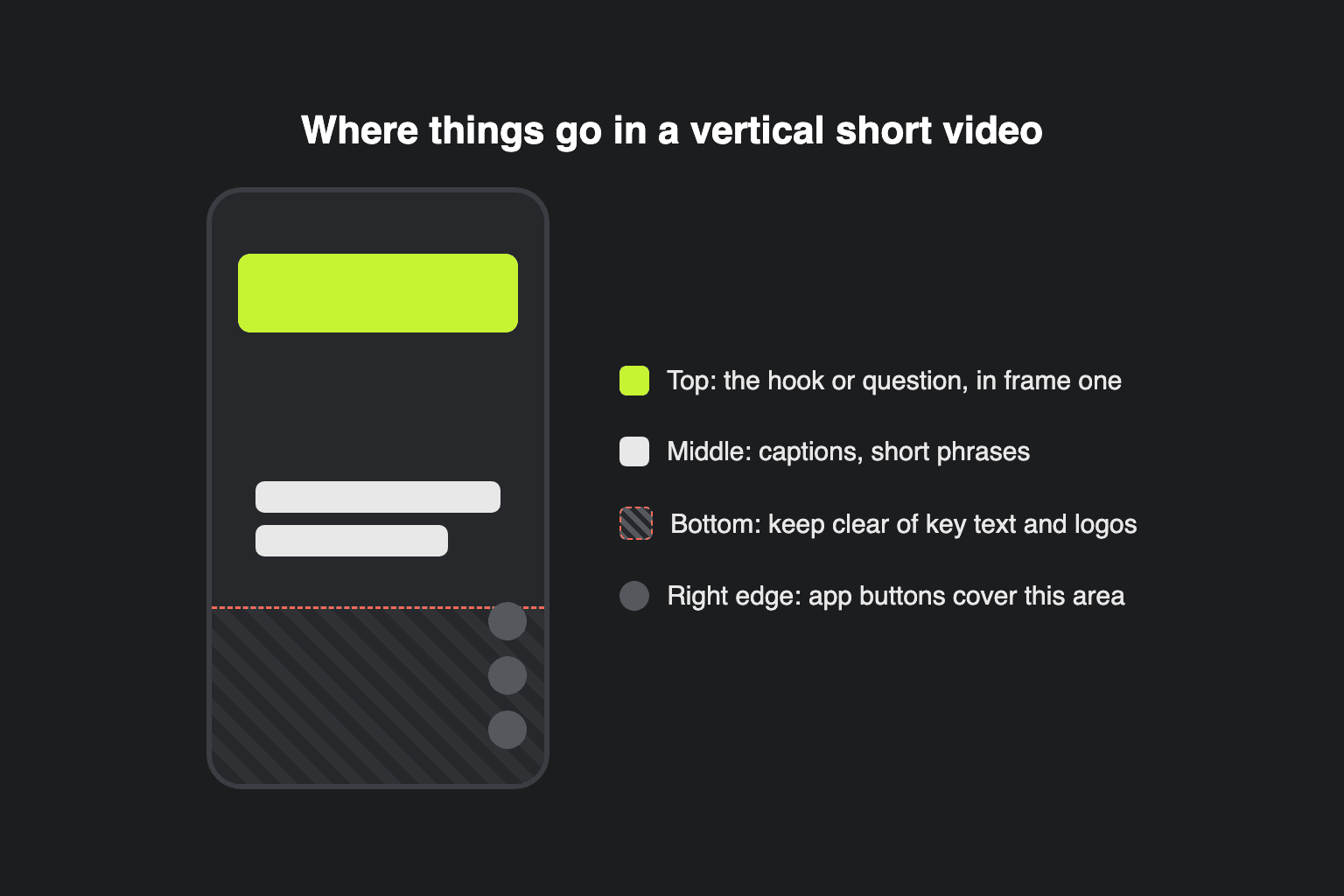
- Keep text out of the bottom strip. Meta's Reels guidance tells advertisers to keep the lower part of the frame free of key text and logos because the app's buttons and caption cover it.
- Always use sound. Music, voiceover or natural sound; both TikTok and Meta list audio as a basic.
When good ideas still get no views
Sometimes the idea is fine and the video still stalls. Before you drop a format from your list of short video ideas for small businesses, work through the likely causes in order. We go deeper on each in why your Reels get no views.
| Symptom | Likely cause | What to try |
|---|---|---|
| People swipe away in the first seconds | Weak hook or slow start | Re-cut the same footage so the result or question is in frame one |
| Watched halfway, then dropped | Too long, or the point arrives late | Trim to the single point; remove the setup |
| Views but no follows or messages | Topic is broad, not for your customers | Answer a specific question your buyers ask |
| Good weeks then silence | Inconsistent posting | Batch-film and schedule a fixed rhythm you can keep |
| Every video sells | Too much promotion | Shift most posts to tips, process and proof |
| Text cut off by buttons | Captions in the bottom strip | Move text up into the middle of the frame |
Ways to get the editing done: DIY, apps, freelancers or done-for-you
Filming is half the job; editing is where most owners stall. There are four realistic routes, and the right one depends on your time and how many videos you want each month.
Editing yourself in a free phone app costs only time, and suits owners who post once or twice a week and enjoy it. Our Descript vs CapCut comparison covers desktop trade-offs. Freelancers suit businesses that want one person to brief; see our notes on Upwork video editors before hiring.
A done-for-you service fits when you have footage but no time. CreatorSuite is an AI video editing service: upload raw phone footage, pick a style, and its AI handles cuts, hook, captions, b-roll, sound and colour, then sends back a ready-to-post video in 3 to 8 hours depending on plan. It edits footage you shoot; it does not film, generate videos from text or make AI avatars, so with no footage at all, a template app is the better start.
| Route | Cost | Time from you | Suits |
|---|---|---|---|
| DIY in a phone app | Free or low | Highest: every cut and caption | One or two posts a week, owners who like editing |
| Desktop editing tools | Varies by tool | High, plus a learning curve | Owners willing to learn a proper editor |
| Freelance editor | Agreed per video or project | Briefing and feedback rounds | Businesses that want one person to brief |
| CreatorSuite (done-for-you AI editing) | From $9/month; Plus $39/month for up to 15 short videos | Film and upload only | Owners with footage and no editing time |
Turn short video ideas for small businesses into a posting rhythm
Ideas only pay off if you keep posting long enough to learn what your audience responds to. Adobe's guide suggests high starting frequencies; for most owners, a rhythm you can keep matters more. Three videos a week from one monthly filming session is a sustainable start.
Post the same video to Reels, TikTok and YouTube Shorts; all three are vertical, short and sound-on, so one edit usually works everywhere. Check analytics once a month, film more of what held attention or drew messages, and drop the rest.
If you are weighing a done-for-you plan, count it in videos: on credit-based plans a short video uses 100 credits, so 300 credits cover three short videos and 1,500 cover fifteen. Compare that with the hours you spend editing each week now.
Where to start this week
Pick three ideas from the bank: one customer question, one process clip and one before and after. Film them in a single session, edit them with the notes above, and post them across the week. Next week, add the next three.
If editing is what keeps you from posting, try CreatorSuite's 3-day free trial: 1 short video, 3 clips or 1 long video up to 10 minutes (card required), with a full refund before your second edit. Over 2,700 creators used the AI video editor in the last 7 days. If you enjoy editing or post only occasionally, a free phone app is simpler, and the idea bank works either way.
What we read for this guide
- Short-form video strategy for business with Reels and TikTok (Social Media Examiner) · socialmediaexaminer.comCommon business struggles (ideas, weak hooks, static footage) and the three-pillar content approach.
- Short video ideas for small businesses (Plann That) · plannthat.comBehind-the-scenes, interactive and teaching formats; consistency over virality; mining comments for ideas.
- Small business social media guide (Adobe Express) · adobe.comProduct-in-action, team and customer story ideas; keep promotional posts a small share.
- Creative best practices for performance ads (TikTok Ads Help) · ads.tiktok.comVertical 9:16, 720p minimum, sound on, early proposition and caption pacing.
- Instagram Reels for business (Meta for Business) · facebook.comShoot vertically, use audio, keep the bottom of the frame clear of key text and logos.
- 5 Reels ideas for business (Later) · later.comTips from questions, behind-the-scenes, day-in-the-life and introduce-yourself formats.
How this page was made: written by Badar Munir and the CreatorSuite team with AI assistance, reviewed by James, from facts we checked ourselves and the sources listed above. Spotted something out of date? Email us and we’ll fix it.
short video ideas for small businesses: FAQs
What are easy short video ideas for small businesses with no time?
Film what you already do: packing an order, opening up, a before and after, or one customer question. Batch them in one monthly session and you have a steady supply.
What to post on Reels for my business if I don't want to show my face?
Use hands-only and voiceover formats: made from start to finish, pack an order, how to use it the right way, and fix a common problem fast. Add captions so the video works with the sound off.
Are TikTok ideas for small businesses different from Reels ideas?
Mostly no. TikTok, Reels and Shorts all use vertical, short, sound-on video, so the same idea and often the same edit works on all three. Adjust captions and hashtags per app.
How many short videos should a small business post per week?
Pick a number you can sustain. Three a week from one monthly filming session is a realistic start. Months of steady posting teach you more than a burst followed by silence.
Can I hand off editing for my short videos?
Yes. You can hire a freelancer, or use a done-for-you AI editing service that turns raw phone footage into finished, captioned videos, from $9/month with a 3-day free trial. If you enjoy editing, a free phone app is enough.
Rather not edit it yourself?
Upload raw footage, get a finished edit back. 3-day free trial: 1 short video, 3 clips or 1 long video up to 10 min.
2,700+ creators in the last 7 days
Start 3-day free trial