

In shortYouTube builds chapters from timestamps in your video description when the first one is 00:00, there are at least three in ascending order, and each chapter runs at least 10 seconds. Chapters also fail on channels with active strikes and on content that may be inappropriate for some viewers. The easiest way to get good chapters is to edit the video in clear sections and mark each one as you cut.
- First timestamp must be 00:00, with at least three timestamps in ascending order and every chapter at least 10 seconds long.
- Manual chapters in the description override YouTube automatic chapters.
- Active strikes or content flagged as inappropriate for some viewers turn chapters off, even with a perfect list.
- Plan sections in the edit and drop a marker at each one; the markers become your timestamps.
- Google can show your chapters as key moments in search, and it prefers the ones you set.
What YouTube chapters and timestamps actually are
YouTube chapters and timestamps are two sides of the same feature. A timestamp is a time code such as 04:12 written in your description or a comment. YouTube turns it into a link that jumps to that moment. Chapters are what YouTube builds when your description holds a valid list of timestamps: the progress bar splits into segments, each segment shows its title when a viewer hovers or scrubs, and a chapter panel lists them all.
So a timestamp on its own is just a shortcut. A list of timestamps that follows YouTube's rules becomes chapters. That difference matters when you troubleshoot, because a single timestamp in a comment will always work as a link, while a chapter list can fail as a whole if one rule is broken.
Chapters help most on long videos: tutorials, reviews, podcasts, course lessons and anything over about ten minutes where viewers want a specific part. Google's own help page describes them as adding context to each part of the video and making it easy to rewatch sections. If you are still deciding what length to make, see long-form vs short-form on YouTube; chapters belong to long-form.
YouTube's rules for chapters (the full list)
YouTube's help page on video chapters sets out the rules. Most failures come from breaking one of them, so check this table first. The help page also says not every video is eligible for automatic chapters, and eligible videos don't always get them.
| Rule | What it means in practice | Common mistake |
|---|---|---|
| First timestamp is 00:00 | The list must start at the very start of the video | Starting at 00:05 because the intro is skipped |
| At least three timestamps | Two sections are not enough for chapters | Listing only an intro and a main part |
| Ascending order | Each time code is later than the one above it | Pasting a section out of order after a re-edit |
| Each chapter at least 10 seconds | No two timestamps closer than 10 seconds apart | A quick 'subscribe' marker 5 seconds before the next section |
| No active strikes on the channel | A strike switches chapters off for the channel | Assuming the list is broken when the strike is the cause |
| Content not flagged as inappropriate for some viewers | Restricted content does not get chapters | Editing the list repeatedly on a restricted video |
| Manual chapters override automatic ones | Your list replaces YouTube automatic chapters | Expecting both to appear |
YouTube automatic chapters are switched on by default for new uploads. You can turn them off per video under Show more, or for all future uploads in Settings > Upload defaults > Advanced settings.
How to add timestamps on YouTube, step by step
Here is how to add chapters to YouTube video uploads in YouTube Studio. The same steps work for a new upload or an old video.
- Open YouTube Studio, go to Content and click the video's title to open its details.
- In the Description box, type your list with one timestamp per line, the time first and the title after it, for example: 00:00 Intro.
- Start with 00:00, keep times in ascending order, and leave at least 10 seconds between any two timestamps.
- Use minutes:seconds for videos under an hour and hours:minutes:seconds (1:02:30) past the hour mark.
- Click Save, then open the video on its public page and check the progress bar for segments.
- If you only want a single jump link (for example in a pinned comment), type the time code in the comment; YouTube links it on its own.
Why YouTube chapters and timestamps don't show up
"YouTube chapters not showing" is the most common complaint around this feature. Troubleshooting guides and creator reports point to the same handful of causes. Work down this list in order; the first items are the most frequent and the quickest to check.
Creator reports also show that platform-side problems happen. In mid-2022 PiunikaWeb collected reports from creators whose chapters stopped working on videos that met the known rules, and from viewers who could not see chapters at all on one of their accounts. YouTube did not post a cause, and one affected user later said it fixed itself. If your list is correct and nothing changes, wait before rewriting it.
- The list does not start at 00:00 (0:00 also works). This is the single most common error.
- Fewer than three timestamps, or a pair placed out of order after a re-edit.
- Two timestamps less than 10 seconds apart.
- Hidden formatting from copying the list out of a document or a chapter tool. Guides suggest pasting it into a plain text editor first, then into the description.
- Text or a link on the same line before the time code, or a time code written with a different separator (04.12 instead of 04:12).
- The chapter titles are in a different language from the video, which one troubleshooting guide lists as a cause.
- An active strike on the channel, or the video is restricted as inappropriate for some viewers.
- Processing delay. Followchain cites YouTube guidance of waiting up to 72 hours after adding chapters before treating it as a fault.
- A platform-side issue. After everything above checks out, use Send feedback in YouTube Studio.
What CreatorSuite sends back
A real upload next to the finished edit. Switch between short form and long form.
Editing for chapters: build the sections into the cut
Most advice about YouTube chapters and timestamps starts after the video is published. The better place to start is the edit. A video with clear sections gets clean chapters in minutes. A video that rambles from point to point gets chapters that land mid-sentence or titles that don't match what is on screen.
Plan the sections before you cut. Write a one-line outline: hook, the problem, three or four main points, a recap. Each line is a future chapter. Then, while editing, give each section a clear opening. A short title card, a change of camera angle, a b-roll sequence or a sound cue all tell the viewer a new part has started, and they give you an obvious place for the timestamp. Our guide on how to add b-roll to YouTube videos covers transitions that work well here.
Drop a marker at every section start. Premiere Pro, DaVinci Resolve, Final Cut Pro and CapCut all support timeline markers. When you export, read the marker times off the timeline and you have your list. Do this on the final cut, not a draft: every trim before a marker shifts every time after it.
Keep the first chapter short and strong. The 00:00 chapter is your hook and intro, and viewers can skip it with one tap if it drags. See YouTube intro editing: first 30 seconds for how to keep that opening tight. Pacing inside each section still decides whether people stay; how to edit YouTube videos for retention goes deeper on that.
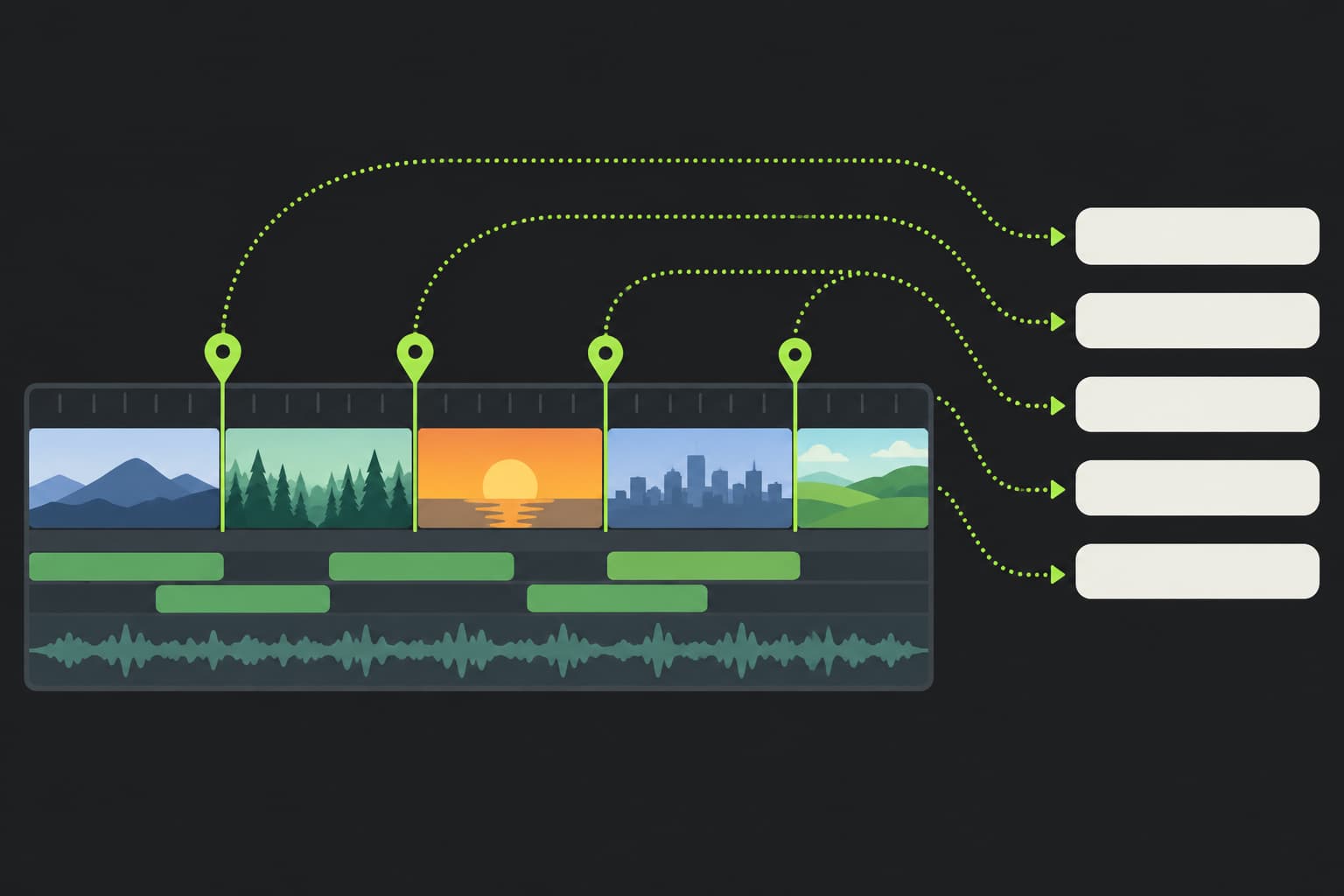
Worked example: chapters for an 18-minute tutorial
Say you filmed a tutorial on setting up a home office desk. The raw footage runs 31 minutes and the final cut is 18 minutes 40 seconds. Here is the process from outline to description.
Step 1, outline before cutting: hook, why most desk setups hurt, choosing a desk height, monitor position, chair setup, cable management, recap. That is seven sections.
Step 2, mark in the edit: after the final cut is locked, a marker goes on the first frame of each section. The 'why setups hurt' section opens on a b-roll shot, so the marker sits on that shot, not on the line before it.
Step 3, read the times and check the gaps: the markers read 00:00, 00:48, 03:15, 06:02, 09:40, 13:05 and 16:55. Every gap is far above 10 seconds, the list starts at 00:00 and it is in order, so all the rules in the table pass.
Step 4, write titles viewers would search for. Instead of 'Part 3', use 'Monitor height and distance'. Short, specific titles also read better when Google shows them as YouTube key moments in search results.
Step 5, paste and verify. The final description list looks like the bullets below. After saving, open the public page and scrub the bar: seven segments should appear.
- 00:00 Why your desk setup matters
- 00:48 Signs your setup is hurting you
- 03:15 Choosing the right desk height
- 06:02 Monitor height and distance
- 09:40 Setting up your chair
- 13:05 Cable management
- 16:55 Recap and checklist
If you trim the video later, for example cutting 20 seconds from the monitor section, every timestamp after 06:02 moves. Re-read the markers and update the whole list.
Chapter titles and YouTube key moments in Google
Your YouTube timestamps in description text do more than help viewers on YouTube. Google Search Central's video documentation says Google tries to find key moments in videos on its own, but it prioritises key moments you set, either with structured data or through the YouTube description. For YouTube videos, Google asks for each timestamp on its own line with its label, in chronological order.
That gives chapter titles a second job. A title like 'Cable management' can match what someone types into Google, while 'Section 6' matches nothing. Write titles as the phrase a viewer would use to look for that part. Keep them short so they fit under the progress bar on a phone screen.
One trade-off: YouTube automatic chapters cost you nothing, but their titles are chosen by YouTube and may not match your wording or your sections. If the video has a clear structure, writing your own list is worth the few minutes.
Do chapters hurt watch time and retention?
A common worry is that chapters let viewers skip ahead and leave early. vidIQ's post on chapters raises this exact concern and tells creators not to spend too much time worrying about it; its evidence is one of its own tutorials with several chapters, which is an anecdote rather than a study. We have no data that settles it either way.
What you can do is measure it on your own channel. Open the retention graph in YouTube Studio for a video with chapters. Spikes at chapter starts show where viewers jump to. A sharp drop right after the intro chapter usually means the intro is too long, not that chapters are the problem. Compare a few similar videos with and without chapters, at similar lengths and topics, before drawing a conclusion.
Skipping is also a signal. If most viewers jump past a section, that section is a candidate to cut shorter in the next video. Chapters show you where your edit drags.
Your options: DIY, chapter tools, freelancers or a done-for-you edit
Writing the chapter list itself takes minutes once the edit is clean. The time sink is the edit that makes clean sections possible. Here are the realistic ways to handle both, with honest trade-offs.
| Option | Best for | Trade-off |
|---|---|---|
| DIY markers in your editor | Creators who already edit their own videos | Adds no cost, but you need to plan sections and re-read markers after every trim |
| YouTube automatic chapters | Videos where you don't mind YouTube's titles | Free, but not every video is eligible and titles may not match your sections |
| Chapter or timestamp generator tools | Long talks and podcasts with little visual structure | Saves typing, but check every time and title; pasted text can carry hidden formatting |
| Freelance editor | Creators who want one person to handle a style end to end | Rates and turnaround vary by person; ask for a marker list or chapter list as part of the delivery |
| Done-for-you AI video editing service such as CreatorSuite | Creators who film a lot and want finished, sectioned edits back | You still write the chapter list from the finished video; not the right fit if you want to cut every frame yourself |
Where CreatorSuite fits
CreatorSuite is an AI video editor run as a done-for-you service. You upload raw footage (phone footage is fine), pick a style, and its AI edits it: cuts, hook, captions, b-roll, motion design, sound and colour. You get back a finished, ready-to-post video. Long videos can be up to 35 minutes. Because the edit has a hook and clear b-roll transitions between parts, the section starts are easy to spot when you write your chapter list.
Plans start at $9 a month (Basic: 300 credits, up to 1 long-form video, back in 6 to 8 hours, 2 revisions per edit). Plus is $39 a month for up to 5 long-form videos with unlimited re-edits. A long video uses 300 credits. There is a 3-day free trial covering 1 long video up to 10 minutes, 1 short video or 3 clips (card required), and a full refund before your second edit. More than 2,700 creators used it in the last 7 days. For YouTube-specific details see the AI video editor for YouTubers page.
When another option fits better: if you enjoy editing and want frame-level control, keep editing yourself and use markers. If your videos are recorded livestreams, start with how to clip livestreams. If you need a team that handles strategy and revisions on calls, compare costs in our video editing agency pricing guide. The service edits footage; it does not film for you or generate videos from text.
Checklist before you publish YouTube chapters and timestamps
Run this list on every long video. It takes two minutes and catches nearly every failure covered above. For the rest of the pre-publish routine, use our YouTube video editing checklist.
- The edit is locked; no more trims after reading marker times.
- First line is 00:00, at least three lines, all in ascending order.
- Every gap between timestamps is 10 seconds or more.
- One timestamp per line, time first, plain text with no links before it.
- Titles are short, specific and in the video's language.
- No active strikes on the channel and the video isn't restricted.
- After saving, the progress bar on the public page shows segments; if not, wait up to 72 hours before using Send feedback.
What we read for this guide
- Video Chapters - YouTube Help · support.google.comOfficial rules: 00:00 start, three or more timestamps, 10-second minimum, strikes and restricted content block chapters, automatic chapters settings.
- YouTube Chapters/Timestamps Not Working - Followchain · followchain.orgTroubleshooting list including language mismatch, a 72-hour wait and Send feedback in Studio.
- YouTube video timestamps or chapters not working for some creators - PiunikaWeb · piunikaweb.com2022 creator and viewer reports of chapters disappearing on valid lists, with no cause posted.
- Why You Should be Using YouTube Video Chapters - vidIQ · vidiq.comBenefits of chapters and the watch-time worry, answered with one anecdotal example.
- Video structured data and key moments - Google Search Central · developers.google.comGoogle prioritises key moments set in the YouTube description; one timestamp per line, in order.
How this page was made: written by Badar Munir and the CreatorSuite team with AI assistance, reviewed by James, from facts we checked ourselves and the sources listed above. Spotted something out of date? Email us and we’ll fix it.
YouTube chapters and timestamps: FAQs
How do I add chapters to a YouTube video?
In YouTube Studio, open the video's details and add a list of timestamps and titles to the description, one per line. Start with 00:00, use at least three timestamps in ascending order, keep each chapter at least 10 seconds long, and click Save.
Why are my YouTube chapters not showing?
The usual causes are a list that doesn't start at 00:00, fewer than three timestamps, timestamps out of order or less than 10 seconds apart, hidden formatting from pasted text, an active strike, or content restricted as inappropriate for some viewers. If everything checks out, allow time for processing, then use Send feedback in YouTube Studio.
What is the difference between timestamps and chapters?
A timestamp is a single clickable time code in a description or comment. Chapters are built from a valid list of timestamps in the description and split the progress bar into titled segments.
Can YouTube add chapters automatically?
Yes. YouTube automatic chapters are on by default for new uploads, but not every video is eligible and eligible videos don't always get them. Any chapters you write yourself override the automatic ones.
Do I need 1,000 subscribers to use chapters?
No. YouTube's help page lists no subscriber minimum. Chapters are blocked by active strikes and by content that may be inappropriate for some viewers, not by channel size.
Do chapters show up in Google search?
They can. Google Search Central says Google prioritises key moments that creators set through the YouTube description, so clear chapter titles can appear as YouTube key moments in search results.
Can an AI video editor add chapters for me?
A done-for-you AI video editing service edits the video itself, with a hook, cuts and b-roll between sections, and you write the chapter list from the finished file. The 3-day free trial covers one long video up to 10 minutes.
Rather not edit it yourself?
Upload raw footage, get a finished edit back. 3-day free trial: 1 short video, 3 clips or 1 long video up to 10 min.
2,700+ creators in the last 7 days
Start 3-day free trial