
In shortA video editing subscription is worth it when your steady monthly volume, multiplied by the per-video price you would otherwise pay, is higher than the subscription fee. Below that volume, paying per video or editing yourself is cheaper. Uneven months, revision loops and queue limits are what usually break the maths.
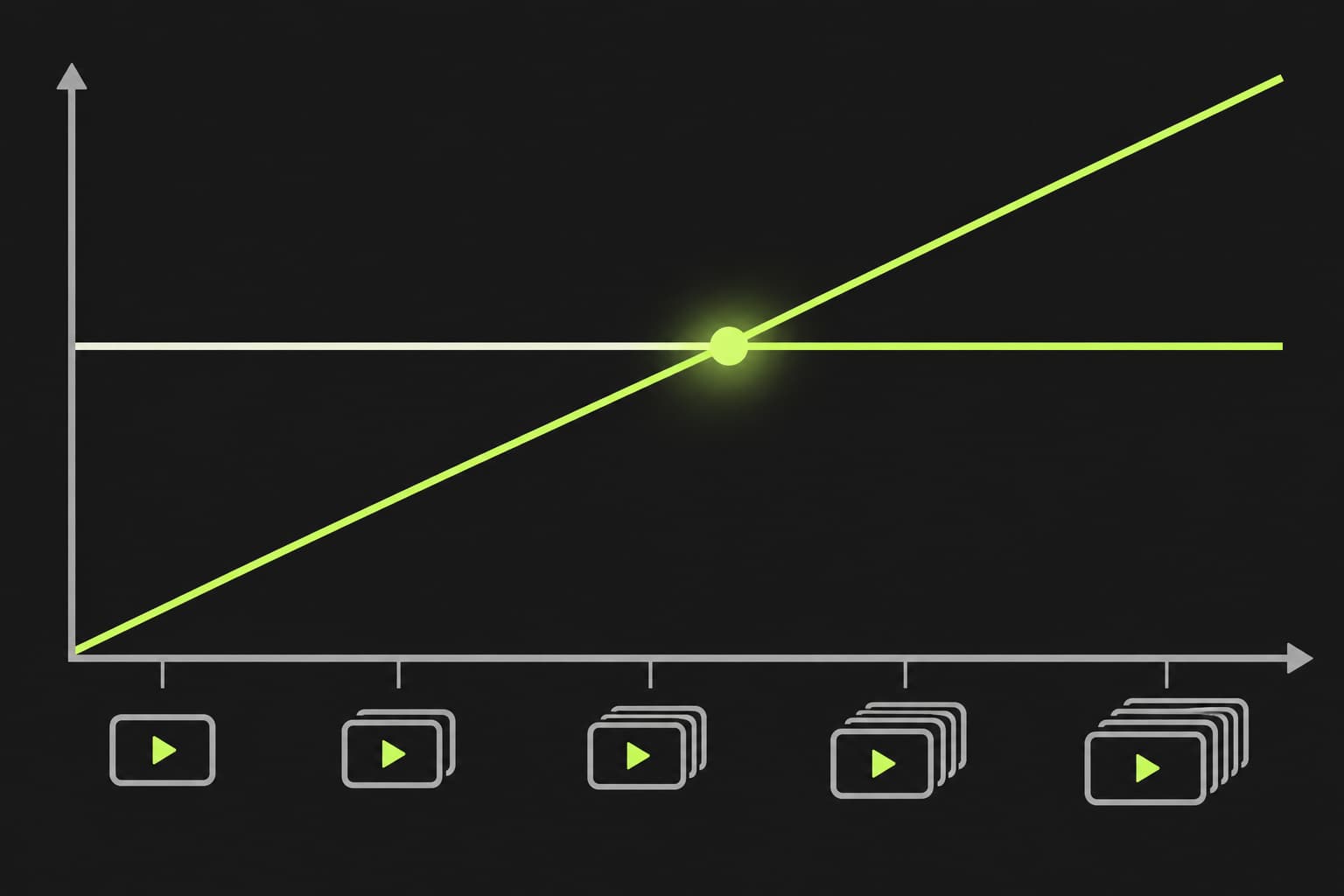
- Break-even = subscription price ÷ the price you would pay per video. Post more than that each month, every month, and the plan wins on cost.
- Count your slowest month, not your best one. Unused capacity is the most common reason a subscription stops being worth it.
- People-based "unlimited" plans are capped in practice by their queue: one video at a time, plus revision days.
- Credit-based plans let you mix shorts, long videos and clips, so you can match the plan to your real output.
- Time spent briefing and fixing revisions is a cost too. Put a number on your own hour before you compare.
Is a video editing subscription worth it? The short answer
Is a video editing subscription worth it? It depends on one thing more than any other: how many videos you finish every month, including the slow months. A subscription turns a variable cost (pay per video) into a fixed one (pay per month). Fixed costs get cheaper per unit the more you use them, and more expensive per unit when you don't.
So the honest answer is a calculation, not an opinion. If you post one long video a month, a monthly plan will usually sit half-used and paying per video or editing yourself makes more sense. If you post several shorts a week, or cut a podcast into clips every week, the per-video cost of a plan drops quickly and a subscription is usually the better deal.
The rest of this page shows you how to run that calculation with your own quotes, what real creators say goes wrong, and how to pick a plan size that fits. If you want the wider picture of prices first, start with our guide to how much video editing costs.
Three kinds of video editing subscription (they are not the same thing)
People use "video editing subscription" for three very different products. Mixing them up is how creators end up paying for the wrong one.
- An app subscription is worth it if you enjoy editing and have the time. Compare it with tools in our CapCut alternative guide.
- A people-based service is worth it if you want custom work and can wait for a queue.
- A credit-based service is worth it if you post often in a repeatable format and want finished files back the same day.
| Type | What you pay for | Who does the editing | Main limit |
|---|---|---|---|
| Editing app subscription (CapCut Pro, Premiere, Descript and similar) | Software features: effects, AI tools, exports | You | Your own time and skill |
| People-based "unlimited" editing service | A team that works through your request queue | Editors at the service | Queue: usually one active request at a time, plus revision days |
| Credit-based AI editing service | A set number of finished edits per month | AI editing software run by the service | Monthly credits and how many videos run at once |
The break-even formula: is a video editing subscription worth it at your volume?
You only need two numbers: the monthly subscription price, and the price you would pay for one comparable edit elsewhere (a freelancer quote, an agency rate, or the value of your own time per video).
Break-even videos per month = subscription price ÷ price per video elsewhere. If you reliably post more videos than that number, the subscription costs less. If you post fewer, it costs more.
Then check the plan can actually deliver that many videos in a month, at the length you need. A plan that is cheap on paper but caps you below your volume is not a saving.
- Step 1: write down how many finished videos you published in each of the last 3 to 6 months. Use the lowest month as your planning number.
- Step 2: get one real per-video quote for the same type of edit (see YouTube video editor rates and Reels editing price for what affects quotes).
- Step 3: divide the subscription price by that quote. That is your break-even volume.
- Step 4: compare your lowest month with the break-even volume. Above it: subscribe. Below it: pay per video or edit yourself.
- Step 5: add your own management time (briefing, reviewing, revisions) to whichever option needs more of it.
Rule of thumb from the formula: the higher your per-video quote and the steadier your output, the sooner a subscription pays off.
What creators actually report after trying editing subscriptions
Most writing on this topic comes from companies selling one model or the other, so it helps to read it with that in mind and look for the points that repeat across sellers and creators.
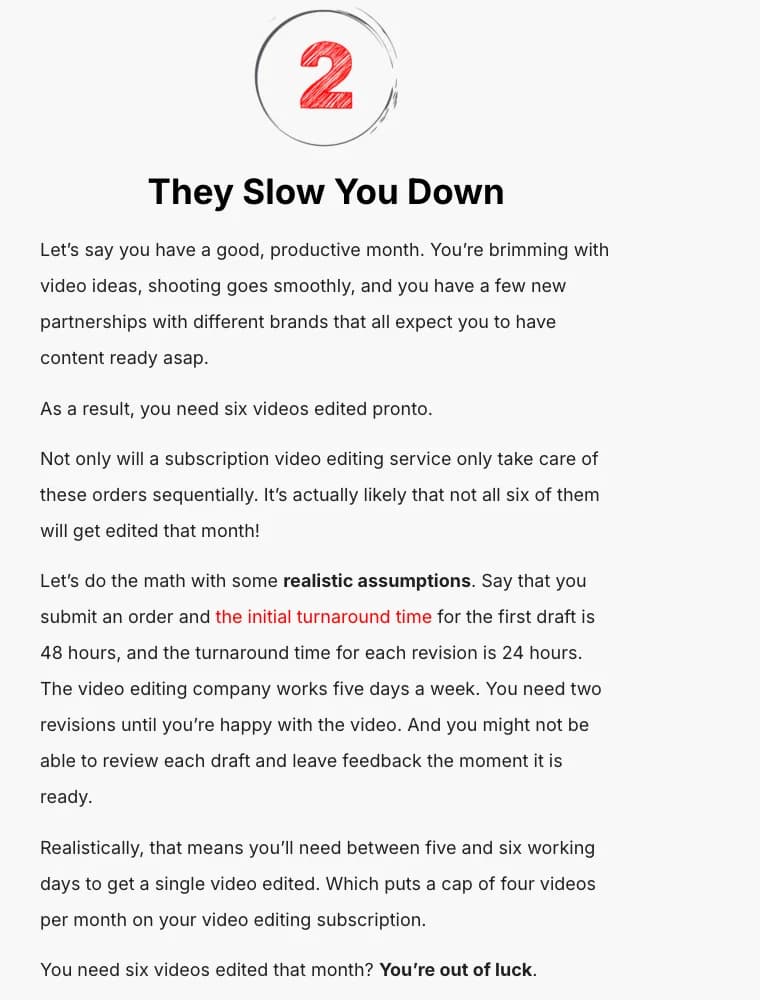
The queue problem comes up again and again. Tasty Edits, which sells per-project editing, walks through the maths of a typical "unlimited" plan: a 48-hour first draft, 24 hours per revision, a five-day working week and two revision rounds add up to five or six working days per video, which caps the plan at about four videos a month no matter what "unlimited" says. Their wider point is that busy months get squeezed and quiet months get wasted.
Shootsta, which sells subscriptions, frames it the other way round: a freelancer is the better choice for one carefully crafted hero edit, while a subscription is built for a constant queue of repeatable edits. They suggest using both, a freelancer for the flagship piece and a subscription for the volume behind it.
Flocksy addresses the unused-capacity worry directly by letting unused hours roll over for 30 to 60 days depending on plan. Whether a service offers anything like this is worth asking before you sign up.
What CreatorSuite sends back
A real upload next to the finished edit. Switch between short form and long form.
The hidden costs that change the answer
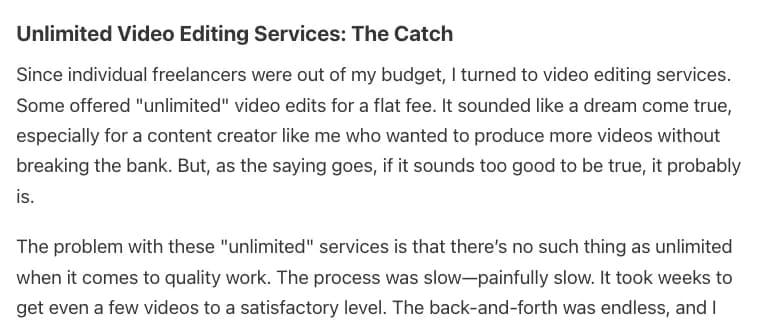
The sticker price is rarely the full cost. YouTuber Sarb Johal wrote up his experience moving from freelancer quotes to an "unlimited" service: slow turnaround, edits that ignored his style sheet, revision rounds that ran to seven or eight passes, and a time-zone gap that added a day to every round. The upfront fee looked low, but the hours he spent managing the work cancelled out much of the saving. He used the service's money-back guarantee and went back to editing himself.
His story is a useful list of what to price in before you decide:
- Unused capacity: months where you post less still cost the full fee.
- Revision time: every extra round costs your time and pushes the next video back.
- Management time: writing briefs, uploading files, checking drafts. Put your own hourly value on it.
- Queue caps: one request at a time limits how much a plan can really produce.
- Time zones: feedback sent at the end of your day may not be picked up until the next.
- Lock-in: check cancellation terms and refund rules before the first payment.
Worked example: is a video editing subscription worth it for three different creators?
To make the formula concrete, here are three typical creators, sized against a credit-based plan where a short video uses 100 credits, a long video 300 credits and a clip 25 credits. The plan sizes are CreatorSuite's: Basic $9 a month for 300 credits, Plus $39 for 1,500, Starter $149 for 3,500 and Growth $299 for 6,000.
Creator A posts two long YouTube videos a month. That is 2 × 300 = 600 credits, which is more than Basic and fits inside Plus with 900 credits spare (enough for 9 shorts or 36 clips). Break-even: divide $39 by 2. If a freelancer would charge more than that figure per long video, Plus wins; if Creator A would never use the spare credits, it is worth comparing against simply paying per video.
Creator B posts 12 Reels and one long video a month. That is 12 × 100 + 300 = 1,500 credits, exactly the Plus allowance. Break-even: divide $39 by 13 edits. For short-form work, that figure is low compared with most per-video quotes, so this is the profile where a subscription clearly pays off, as long as the 12 Reels really happen every month.
Creator C runs a weekly podcast: 4 long episodes plus 10 clips from each. That is 4 × 300 + 40 × 25 = 2,200 credits, which needs Starter (3,500 credits, $149). Break-even: divide $149 by 44 edits. Clip-heavy workflows are where per-video pricing gets expensive fastest; our guide on how many clips per podcast episode helps you set that number.
| Creator | Monthly output | Credits used | Plan that fits | Break-even check |
|---|---|---|---|---|
| A: long-form YouTuber | 2 long videos | 600 | Plus (1,500 credits) | $39 ÷ 2 vs your per-video quote |
| B: Reels-first creator | 12 shorts + 1 long | 1,500 | Plus (1,500 credits) | $39 ÷ 13 vs your per-video quote |
| C: weekly podcaster | 4 long + 40 clips | 2,200 | Starter (3,500 credits) | $149 ÷ 44 vs your per-video quote |
Subscription vs freelancer vs DIY vs agency: which fits when
The video editing subscription vs freelancer question has no single winner. Each option wins in a different situation. Our DIY editing vs outsourcing breakdown goes deeper on the time side, and video editing agency pricing covers the top end.
| Option | Best when | Watch out for |
|---|---|---|
| Edit it yourself (free or paid app) | Low volume, you enjoy editing, tight budget | Hours per video; burnout when volume rises |
| Freelancer, pay per video | 1-3 videos a month, custom storytelling, one hero piece | Availability, rate rises, one person's queue |
| People-based "unlimited" subscription | Steady volume, flexible deadlines | Sequential queue, revision days, unused months |
| Agency | Brand campaigns, high production value | Highest cost per video, slower briefs |
| AI editing service on credits | Frequent shorts, clips and talking-head videos | Less suited to unusual, story-led edits |
Where CreatorSuite fits, and when another option is better
CreatorSuite is an AI video editor run as a service: you upload raw footage (phone footage is fine), pick a style, and get back a finished video with cuts, hook, captions, b-roll, motion design, sound and colour. Plans start at $9 a month, and because credits are shared across shorts, long videos (up to 35 minutes) and clips, you can size the plan to your real mix instead of a fixed number of "requests". Basic runs 1 video at a time and returns edits in 6 to 8 hours; Plus and Starter return in 5 to 6 hours and Growth in 3 to 4 hours, with unlimited re-edits from Plus up.
It is a good fit for Creator B and Creator C above: frequent, repeatable formats where turnaround matters. More than 2,700 creators used it in the last 7 days. You can test whether this AI video editing service suits your footage with the 3-day free trial (1 short video, 3 clips or 1 long video up to 10 minutes; card required), and there is a full refund before your 2nd edit.
It is not the right choice for everything. CreatorSuite edits footage; it does not film, generate videos from text or make AI avatars. If you post one carefully crafted documentary-style video a month, a freelancer you work with closely may serve you better. If you love editing, an app subscription is cheaper. And if you only need a few one-off edits, compare per-video options such as those in our Fiverr video editors alternative guide.
Checklist before you pay for any monthly video editing service
Whichever service you look at, including the cheap video editing subscription offers, get clear answers to these questions first. Our guide to cheap video editing services and what to watch for lists more warning signs.
- How many videos can be in progress at once, and what is the turnaround for a first edit?
- How many revisions are included, and how long does each one take?
- Is there a cap on video length or raw footage per video?
- What happens to unused capacity at the end of the month?
- Can you change plan size up or down month to month?
- What are the cancellation and refund terms?
- Do you get the final files to keep and post anywhere?
- Is there a trial, so you can judge the result on your own footage before committing?
Verdict: when a video editing subscription is worth it
Is a video editing subscription worth it for you? Run the break-even formula with your slowest month and a real per-video quote. If your steady volume is above break-even and the plan can actually deliver that volume, subscribe. If your output is irregular, or you make one high-craft video a month, pay per video or edit yourself.
For most creators the deciding factor is consistency: a plan that matches a steady posting rhythm saves money and time, while a plan bought for a best-case month mostly saves neither. If you are building that rhythm, our content repurposing workflow for creators shows how one recording becomes a full month of posts, and comparing an AI video editor vs a human video editor helps you pick the right kind of plan. If you want to try the credit-based route, CreatorSuite's 3-day free trial lets you test it on your own footage first.
What we read for this guide
- 3 Reasons to Avoid Video Editing Subscriptions (and What to Get Instead), Tasty Edits · tastyedits.comTurnaround and revision maths that caps a typical "unlimited" plan at about four videos a month; unused months still cost the fee.
- The Real Cost of Hiring a YouTube Editor, The TechPacker (Sarb Johal) · thetechpacker.substack.comA creator's account of an unlimited service: slow turnaround, ignored style sheets, many revision rounds, time-zone delays, money-back guarantee used.
- Freelance Video Editor vs Subscription, Shootsta · shootsta.comSeller's view: freelancer for one hero edit, subscription for a constant queue; suggests using both.
- Flocksy plans page · flocksy.comUnused hours roll over for 30 to 60 days depending on plan, one answer to the unused-capacity problem.
- I Hired a Video Editor For YouTube: Here's What Happened (YouTube, The TechPacker) · youtube.comVideo version of the creator's outsourcing experience.
How this page was made: written by Badar Munir and the CreatorSuite team with AI assistance, reviewed by James, from facts we checked ourselves and the sources listed above. Spotted something out of date? Email us and we’ll fix it.
is a video editing subscription worth it: FAQs
Is a video editing subscription worth it for a small YouTube channel?
Usually only if you post consistently. Divide the plan price by a real per-video quote to get your break-even number. If your slowest month is below that, paying per video or editing yourself is cheaper.
What does a video editing subscription cost?
It varies widely by type. App subscriptions charge for software, people-based services charge a flat monthly fee for a request queue, and credit-based services charge for a set number of edits. CreatorSuite's plans are $9, $39, $149 and $299 a month.
Is an unlimited video editing subscription really unlimited?
Rarely in practice. Most people-based services work one request at a time, so turnaround and revision days cap how many videos you get each month. Ask how many videos can run at once before you sign up.
Video editing subscription vs freelancer: which is cheaper?
A freelancer is usually cheaper at low or irregular volume because you pay only for videos you make. A subscription gets cheaper per video as steady volume rises. Use the break-even formula to find your crossover point.
Can I try an editing subscription before committing?
Many services offer trials or refunds. CreatorSuite has a 3-day free trial (1 short video, 3 clips or 1 long video up to 10 minutes, card required) and a full refund before your 2nd edit.
What is the best video editing subscription for creators who post shorts?
Look for a plan priced per edit rather than per request, with fast turnaround and several videos in progress at once. Credit-based AI editing services suit frequent shorts and clips; a freelancer suits custom, story-led pieces.
Rather not edit it yourself?
Upload raw footage, get a finished edit back. 3-day free trial: 1 short video, 3 clips or 1 long video up to 10 min.
2,700+ creators in the last 7 days
Start 3-day free trial