
In shortFor most creators and small businesses, 3 to 5 Reels a week is a sustainable target, 1 to 2 keeps an account active, and 6 or more suits full-time creators who can hold quality. Instagram's head says there is no single right number: posting more tends to bring more reach, but only a schedule you can sustain is worth picking.
- There is no official Reels quota: Instagram's head says more posts tend to mean more reach, but burnout is the bigger risk.
- Buffer's data on Instagram feed posts points to 3–5 posts a week as the growth sweet spot, with smaller gains above that.
- Pick your schedule from your time budget, not from a number you read: hours per Reel × Reels per week must fit your week.
- Batching (plan, film, edit and schedule in blocks) is what keeps a schedule alive past the first month.
- If more posts are not lifting views, fix the hook, topic and watch time before you add volume.
How often to post Reels: the short answer
If you want one line on how often to post Reels: 3 to 5 a week for steady growth, 1 to 2 a week to stay active, and 6 or more only if you can keep the quality up. Those ranges match what Buffer found when it studied Instagram posting frequency, and they sit comfortably inside what Instagram's own head has said in public (more on both below).
The number matters less than two things around it: whether you can keep it for months, and whether each Reel is good enough to hold attention. A creator who posts 3 strong Reels every week for a year usually ends up ahead of one who posts daily for three weeks and then disappears. If your Reels are already going out but not getting watched, start with why your Reels get no views before you change the schedule.
Use this table to pick a starting tier. Then check it against your time in the next sections.
| Tier | Reels per week | Who it suits | Main risk |
|---|---|---|---|
| Maintain | 1–2 | Busy owners, side projects, accounts in a slow season | Slow growth; the account can stall |
| Grow steadily | 3–5 | Most creators, coaches, local businesses | Skipped weeks if there is no batching system |
| Push hard | 6–9 | Full-time creators, brands with a content team | Quality drops and burnout |
| Daily or more | 7–14+ | Creators with a repeatable format and help with editing | Repetitive content, rushed hooks |
What Instagram's head says about posting frequency
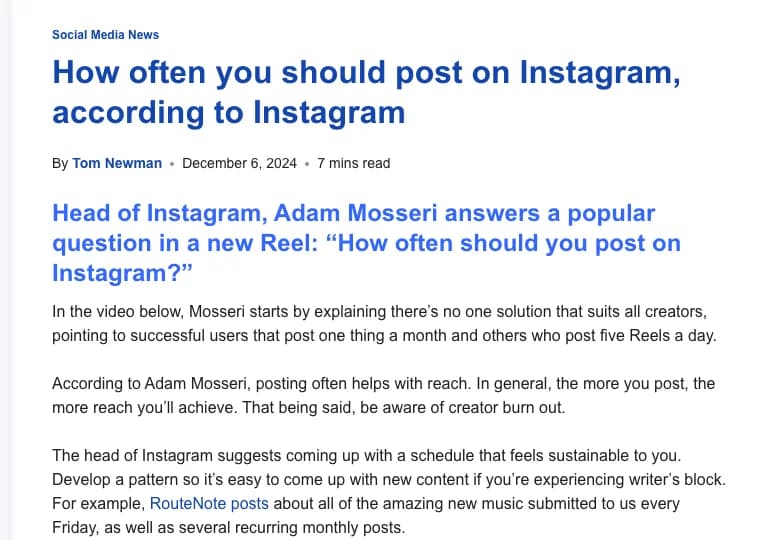
Adam Mosseri, the head of Instagram, answered this question in a Reel of his own. As RouteNote reported it, he started by saying there is no one answer that suits every creator: some successful accounts post one thing a month and others post five Reels a day.
His general point was that posting more often helps with reach, and that the more you post, the more reach you tend to get. He paired that with a warning about creator burnout and suggested building a schedule that feels sustainable to you, with repeating patterns (a weekly series, a recurring theme) so you are not starting from a blank page each time.
What he did not give is a quota. Any article that says 'Instagram recommends exactly X Reels a week' is going further than the public record. Treat the Instagram view as a direction, not a target: more is generally better, as long as you can keep it up.
What the data shows about how often to post Reels
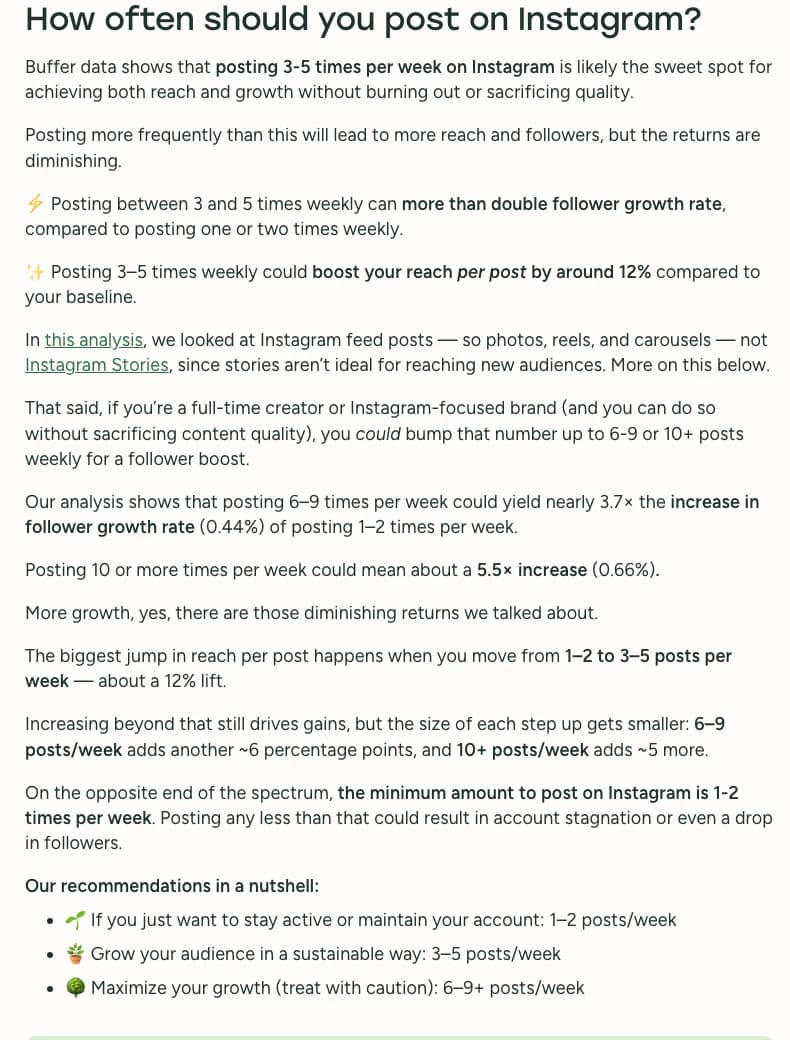
Buffer studied around 2 million Instagram posts and published its recommendations in three tiers: 1–2 posts a week to stay active, 3–5 a week to grow in a sustainable way, and 6–9 or more a week to push growth, which it says to treat with caution. It also found diminishing returns: the biggest step up came from moving from 1–2 to 3–5 posts a week, and each step above that added less.
Two details matter if you are reading this for Reels specifically. First, Buffer counted Instagram feed posts as a group (photos, Reels and carousels), not Reels alone, so the tiers describe your total feed output. Second, it found that posting less than once or twice a week could leave an account stagnant or losing followers. In plain terms, going quiet costs more than posting a little less often.
Social Media Today, covering the same study, made the point every creator should keep in mind: posting more gives you more chances to land, but it is also a lot of work, and pushing volume at the cost of quality can turn your audience off. That is why the rest of this guide is about capacity, not just numbers.
Why posting more Reels isn't fixing your reach
A common pattern in creator forums goes like this: someone moves from 2 Reels a week to daily, views stay flat, and they conclude the schedule is wrong. Frequency is rarely the only cause. Before you change how often you post, rule out the others.
Check your last 10 Reels in Instagram's Insights and look at views, average watch time and shares per Reel. If people leave in the first seconds, the issue is the hook. If watch time is fine but nobody shares or follows, the issue is usually topic or audience fit.
- Weak hook: the first one to two seconds don't give a reason to stay. More Reels with the same opening won't help.
- Topic drift: posting daily often means filling slots with filler topics your audience doesn't care about.
- Quality drop: rushed edits with dead air and no captions. Tight jump cuts in short videos and on-screen text fix a lot of this.
- Inconsistency: three Reels one week and none for two weeks reads as an inactive account.
- Wrong audience: Reels reach non-followers first, so a vague topic attracts viewers who never come back.
- Visual sameness: the same talking head at the same angle every day. Cutaways and b-roll for short videos keep a daily schedule from looking repetitive.
What CreatorSuite sends back
A real upload next to the finished edit. Switch between short form and long form.
Work out how often to post Reels from your time budget
The honest way to decide how often to post Reels is to start with the hours you have, not the number you want. Time yourself on your next two Reels from idea to posted. Most people underestimate editing, which is usually the slowest part.
Then use one line of arithmetic: hours per Reel × Reels per week must be less than the hours you can protect every week. If a Reel takes you 90 minutes end to end and you have 5 hours a week, your ceiling is 3 Reels, not 7. Any plan above that ceiling will break by week three.
Worked example: a solo contractor has about 4 hours a week for content. Planning takes 15 minutes per Reel, filming 15 minutes and editing 45 minutes, so each Reel costs about 75 minutes. Four hours fits 3 Reels with a little room to spare. If they cut editing time, the same 4 hours could hold 5. That is the real lever: the schedule is mostly limited by editing time.
| Time per Reel (end to end) | 2 hours a week | 4 hours a week | 8 hours a week |
|---|---|---|---|
| 2 hours | 1 Reel | 2 Reels | 4 Reels |
| 90 minutes | 1 Reel | 2 Reels | 5 Reels |
| 1 hour | 2 Reels | 4 Reels | 8 Reels |
| 30 minutes (editing handed off) | 4 Reels | 8 Reels | 16 Reels |
Re-time yourself after a month. As your format settles, each Reel usually gets faster, and you can move up a tier without adding hours.

Worked example: a 3-Reels-a-week batch system
Batching means doing each type of work in one block instead of making every Reel from scratch on the day it posts. It is the single habit that keeps a schedule alive. Here is a weekly version for 3 Reels; double the numbers for a 6-Reel week.
Katie Steckly's video below shows a stretched version of the same idea, planning, scripting, filming and editing a month of Reels in one day, with her script and shot list on screen. You don't need a month at once; a week or two is a good place to start.
- Monday, 20 minutes: pick 3 topics from one theme. Write the first line (the hook) and three points for each. Our short video ideas for small businesses list is a good source if you're stuck.
- Tuesday, 45 minutes: film all 3 in one session, same light and setup. Record each hook three ways so you have options. Grab 5–10 cutaway shots while the camera is out.
- Wednesday and Thursday: edit. Cut pauses, add captions, place cutaways, add sound. Follow one repeatable short-form video editing workflow so every Reel takes the same steps.
- Friday, 15 minutes: schedule all 3 for the next week (for example Monday, Wednesday and Saturday) with captions and cover frames.
- Following week: post on schedule, reply to comments in the first hour, and note which hook did best. Use that note in Monday's planning.
Ways to make the editing side of the schedule lighter
Once your time budget shows editing is the bottleneck, you have four realistic options. None is right for everyone, so here are the trade-offs.
If your format is simple (one take, captions, a cutaway or two), a free app is often enough. If you want a person who learns your style over months, a freelancer is the better fit, and our page on the alternative to hiring a video editor lays out where that route wins. If you mostly edit by transcript, compare it with a Descript alternative first.
Done-for-you services sit in between. CreatorSuite is an AI video editor you send raw phone footage to; it handles the cuts, hook, captions, b-roll, sound and colour and sends back a finished Reel. On plan maths: 3 Reels a week is about 12–13 a month, which the Plus plan ($39/month, up to 15 short videos) covers. A daily Reel is about 30 a month, which fits the Starter plan ($149/month, up to 35 short videos). If you only post once or twice a week, Basic ($9/month, up to 3 short videos) or a free app may be all you need.
| Option | Your time per Reel | Best for | Trade-off |
|---|---|---|---|
| Edit yourself in a free app | Highest | Simple formats, 1–3 Reels a week | Editing time caps how often you can post |
| Freelance editor | Low once they know your style | Creators who want a long-term person and custom style | Finding, briefing and managing someone; cost varies |
| AI editing app you run yourself | Medium | People who like control and some automation | You still drive every edit and fix mistakes |
| Done-for-you AI editing service | Low (film, upload, post) | 3+ Reels a week from raw phone footage | Less hands-on control than editing yourself |
When to rethink how often to post Reels
A schedule is not fixed for life. Review it every 4 to 6 weeks, using the same Insights numbers each time.
Post more often when you have a launch, a busy season or a format that keeps working, and you have the hours to back it up. Post less often when quality is slipping, your hooks feel forced, or you're dreading the camera. Dropping from 5 to 3 is far better than dropping from 5 to 0.
If you are asking 'is posting Reels every day too much?', the answer depends on your format. A daily schedule works when each Reel comes from a repeatable template (a daily tip, a recurring series, clips cut from a longer recording). It breaks when every Reel needs a new idea, a new location and a full edit. Faceless formats can also make a higher tier easier to hold; see how to make faceless Reels.
Whatever tier you pick, hold it for at least 8 weeks before you judge it. One week of numbers tells you very little.
Making your Reels schedule stick
Pick the tier your time budget allows, batch the work, and protect the editing time, because that is where most schedules fail. Make each Reel worth watching first: our guide on how to edit Instagram Reels that get views covers the hook, pacing and captions that make volume pay off.
If editing is the part that keeps breaking your schedule, CreatorSuite's AI video editor can take that step off your week. The 3-day free trial covers 1 short video, 3 clips or 1 long video up to 10 minutes (card required), so you can test it on one week's footage and see whether it fits your workflow before you change anything else. If you enjoy editing and have the hours, keep doing it yourself; the schedule you can keep is the right one.
What we read for this guide
- How often you should post on Instagram, according to Instagram (RouteNote) · routenote.comSummary of Adam Mosseri's Reel: no single answer, more posting helps reach, watch for burnout, build a sustainable pattern.
- How Often Should You Post on Instagram? What Data From 2 Million Posts Tells Us (Buffer) · buffer.comFrequency tiers (1–2, 3–5, 6–9+ posts a week), diminishing returns, feed posts counted together, stagnation below 1–2 a week.
- Study shows posting more on Instagram leads to more reach (Social Media Today) · socialmediatoday.comCoverage of the Buffer study, with the caution that more volume is more work and can lower quality.
- How often should I post on Instagram to grow consistently? (Jeff Bullas forum) · jeffbullas.comForum thread: 3–5 feed posts a week, a rhythm you can maintain, batching and repurposing to stay consistent.
- Making a month of Instagram Reels in 1 DAY (Katie Steckly, YouTube) · youtube.comCreator's batch process: planning, script and shot list, filming and editing in one session.
How this page was made: written by Badar Munir and the CreatorSuite team with AI assistance, reviewed by James, from facts we checked ourselves and the sources listed above. Spotted something out of date? Email us and we’ll fix it.
how often to post Reels: FAQs
How many Reels per week should a beginner post?
Start with 2 to 3 a week. It is enough to learn what works and to build a batching habit, and it is low enough that you can keep it up while you get faster. Move up a tier once you have held it for 8 weeks.
How many Reels should I post a day?
Most accounts don't need more than one a day, and many do well on 3 to 5 a week. Instagram's head has said some successful creators post several Reels a day and others post once a month, so multiple daily Reels only make sense if you have a repeatable format and the time to keep quality up.
Does posting Reels too often hurt reach?
Buffer's study of Instagram feed posts did not find that posting more often hurt reach per post; it found reach per post tended to rise with frequency, with smaller gains at higher tiers. The real risk is quality dropping when you post more than you can make well.
What happens if I skip a week?
One missed week is not a disaster. Buffer's data suggests that regularly posting less than once or twice a week can leave an account stagnant, so the goal is to avoid long gaps. Keep two or three finished Reels in reserve for weeks when filming falls through.
What is the best Reels posting schedule for a small business?
For most small businesses, 3 Reels a week on fixed days (for example Monday, Wednesday and Saturday) is a good starting point. It is enough to stay visible, and it fits into one planning session, one filming session and one editing block each week.
Should Reels count toward my total Instagram posts?
Yes. Buffer's frequency tiers count photos, Reels and carousels together, so 2 Reels and 1 carousel make a 3-post week. Reels tend to be the format that reaches new people, so many accounts make them most of their weekly posts.
Rather not edit it yourself?
Upload raw footage, get a finished edit back. 3-day free trial: 1 short video, 3 clips or 1 long video up to 10 min.
2,700+ creators in the last 7 days
Start 3-day free trial