
In shortJump cuts in short videos work when they remove time the viewer does not need: pauses, restarts and filler words. They hurt when they clip words, land on every breath, or slice through a moment that needs a pause. Cut on breaths, keep a beat around key lines, and vary punch-ins, b-roll and graphics so no two cuts look the same.
- A jump cut removes time from one continuous shot, so the subject visibly hops in the frame.
- Use them to cut dead air, restarts and filler words, and to compress a process into seconds.
- Don't cut between every word, through emotional beats, or so tight that words get clipped.
- Alternate punch-ins, b-roll, on-screen graphics and short audio fades so the cuts don't form a pattern.
- If viewers still leave early, check the hook and topic before you blame the cuts.
What a jump cut is, and why short videos use so many
A jump cut is an edit that removes a piece of time from one continuous shot. Because the camera has not moved, the person on screen appears to hop from one position or expression to the next. Film schools long treated that hop as a mistake. Online video flipped the rule: viewers now read a visible jump as fast and honest, not sloppy.
Jump cuts in short videos are everywhere for a practical reason. Most Reels, Shorts and TikToks are one person, one camera, talking to the lens. There is no second angle to cut to. When you remove an "um", a restart or a three-second pause, the only thing left is a jump. In a 30- to 60-second clip, every second of dead air costs attention, so creators cut hard.
The question is not whether to use jump cuts. It is which ones to make, where to land them, and how to stop them forming a pattern the viewer notices. If you are building your whole editing process from scratch, start with our short-form video editing workflow and come back here for the cutting detail.
When jump cuts in short videos help
Every useful jump cut removes something the viewer would not miss. The table below lists the situations where a cut almost always improves a short clip, and what to cut in each.
| Situation | What to cut | Why it works |
|---|---|---|
| Talking head with pauses | Silences, long breaths, "let me start again" | Keeps the point moving without a perfect single take |
| Filler words | "Um", "uh", "like", "you know", false starts | The speaker sounds sharper than they did live |
| Process or tutorial | Repetitive middle steps of an action | Compresses minutes into seconds, like a montage |
| List or tips video | The gap between items | Each cut doubles as a chapter marker |
| Comedy or reaction | The beat before the punchline | A sudden jump can land the joke |
| Outfit, room or progress reveal | Everything between before and after | The jump is the reveal |
Rule of thumb: if you can describe what a cut removed in two words ("a pause", "a restart"), it is probably a good cut. If you cannot, it may just be a habit.
When they hurt: the complaints that come up again and again
Editors and viewers raise the same few problems. Scott Simmons's "Angry Editor" column on ProVideo Coalition picks apart a one-minute product video where the cuts fall between words, not on mistakes, and nearly snip syllables off. He suspects it was run straight through an automatic dead-air remover and never watched back. That is the most common failure with talking head jump cuts today: the tool made the cuts and nobody checked how they sound.
No Film School's write-up of Jeven Dovey's tips says overusing jump cuts makes a video feel like Frankenstein's monster, with the audience annoyed by uneven cuts between takes. A Pixel8 guide on talking-head editing makes the same point from the other side: remove every gap and the speaker sounds breathless and robotic, and cutting through a serious story makes it feel rushed and insincere.
Videomaker's Peter Zunitch adds a warning about the fix itself: the zoom used to hide a cut can become its own distraction if it repeats. So "too many jump cuts" is usually not about the count. It is about cuts with no reason, cuts that damage the audio, and cuts that all look identical.
- Clipped words: the cut lands mid-syllable, so the first or last sound of a word is missing.
- No breathing room: every gap is gone, so the speaker sounds rushed and the viewer gets tired.
- Cut emotion: a pause that carried meaning is removed, and the moment loses its weight.
- Same cut every time: identical hops or identical zooms every two seconds become a visible pattern.
- Audio jumps: room tone, volume or a click changes at each cut, even when the picture looks fine.
Is it the cuts? How to diagnose a short that loses viewers
Creators often blame jump cuts in short videos for drop-off that has another cause. Before you re-edit, open the retention graph in YouTube Studio, Instagram Insights or TikTok analytics and find where viewers leave. Then match the pattern to a cause.
| What you see | Likely cause | What to check |
|---|---|---|
| Big drop in the first 2-3 seconds | Hook or topic, not cuts | Does the first line say why to keep watching? Is the topic one your audience wants? |
| Steady slide with no single cliff | Pacing or length | Is there a section where nothing new is said? Could the clip be shorter? |
| Sharp drop at one moment mid-clip | A bad cut, an audio glitch or a confusing jump | Watch that exact second with sound on. Is a word clipped or a sentence cut off? |
| Viewers stay but don't engage | Offer or call to action | Is there a clear reason to follow, comment or save? |
| Views drop across every post | Posting rhythm or account-level change | Has your schedule changed? See our guide on [how often to post Reels](/blog/how-often-to-post-reels). |
What CreatorSuite sends back
A real upload next to the finished edit. Switch between short form and long form.
Step by step: cutting a talking-head Short (worked example)
Here is the order most editors follow. Say you filmed one take of a tip video on your phone: about 90 seconds of raw footage with two restarts, several "ums" and a long pause while you remembered your third point. You want a tight clip for Reels, Shorts and TikTok. (If the footage itself is the problem, see how to film short videos on your phone first.)
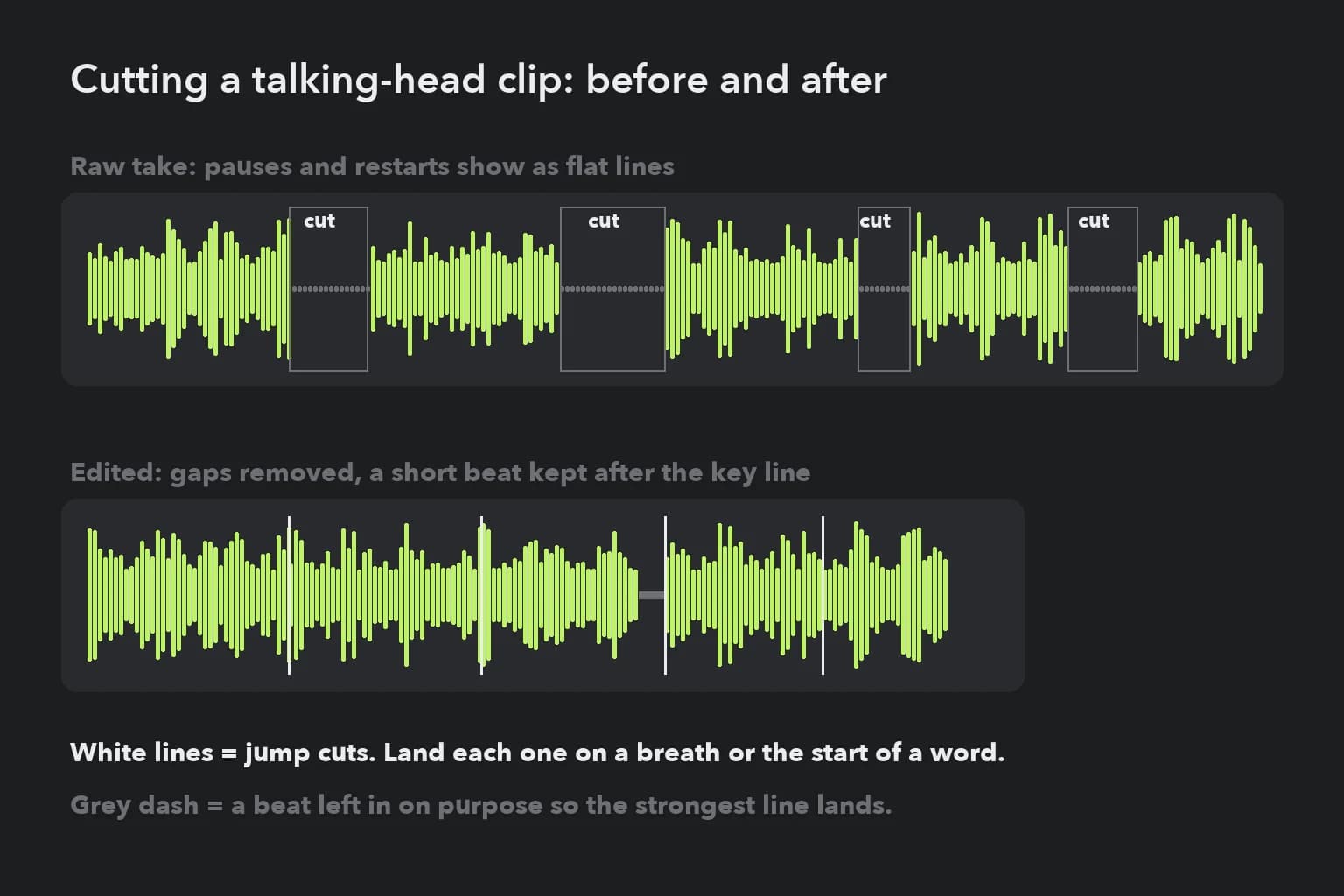
Pass 1, cut the obvious junk. Remove both restarts, the long pause and anything off-topic. Work from the audio waveform: silences show up as flat lines you can cut on sight. Don't polish yet.
Pass 2, tighten the gaps. Trim the half-second pauses between sentences, but leave a short beat after your strongest line so it lands. This pass decides whether the clip feels energetic or breathless.
Pass 3, remove filler words. Cut on a breath or at the very start of the next word, where the mouth is closed or moving into the next sound. That stops clicks and clipped syllables.
Pass 4, watch it back with sound, at full speed. Listen for clipped words, jumps in volume or room tone, and any place where two sentences now run together. Fix each one by nudging the cut a few frames.
Pass 5, decide how to treat each remaining cut. Leave some as plain jumps, punch in on others, and cover one or two with b-roll or a graphic. The next section shows the options. Then add captions and export; our guide to editing Instagram Reels that get views covers the rest of the finish.
Five ways to hide or soften jump cuts in short videos
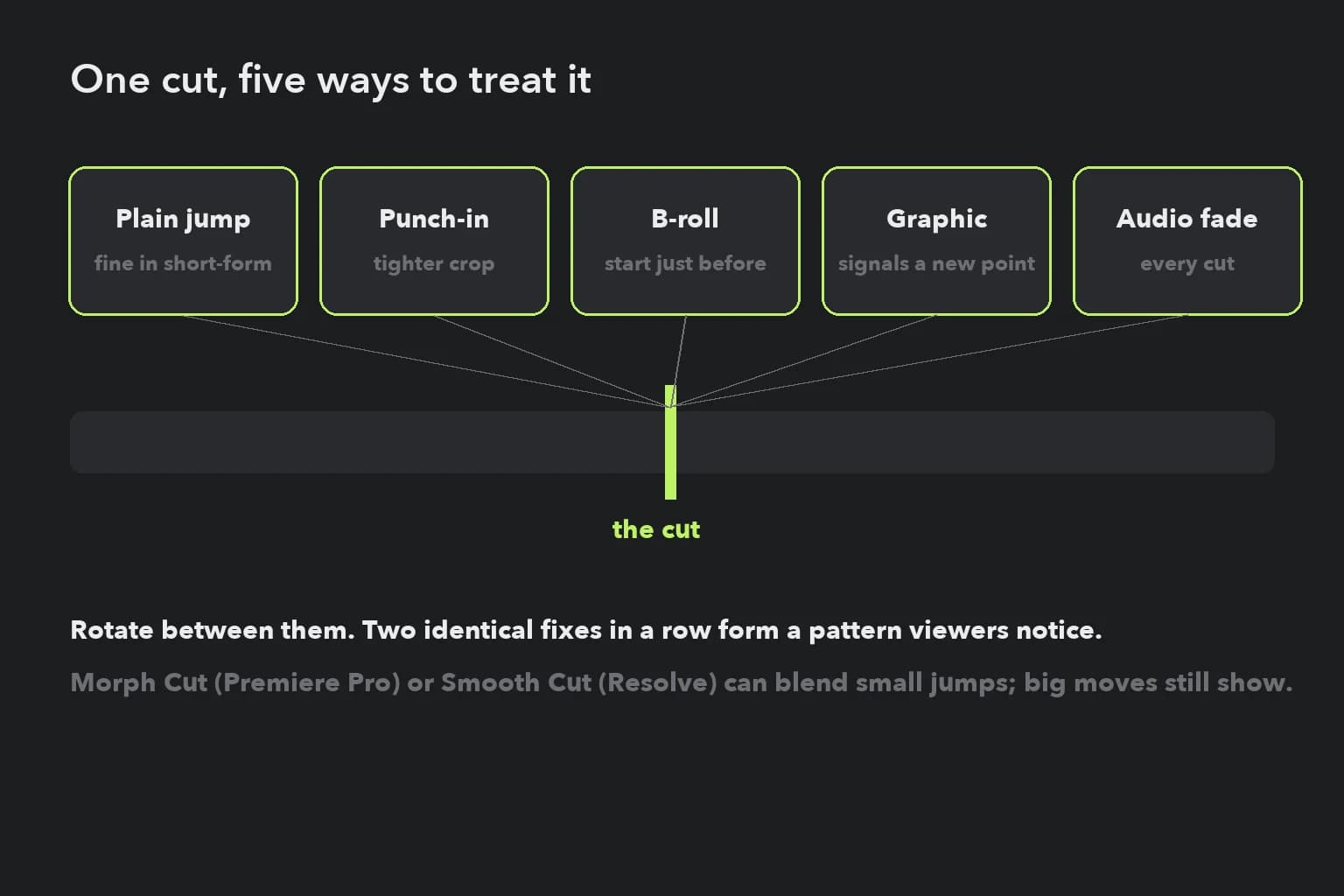
You don't have to hide every cut. A plain jump is fine in short-form. What matters is variety, so the viewer feels the pace without noticing a pattern. These are the tools editors rotate between.
- Punch-in (zoom): cut to a tighter crop of the same shot. The hop becomes a deliberate change of scale, like a second camera.
- B-roll: cover the cut with footage of what you are talking about, so the viewer is looking at something else when the jump happens. Premiere Gal suggests starting the b-roll just before the cut, not exactly on it. Our b-roll for short videos guide covers where to find it.
- On-screen graphic: a title, list item or emoji card over the cut signals a new point and hides the hop.
- Short audio fades: fade out on one word and in on the next so there is no click or sudden change in room tone. This matters even when the picture is covered.
- Morph or smooth cut: Premiere Pro's Morph Cut and DaVinci Resolve's Smooth Cut blend the frames either side of a small jump. They can make a subtle jump invisible but fail on big movements.
Don't use the same fix on two cuts in a row. Two punch-ins back to back look like the camera is breathing.
Punch-ins: the short-form default, done properly
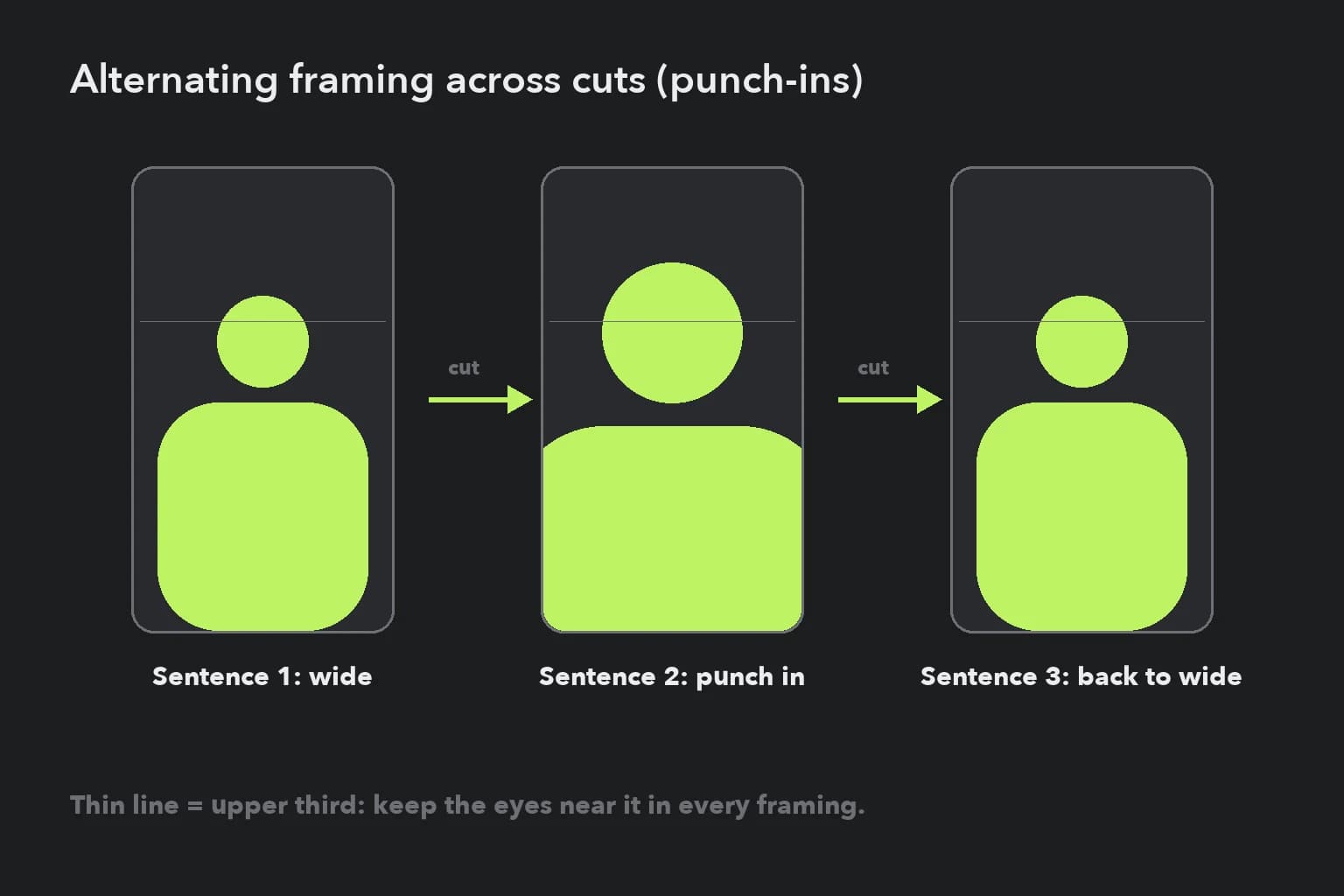
Punch-ins are the most common way to treat jump cuts in short videos because they need no extra footage. The idea is to alternate between a wider and a tighter framing across cuts, so each jump reads as a change of shot.
To do a punch in zoom edit: select the clip after the cut, increase its scale in your editor's transform or scale control, and reposition so the eyes stay in the upper third of the frame. Keep the change obvious enough to read as intentional, but not so large that the image goes soft. Go back to the wider framing at a later cut.
Quality depends on how you shot. Filming in 4K and framing a little wider than you need gives you room to crop for a vertical export without losing sharpness, a tip Premiere Gal and the Pixel8 guide both give. Avoid animated zooms on every cut. A hard punch-in on a new sentence looks cleaner than a slow push that repeats every few seconds.
Jump cuts by format: Reels, Shorts, TikTok and beyond
The same footage can need different cutting depending on what kind of short it is. The platforms themselves don't demand a style, but audiences on each have habits; our Reels vs TikTok vs Shorts breakdown covers the differences in more depth.
| Format | How hard to cut | Watch out for |
|---|---|---|
| Quick tip or hot take | Tight. Remove nearly every pause. | Leave a beat after the main line. |
| Tutorial or how-to | Medium. Cut steps, keep explanations clear. | Don't cut away before the viewer sees the result. |
| Story or personal moment | Light. Keep meaningful pauses. | Over-cutting makes it feel insincere. |
| Comedy | Tight, with timing on purpose. | The pause before a punchline is often the joke. |
| Faceless or voice-over | Cut the audio; cover with visuals. | Audio fades matter more than picture. See [how to make faceless Reels](/blog/how-to-make-faceless-reels). |
Your options: DIY, auto-cut tools, freelancers or done-for-you
Cutting jump cuts by hand is slow, and that time adds up when you post several clips a week. These are the main routes, with honest trade-offs.
If you mainly need a free phone editor, CapCut handles manual cuts and zooms well; our CapCut alternative page explains where it fits and where it stops. Transcript-based tools like Descript let you cut by deleting words in text, which speeds up passes 1 to 3; see our Descript alternative page for the comparison. Automatic dead-air removers are fast, but as the ProVideo Coalition column shows, their output still needs watching back with sound.
If you would rather not edit at all, CreatorSuite is an AI video editor you send raw footage to. You upload your clip (phone footage is fine), pick a style, and the AI video editor does the cuts, hook, captions, b-roll, motion design, sound and colour, and sends back a finished, ready-to-post video. Plans start at $9/month and there is a 3-day free trial that covers 1 short video (card required). It does not film for you, and if you enjoy hand-tuning every cut, a manual editor gives you more control.
| Option | Best for | Trade-off |
|---|---|---|
| Manual edit (CapCut, Premiere, Resolve) | Full control over every cut | Slowest; quality depends on your skill |
| Transcript or silence-removal tools | Fast rough cuts of talking heads | Can clip words; you still add b-roll, punch-ins and captions |
| Freelance editor | A custom style and a person to brief | Cost and turnaround vary; you manage the relationship |
| Done-for-you AI editing (CreatorSuite) | Creators who want finished clips without editing | Less frame-by-frame control than editing yourself |
Checklist before you post
Run through this list on every clip. It catches most of the problems people complain about with jump cuts in short videos.
If you post for a personal brand and want this done on every clip without the editing time, see how an AI video editor for personal brands handles it, and start with the 3-day free trial.
- Watched back once with sound at full speed.
- No clipped first or last syllables at any cut.
- No sudden change in volume or room tone at a cut.
- A short beat left after the most important line.
- No two identical fixes (zoom, zoom) back to back.
- Emotional or serious moments left to breathe.
- Captions checked against the cut audio, so no word appears that was removed.
What we read for this guide
- The Angry Editor: sometimes the jump cuts are just too much (ProVideo Coalition) · provideocoalition.comAn editor's critique of cuts placed between words and run through an automatic dead-air tool without review.
- 6 Easy Ways to Hide Jump Cuts in Your Next Video (No Film School) · nofilmschool.comJeven Dovey's tips: b-roll, punch-ins, two cameras, graphics, audio fades; warns overuse feels like Frankenstein's monster.
- Jump Cut Editing for Talking-Head Videos (Pixel8 Production) · pixel8production.comMulti-pass cutting order, overcutting sounds robotic, cutting emotional moments feels insincere.
- Dr. Strangeedit: or How I Learned to Stop Worrying and Love the Jump Cut (Videomaker) · videomaker.comZooming in to fake close and wide shots is the usual fix for single-camera talking heads.
- What's a jump cut? (Vimeo blog) · vimeo.comDefinition, history from Breathless, and uses for compressing time and tightening conversations.
- Hide Jump Cuts Like a PRO: transcript and summary (SozAI) · sozai.appPremiere Gal's tutorial: shoot 4K wide, b-roll just before the cut, audio fade handles, don't add effects at every cut.
- Jump cut (Descript blog) · descript.comA jump cut removes time from a continuous shot, leaving a visible skip; common in talking-head video.
How this page was made: written by Badar Munir and the CreatorSuite team with AI assistance, reviewed by James, from facts we checked ourselves and the sources listed above. Spotted something out of date? Email us and we’ll fix it.
jump cuts in short videos: FAQs
Are jump cuts bad in short videos?
No. They are the normal edit for talking-head Reels, Shorts and TikToks. They become a problem when they clip words, remove every breath, cut through emotional moments, or all look the same.
How many jump cuts are too many?
There is no fixed number. A cut is too many when it removes nothing the viewer would miss, or when it damages the audio. Watch the clip back with sound: if it sounds breathless or words are clipped, you have cut too hard.
How do I hide jump cuts without a second camera?
Alternate punch-ins (a tighter crop of the same shot), cover some cuts with b-roll or an on-screen graphic, and add very short audio fades. Shooting in 4K and slightly wide gives you room to crop.
What is the difference between a jump cut and a smooth cut?
A jump cut leaves the hop visible. A smooth cut or morph cut (DaVinci Resolve's Smooth Cut, Premiere Pro's Morph Cut) blends the frames either side to hide a small jump. It works on small movements and fails on big ones.
Should I use automatic silence removal for jump cuts for TikTok?
It is a fast first pass. Always watch the result with sound, because automatic tools can cut between words or snip syllables. Then add the punch-ins, b-roll and captions yourself or with an editing service.
Can CreatorSuite do the jump cuts for me?
Yes. You upload raw footage and pick a style, and CreatorSuite's AI edits it, including the cuts, hook, captions, b-roll, sound and colour, then sends back a ready-to-post video. There is a 3-day free trial with a card.
Rather not edit it yourself?
Upload raw footage, get a finished edit back. 3-day free trial: 1 short video, 3 clips or 1 long video up to 10 min.
2,700+ creators in the last 7 days
Start 3-day free trial