
In shortVideo editing subscription services charge a fixed monthly fee for a set amount of editing capacity, while per-video pricing charges for each finished edit. A subscription is cheaper only when you send enough work every month to pass the break-even point (monthly fee divided by your per-video quote). "Unlimited" plans usually mean unlimited requests in a queue, not unlimited finished videos, so the number of active requests and the turnaround time decide your real output.
- "Unlimited" usually means unlimited requests, worked on one at a time, not unlimited finished videos.
- Break-even = monthly fee divided by the per-video price you would otherwise pay.
- Active request slots and turnaround time set your real monthly output, not the word "unlimited".
- Per-video pricing fits irregular schedules; subscriptions fit steady weekly publishing.
- Check revisions, length caps, unused-capacity rules and cancellation terms before paying.
- Test any service with a trial or a single video before committing to a month.
Video editing subscription services explained: the four pricing models
If you want someone (or something) else to edit your videos, you will meet four ways of paying. This is video editing subscription services explained in one sentence each: an unlimited plan gives you a request queue for a flat fee, a credit or allowance plan gives you a fixed amount of editing per month, a retainer buys a set number of videos or hours from one freelancer, and pay per video editing charges for each finished edit.
Most video editing subscription services look alike on a pricing page. They behave very differently once you start sending footage. The table below shows what you actually buy with each one. If you are still deciding between doing it yourself and outsourcing, start with our guide to the best AI video editors for creators, which covers the tools side.
| Model | What you pay for | What limits your output | Best fit |
|---|---|---|---|
| Unlimited / flat rate video editing | A monthly fee for an open request queue | How many requests are active at once, turnaround, revision rounds | Steady publishers who send work every week |
| Credit or allowance subscription | A monthly fee for a stated number of credits or videos | The allowance itself, plus how many edits run at once | Creators who want to know their exact monthly output |
| Freelancer retainer | A monthly fee for an agreed number of videos or hours from one editor | That editor's hours and other clients | Channels that want one consistent editor and style |
| Pay per video | A price for each finished edit | Only your budget and the editor's availability | Irregular schedules, testing an editor, one-off projects |
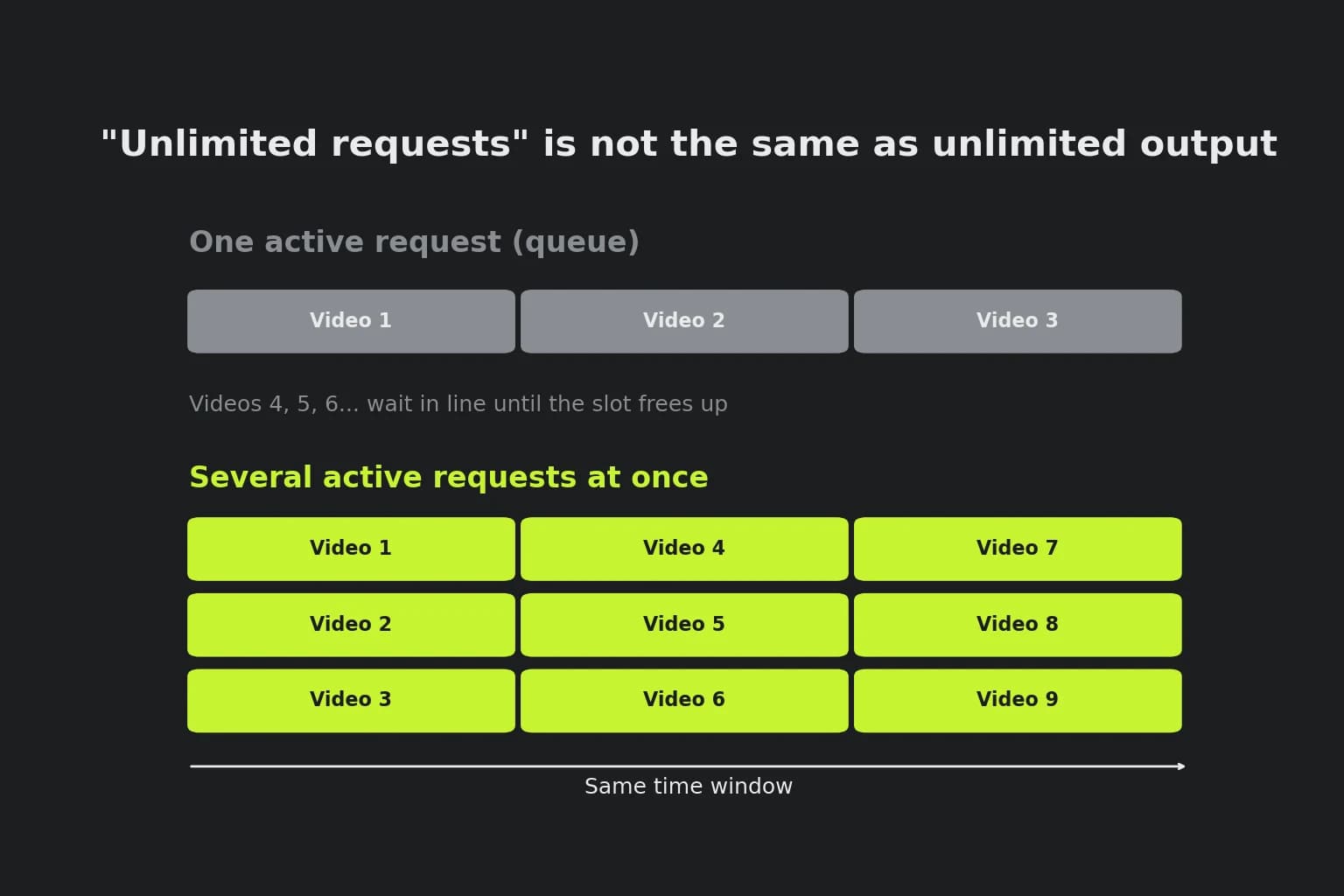
The word "unlimited" describes how many requests you can submit. It rarely describes how many finished videos you get back.
How unlimited video editing subscriptions work in practice
Most unlimited plans run on a queue. You add as many requests as you like, the editor works on one (or a few, on higher tiers), and the next request starts only when the current one is delivered or approved. Vidpros, which sells a different model, describes it as unlimited requests rather than unlimited work completed, and notes that providers often do not say how many editor hours your account actually gets.
Tasty Edits, a project-based competitor, collected the disclaimers some providers print. One says the word refers to unlimited requests, footage length and revisions, not unlimited finished videos. Others note that turnaround times are estimates and that work happens on business days. Both sources sell an alternative, so read their framing with that in mind, but the queue mechanics they describe match the plan pages themselves.
The practical effect: your monthly output equals the number of active slots, multiplied by how many edits each slot can finish in a month. Every revision round holds a slot. A plan with one active request and slow revisions can produce far fewer videos than you expected, even though nothing on the page is false.
- Ask how many requests are worked on at the same time.
- Ask whether revisions hold your slot or go to the back of the queue.
- Ask what the turnaround is measured in: hours, or business days.
- Ask whether footage length or video type is capped.
Per-video pricing: what you get and what it costs you in time
With pay per video editing you agree a price for one edit, send the footage, and pay when it is done. Nothing renews. If you take a month off, you pay nothing. That makes it the safest way to test an editor and the cheapest way to edit when you publish irregularly.
The costs are less visible. You brief every video from scratch, the style can drift between editors, and a good freelancer may not be free the week you need them. Umbrella Creators' comparison of retainers and per-video work lists these: briefing time, inconsistent style, and restarting the search if an editor leaves. Their own sample figures are illustrative, so use their reasoning rather than their numbers.
If you go this route, our checklist on how to choose a video editing service covers what to ask before the first job, and cheap video editing services: what to watch for covers the warning signs at the low end of the market.
Are video editing subscription services cheaper for you? The break-even math
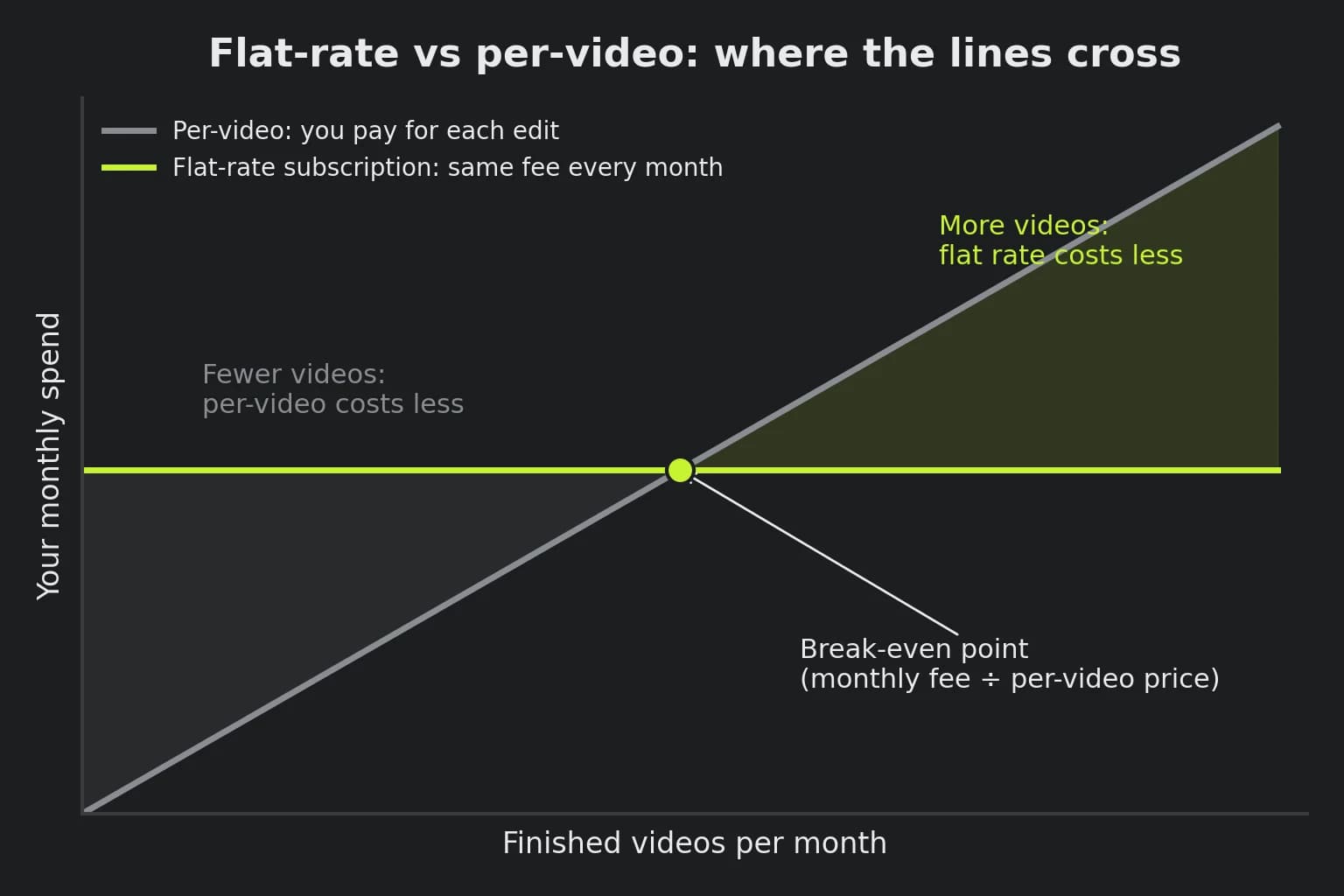
Every flat fee has a break-even point. Below it, paying per video costs less. Above it, the subscription costs less. You can work it out in a few minutes with numbers you already have or can get by asking for quotes.
Do not use the most videos a plan could produce. Use the number you will actually publish, and the number the plan can actually deliver given its active slots and turnaround.
- Step 1: Count your real output. Look at the last three months and write down how many long videos, short videos and clips you published, or would have published if editing was not the bottleneck.
- Step 2: Get a per-video quote for each format from one or two freelancers or services. Call the price for a long video L and for a short S.
- Step 3: Work out your per-video monthly cost: (long videos x L) + (shorts x S).
- Step 4: Compare it with the subscription fee. If the subscription costs less than the Step 3 total, and the plan can deliver that many videos in a month, it wins.
- Step 5: Find the break-even point: monthly fee divided by your per-video price. If you publish fewer videos than that number, pay per video.
- Step 6: Add the hidden time. Briefing, chasing and re-briefing per-video work takes hours. Put a value on your time and add it to the per-video side if it matters to you.
Break-even videos per month = subscription fee / per-video price. Below that number, pay per video. Above it, compare delivery capacity before you subscribe.
What CreatorSuite sends back
A real upload next to the finished edit. Switch between short form and long form.
Worked example: a creator posting two long videos and eight shorts a month
Here is the math on a real plan structure, using our own published plans because we know those numbers exactly. CreatorSuite is an AI video editor that works as a done-for-you service: you upload raw footage (phone footage is fine), pick a style, and the AI edits it (cuts, hook, captions, b-roll, motion design, sound, colour) and sends back a ready-to-post video.
It uses credits rather than an open queue. A short video costs 100 credits, a long video 300, and a clip 25. Our example creator publishes two long videos and eight shorts a month. That is (2 x 300) + (8 x 100) = 1,400 credits.
The Basic plan at $9/month has 300 credits, so it is too small. The Plus plan at $39/month has 1,500 credits, which covers 1,400 with 100 to spare (one more short). Plus also runs 3 videos at a time, returns edits in 5-6 hours and includes unlimited re-edits, so the queue problem from the unlimited model does not cap this creator's month.
Now compare with per-video. Using Step 3, multiply 2 by your long-video quote and 8 by your short-video quote. If that total is more than $39, the subscription is cheaper for this mix. If you only post once a month, run the same sum again: one long video needs 300 credits, which fits Basic at $9/month, and the per-video comparison becomes a single quote against that fee.
| CreatorSuite plan | Monthly price | Credits | Example capacity | Videos at a time | Turnaround |
|---|---|---|---|---|---|
| Basic | $9 | 300 | 3 short or 1 long, or 12 clips | 1 | 6-8 hours |
| Plus | $39 | 1,500 | 15 short or 5 long, or 60 clips | 3 | 5-6 hours |
| Starter | $149 | 3,500 | 35 short or 11 long, or 140 clips | 4 | 5-6 hours |
| Growth | $299 | 6,000 | 60 short or 20 long, or 240 clips | 4 | 3-4 hours |
The fine print checklist for any monthly video editing package
Most complaints about subscriptions come from terms nobody read. DreamGrow's roundup of unlimited services makes the same point: most offers still cap submissions, file size, video length or revision rounds somewhere. Before you pay for any monthly video editing package, get a clear answer to each of these in writing.
- Active requests: how many edits run at the same time on your plan?
- Turnaround: hours or business days, and is it a promise or an estimate?
- Revisions: how many rounds per edit, and do they block your next request?
- Length and format caps: maximum footage length, vertical vs horizontal, number of exports per video.
- Unused capacity: if you send less one month, does anything carry over, or is it lost?
- Pausing and cancelling: can you pause during a break, and how much notice does cancelling need?
- Refunds and trials: can you test before paying full price, and what happens if the first edit is wrong?
- Brand consistency: can you store fonts, colours and logos so every edit matches? See our guide to an AI video editor with brand kit.
- Extras: are thumbnails, resizes for other platforms, or captions included or charged on top?
Every option on the market, with honest trade-offs
Subscriptions are one answer to "I need my videos edited". Here is the full range, from free to fully done-for-you.
- Edit it yourself with free or cheap apps. Lowest cost, highest time cost. Fine if you enjoy editing or publish rarely. Our breakdown of free AI video editors: what you really get shows where the free tiers stop.
- Clipping tools for long-to-short repurposing. Good when you already have long recordings and need many short clips, less useful for a full long-form edit. Compare options on our Opus Clip alternative page.
- Freelancer, paid per video. Best for testing, irregular schedules and specialist edits. You carry the briefing and availability risk.
- Freelancer on a retainer. Best when you want one editor who learns your style and you publish on a fixed schedule. You pay in slow months too.
- Unlimited editing agencies. Predictable fee and a team behind you. Real output depends on active slots, turnaround and revisions. If you are comparing agencies, our Vidchops alternative page sets out how a credit-based service differs.
- AI done-for-you services such as CreatorSuite. You upload footage and get a finished edit back in hours, with a stated monthly allowance rather than an open queue. It edits footage you filmed; it does not film, generate videos from text, or make AI avatars. If you need a cinematic, story-driven edit with heavy creative direction, a dedicated freelancer is the better fit.
Which model fits which creator
Match the model to how you publish, not to how much you hope to publish. The table below sums up the choices. If you are new to handing off edits, AI video editing for beginners explains what to send and what to expect back.
| Your situation | Usually the better fit | Why |
|---|---|---|
| You post once a month or less | Pay per video, or the smallest subscription | You stay below any break-even point |
| You post every week on a fixed format | Subscription (credit or flat rate) | Steady volume passes break-even and briefing becomes routine |
| You need many short clips from long recordings | Clipping tool or a clip allowance | Clips are cheap per unit; one long recording feeds many |
| You want one person who knows your channel deeply | Freelancer retainer | Consistency and creative input from the same editor |
| You publish in bursts (launches, seasons) | Per video, or a plan you can pause or cancel | You avoid paying full fees in quiet months |
| You run a team or automate publishing | A plan with parallel edits and API access | Several edits at once and fewer manual uploads |
Testing a video editing subscription before you commit
Whatever unlimited video editing subscription or credit plan you pick, do not judge it by the pricing page. Send it real footage. A trial or a single paid video tells you more than any comparison article, including this one.
With CreatorSuite, the 3-day free trial covers 1 short video, 3 clips or 1 long video up to 10 minutes (a card is required), and there is a full refund before your 2nd edit. That is enough to check the cuts, captions and turnaround on your own content before the $9/month Basic plan or a larger one starts. Plans from Plus include a brand kit and unlimited re-edits; Starter and above add API and MCP access, which our guide to AI video editing with MCP and ChatGPT covers. As an AI video editing service, it was used by 2,700+ creators in the last 7 days.
For any service, use the same test: send the same raw footage you would normally post, time how long the edit takes, count how many changes you needed, and work out the break-even point from the earlier steps. If the per-video route still comes out cheaper for your schedule, take it. That is the honest answer for many creators who post rarely.
What we read for this guide
- The "Unlimited" Video Editing Lie: Avoid Getting Trapped by the Fine Print (Tasty Edits) · tastyedits.comQuotes provider disclaimers: unlimited requests not finished videos, one-at-a-time queue, estimated turnaround, business days.
- What is Unlimited Video Editing? Is it Really Unlimited? (Vidpros) · vidpros.comExplains unlimited as unlimited requests, finite editor hours, and that hours per account are rarely disclosed.
- Monthly YouTube editing package vs per-video (Umbrella Creators) · umbrellacreators.comPros and cons of retainers vs per-video work: briefing time, style drift, paying for unused capacity.
- Best Unlimited Video Editing Services (DreamGrow) · dreamgrow.comShows most unlimited offers still cap submissions, length, file size, revisions; turnaround varies by tier.
- I Paid 3 Editors on Fiverr To Edit The Same Video (Premiere Basics, YouTube) · youtube.comShows how results vary between per-video freelancers given identical footage.
How this page was made: written by Badar Munir and the CreatorSuite team with AI assistance, reviewed by James, from facts we checked ourselves and the sources listed above. Spotted something out of date? Email us and we’ll fix it.
video editing subscription services explained: FAQs
What does unlimited video editing actually mean?
In most plans it means unlimited requests, not unlimited finished videos. You can queue as many edits as you like, but they are worked on one at a time (or a few at a time on higher tiers), so active slots, turnaround and revision rounds decide how many videos you get each month.
Is unlimited video editing worth it?
It is worth it when you send steady work every week and the plan can actually deliver that volume. Work out the break-even point (monthly fee divided by your per-video quote) and check the number of active requests. If you publish rarely or in bursts, pay per video editing usually costs less.
How do video editing subscriptions work compared with a retainer?
A subscription is sold by a service with fixed plans: a queue, a credit allowance or a set number of videos. A retainer is a private agreement with one freelancer for a number of videos or hours per month. Retainers give you one consistent editor; subscriptions usually give you more predictable terms and capacity.
Video editing retainer vs per video: which is cheaper?
Per video is cheaper below the break-even point and a retainer is cheaper above it. Divide the monthly retainer by the editor's per-video price to find that point, then compare it with how many videos you really publish each month.
What does a credit-based editing subscription cost?
As one example, CreatorSuite plans start at $9/month for 300 credits (Basic), then $39/month for 1,500 credits (Plus), $149/month for 3,500 credits (Starter) and $299/month for 6,000 credits (Growth). A short video uses 100 credits, a long video 300 and a clip 25. There is a 3-day free trial (card required).
Can a subscription service edit long YouTube videos?
Many can, but check the length cap. Our service edits long videos up to 35 minutes, and the free trial covers one long video up to 10 minutes. For more on what AI can handle, read [can AI edit a YouTube video for you](/blog/can-ai-edit-a-youtube-video-for-you).
Rather not edit it yourself?
Upload raw footage, get a finished edit back. 3-day free trial: 1 short video, 3 clips or 1 long video up to 10 min.
2,700+ creators in the last 7 days
Start 3-day free trial